Fisk AI turns any fisk-based command-line application into an LLM agent. It introspects the app’s command tree, exposes the allowed commands as tools, and runs an agent loop against the Anthropic API that calls those commands to satisfy a prompt.
No glue code. If your CLI is built with Fisk, Fisk AI can turn it into a purpose-built agentic harness.
The main focus is on safety and determinism. This harness sets itself apart by what it leaves out rather than by a long list of features.
It is designed in particular to complement Choria App Builder. App Builder lets you define a command line application declaratively in YAML, and because it is built on fisk, any App Builder application can be introspected and driven by fisk-ai. Together they let you define a strict, purpose-built set of tools in a YAML file and expose exactly those to an agent, without writing or compiling any code: App Builder describes the commands, fisk-ai’s configuration selects which of them the agent may use and how it should behave.
Small and Focused
Deliberately restricted AI Harness to create safe, deterministic, AI Agents for Operations use
Safety first
Agents can only interact with the tools provided. Using tags in the tool the Harness provides Human-in-the-Loop safety guardrails.
Utilities from Prose
Supports creating Shell hosted utilities that have Agentic abilities and zero code - describe a flow, supply the tools and have it dynamically react
Built-in tools for HITL and Memory complement those from Fisk.
Supports Local Models
Host local models using ollama, llama.cpp, LM Studio and any other provider that supports the Anthropic API.
Single binary RAG
Fisk AI includes a zero dependency, single binary, RAG system to create local knowledge bases for your Markdown data.
Zero to full-text and vector search in under 1 minute for 1000s of Markdown files.
Loves App Builder
Fisk AI is tailor-made to create AI Agents using just YAML files and utilities you already have by targeting App Builder as tool provider
App Builder can create tools with strict guardrails, input validation and integration with secret providers like 1Password.
Deterministic AI Harnesses are only a few YAML files away.
Multiple UI Surface
Any Agent can be accessed via Shell, TUI, Slack or via our durable execution framework Async Jobs.
We have a Messaging orientated A2A protocol accessible via NATS with more planned in the future.
Use cases
I’ve used this with success in numerous problem areas:
Pull request review - do not want to give the LLM access to gh command as it will try to do a lot of things it is not supposed to. So I wrap gh with App Builder giving it commands such as “abt pr triage” which will apply the correct label
Built a DMARC email parsing system, do not want to give it shell access, turned a set of SKILLs into a standalone agent with just the tools it needs, no more randomly calling whatever the LLM wants. Once while performing this task Claude tried Bashisms on my Zsh and did rm -rf /, now that is impossible
Created various MCP servers to plug into Claude Code with strict control over how the tools are called
Tool to interpret GitHub repository stats - being able to just ask questions to interpret the data without fear of complex Bash callouts really helps
Drives complex testing scenarios against an API-driven Cluster Manager
Local knowledge base indexing Open Source project websites for local RAG based discussions
In all these cases the best solution is to apply understanding and language interpretation to the problem, but doing so safely and repeatedly from within Claude Code is difficult because that favors running Bash commands - and not always the same ones to solve the same problem.
Wrapping CLI tools like gh using App Builder and then only giving it these deterministic tools means we can get much better outcomes from LLM based utilities.
Shell example
Here we use the nats command line utility to create a Stream Management Agent.
# agent.yaml# Command to introspect and expose as an agentapplication_path: /usr/bin/natsinclude:
# Include the entire Stream and Consumer command set nothing elsetools:
- ^stream - ^consumerharness:
# Allow the LLM to prompt us for information if neededhuman_in_the_loop:
enabled: true# Map nats command tags of impact to HITL prompts - any# command that changes the system requires human approvalconfirm_tags: [impact:rw]llm:
model: claude-haiku-4-5-20251001budget:
max_tokens: 100000max_iterations: 50system_prompt: | You manage NATS JetStream Streams using tools.
Assist users with questions related to Streams and Consumers in their JetStream account.
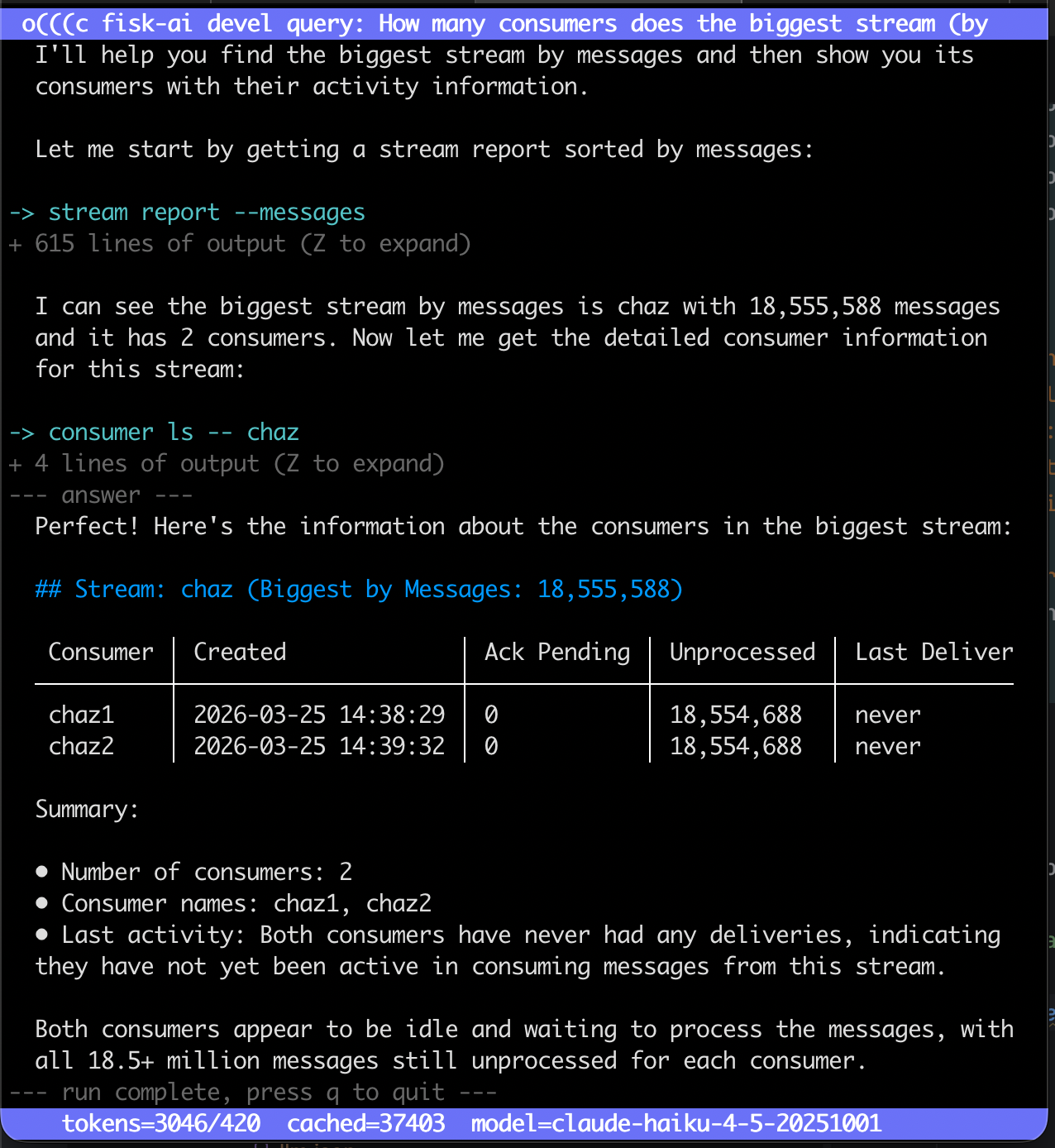
Above we create an agent with various Stream and Consumer management utilities as tools, here we use it on the CLI:
We can now prompt this agent knowing it can only interact with these nats commands as tools.
How many consumers does the biggest stream (by messages) have? Show their names and when last they had activity
Subsections of Introduction
Agents
The main feature of Fisk AI is creating AI agents from CLI tools written with Fisk.
Any tool built with Fisk, such as the nats or choria CLI, or an application made
with Choria Application Builder, can be turned into an AI agent.
Fisk AI creates capable systems that use the abilities LLMs have, such as reasoning and text interpretation, in a safe
and deterministic manner.
Building an agent resembles building a CLI tool: describe the goals, give broad guidance, supply tools to interact with
the world deterministically, then run it on a shell like any other utility.
Installation
On a Mac you can install fisk-ai using homebrew:
brew tap choria-io/tap
brew install choria-io/tap/fisk-ai
Other Operating System users can download the latest release from the releases page.
Where to go next
Basic agent: build a working agent from a CLI tool and run it
Model settings: which model runs the agent, what a run may spend, and whether it reasons
Tool selection: which commands become tools, and the tags fisk interprets
Session snapshots: journaling, continuing a conversation, and where sessions are stored
Remote agents: point a terminal at an agent somebody else is running
MCP client: import tools from third-party MCP servers into a run
Human in the loop: let the model ask the operator a question and wait for the answer
Memory: a key/value store the model keeps across runs
Safety: how commands are run and what a tool can reach
Local LLMs: point fisk at an Anthropic-compatible endpoint you host
Subsections of Agents
Basic agent
This example builds an AI agent that speaks in cowsay bubbles.
The steps make a quick CLI application using App Builder and then drive it in various ways using the LLM.
The example needs an Anthropic API key, the cowsay application (try brew install cowsay) and fisk-ai installed.
Creating a CLI tool
This example uses Choria Application Builder to create a basic CLI tool that
can say and think. Any command line tool built with Fisk works.
First create an ABTaskFile:
name: cowsaydescription: Tools for the Cowsay LLM Agentauthor: fisk-ai@choria.iocommands:
- name: saydescription: Say something using a talking cow, does not accept emojitype: execarguments:
- name: messagedescription: The message to send to the terminalrequired: truevalidate: is_shellsafe(value)command: | {{ default .Config.Cowsay "cowsay" }} {{ .Arguments.message | escape }} - name: thinkdescription: Think something using a thinking cow, does not accept emojitype: execarguments:
- name: messagedescription: The message to send to the terminalrequired: truevalidate: is_shellsafe(value)command: | cowthink {{ .Arguments.message | escape }}
Now install appbuilder:
$ brew tap choria-io/tap
$ brew install appbuilder
Then confirm the CLI tool works:
$ abt
usage: abt [<flags>] <command> [<args> ...]

Tools for the Cowsay LLM Agent

Help: https://choria-io.github.io/appbuilder

Commands:
  help [<command>...]
  say <message>
  think <message>
Turning this CLI into an LLM agent needs an agent.yaml file.
# Command to introspect and expose as an agentapplication_path: /opt/homebrew/bin/abtharness:
# Allow the LLM to prompt us for information if neededhuman_in_the_loop:
enabled: truellm:
# Choose a Model and set safety budgetsmodel: claude-haiku-4-5-20251001budget:
max_tokens: 100000max_iterations: 50# We want a cow joke machine!system_prompt: | Tell jokes using Cows!
You have tools that can render a cow saying < 120 character sentences, when asked use the tools to tell funny jokes.
You tell cow jokes, no other kinds of jokes, strictly jokes about cows. If asked to tell non cow jokes, refuse and show no joke.
Keep narration short, just stick to the jokes, don't say what you are doing or planning to do, just do it and don't repeat the joke
Run the agent after setting the API key:
$ export ANTHROPIC_API_KEY="....."
$ fisk run --tool-output --no-tui 'tell me a joke '
-> say -- Why did th...space?
<-
 ______________________________
< Why did the cow go to space? >
 ------------------------------
        \   ^__^
         \  (oo)\_______
            (__)\       )\/\
                ||----w |
                ||     ||

-> think -- To visit t...oooon!
<-
 ______________________
( To visit the Moooon! )
 ----------------------
        o   ^__^
         o  (oo)\_______
            (__)\       )\/\
                ||----w |
                ||     ||


  There you go! A classic cow joke for you!

Run summary: model=claude-haiku-4-5-20251001 llm_calls=2 tool_calls=2 tokens=3536/113 thinking=0 latency=3.613s
The default is a running TUI. To make the output easy to show here, the run passes --no-tui and shows the tool call
output with --tool-output.
Now ask about a cat joke:
$ fisk run 'tell me a joke about a cat'

  I appreciate the request, but I only tell jokes about cows! I'm strictly a cow joke specialist.

  If you'd like to hear some funny cow jokes instead, I'd be happy to moo-ve right into those for you!

Run summary: model=claude-haiku-4-5-20251001 llm_calls=1 tool_calls=0 tokens=1632/54 thinking=0 latency=1.341s
Running the agent
The agent runs in one of these modes:
A shell script style output, plain text to STDOUT with an exit at the end of the task
A TUI for interaction, optionally continuing to chat with the agent after the main task completes
Hosted behind a channel, taking work from a queue or serving its tools to other agents
TUI
The TUI mode is the default: a visual runner with hot-keys to show or hide thinking and tool output, and scrolling up
and down the session history. A chat box can optionally be enabled to continue a session.
In the TUI press the ? key to get interactive help.
Chat after turn
In the TUI mode the chat bar opens once the prompt is processed, instead of exiting, for follow up questions related to
the session. Every full-screen run works this way; --no-tui answers one prompt and exits, since it has no bar to
open.
Type a follow-up and press Enter to send it; Ctrl-D ends the session, Ctrl-C aborts it. Up/Down recall this
session’s earlier follow-ups. Alt-Enter (Option-Enter) moves to the next line rather than send. Ctrl-L empties the
transcript on screen and leaves the conversation and any half-typed follow-up alone, where /clear does the opposite
and drops the conversation while leaving the scrollback.
Shell mode
The TUI is turned off with --no-tui, and the system falls back to a simple terminal output format suitable for
scripting.
The model’s prose is markdown: both the final answer and any mid-conversation updates. When stdout is a terminal it is
rendered for readability with a style matched to the terminal background; when stdout is piped or redirected, the raw
markdown is written so the result stays free of ANSI escape codes. Rendering can also be disabled with --no-color, or
the standard NO_COLOR environment variable.
Output is separated by kind. Only the final answer goes to stdout; everything else goes to stderr: the commands being
run, mid-conversation updates, a final run summary (LLM calls, tool calls, tokens, latency), and, with --thinking,
the model’s reasoning (each line prefixed with a thought bubble). This keeps stdout safe to pipe into other tools.
One-shot runs
The common use case gives a system_prompt that describes the goals and approach (think of it as a one-file SKILL) and
a user prompt that provides the question to solve.
The LLM runs through the prompt and, once it reaches the end of its turn, finishes processing, and the session cannot
continue later. This resembles a shell utility.
HTTP debugging
As a debug or learning aid, all the HTTP requests can be logged to http-debug.log using the --http-debug flag.
Model settings
The agent.yaml sets which model runs the agent, the budget a run may spend, and whether the model exposes its
reasoning. The Basic agent example shows these together. The full set of configuration fields is in
the configuration reference.
Model
llm.model selects the model and is required. It accepts any model identifier the Anthropic API accepts:
llm:
  model: claude-sonnet-5
Larger models reason better on complex, long-horizon tasks; smaller models like Haiku are faster and cheaper for narrow
ones. When the agent exposes ten or more tools it relies on the model’s server-side tool search, which recent models
support and older ones (Claude Opus 4.1 and earlier and local models) do not. Set llm.no_tool_search to send every tool
directly on an endpoint that does not implement tool search; when a large tool set cannot use it the run warns that all
tools are being sent directly. The configuration reference lists the known models and their trade-offs.
Budget
llm.budget limits the agent loop so it cannot run without end:
tokens a whole conversation may process, default 500000
max_iterations
agent loop iterations one turn may take, default 50
call_timeout
per-call timeout as a duration string, default 120s
The two caps have different scopes.max_iterations applies to a single turn, and
every turn of a conversation gets the same allowance. max_tokens applies to the whole
conversation, so every turn draws on one allowance. Start a new conversation to get a
fresh one.
When a turn reaches the iteration cap, it stops, says so, and you can carry on with
another prompt. When a conversation reaches its token cap, it is finished: the next prompt
is refused before it runs. Start a new conversation, or raise llm.budget.max_tokens on
the machine running the agent.
max_tokens counts tokens, not money. It adds up the uncached input, the output, and
both prompt-cache tiers. A cache read counts the same as an uncached input token here even
though it costs a fraction as much, so two conversations with the same token count can
cost very different amounts. Set this value against your own usage rather than treating it
as a spending limit.
Thinking
Extended thinking lets the model expose its reasoning before it answers. Some providers call this reasoning rather
than thinking; it is the same setting.
llm:
  thinking:
    enabled: true
Reasoning is never displayed unless asked for. --thinking (or THINKING=1) shows it, on fisk run and on
fisk session show --transcript.
thinking=N on the run summary and in the TUI status bar reports the tokens spent reasoning, shown whether or not
reasoning is displayed. It is part of the output half of tokens=in/out, not extra.
Note
Older models that predate adaptive thinking, such as Sonnet 4.5 and Haiku 4.5, reject the parameter. Both explicit
states send one, so for those models remove the thinking block rather than setting enabled: false. The same
applies to an endpoint behind ANTHROPIC_BASE_URL whose proxy does not implement it.
Terminal UI
These harness settings govern the full-screen UI for an agent, independent of the per-run --no-tui flag:
harness:
no_tui: trueno_bell: true
no_tui is a persistent off switch: the agent always uses the line-by-line output, even on an interactive terminal, and the command line cannot turn the UI back on. Use --no-tui instead for a one-off run.
no_bell silences the terminal bell. By default the full-screen UI rings the bell each time a run blocks on an approval gate or an ask_human_* prompt, so a waiting run is noticed even when unattended.
Both are negative switches and have no effect in the line UI.
Tool selection
Fisk turns an application’s commands into tools for the model, alongside the built-in tools the configuration enables.
fisk info shows the resulting set:
$ fisk info
╭───────────────────┬────────┬───────────────────────────────────────────────────────┬──────╮
│ TOOL              │ SOURCE │ DESCRIPTION                                           │ TAGS │
├───────────────────┼────────┼───────────────────────────────────────────────────────┼──────┤
│ say               │ local  │ Say something using the configured command            │      │
│ think             │ local  │ Think something using a cow                           │      │
│ ask_human_confirm │ local  │ Ask the human operator a yes/no question at the te... │      │
│ ask_human_select  │ local  │ Ask the human operator to choose one option from a... │      │
│ ask_human_input   │ local  │ Ask the human operator to type a free-text value a... │      │
╰───────────────────┴────────┴───────────────────────────────────────────────────────┴──────╯

Prompt:

  Tell short jokes using Cows!
...
The output shows the say and think tools and the Human in the Loop tools. When the configuration sets a model,
fisk info also prints a Model section listing the resolved model and provider, whether thinking is enabled, and how
tool search will behave.
Application tags
The application can declare that the LLM never gets the think tool:
- name: thinkdescription: Think something using a cowtype: exectags: [ ai:deny ]# ...
Adding the ai:deny tag to a command means Fisk AI never exposes that tool to the LLM. fisk info confirms the LLM
only gets the say tool now.
Agent configuration
The agent.yaml can also include only certain tools:
include:
  tools:
    - ^say
Or exclude certain tools specifically:
exclude:
  tools:
    - ^think
This uses regular expressions over the tool name, and both can be used together. For example, include ^cow but exclude
^cow_think.
A tool’s name is its command path joined with underscores, so a nested command like cow think becomes the tool
cow_think. Grouping commands and hidden commands are skipped and never become tools.
Tools can also be included or excluded by tag:
exclude:
  tags:
    - scope:system
This excludes any command that has the scope:system tag.
The filters cover every tool the agent gets, not only the application’s commands: a built-in is
matched by its name, such as memory_write, and a tool imported from a remote agent or an
MCP server by its final name, which is alias_tool when the importer prefixed it. Only a command
carries tags, so an include that lists tags alone removes every built-in and import; a pattern beside the tags names
one back.
Built-in tools
Fisk has a set of built-in tools that are enabled under harness.tools:
Only listed tools are enabled. confirm: true requires user confirmation before each call. options holds the tool’s
own settings; an unknown key is an error.
read_file
read_file reads one regular file under a configured root. Its argument is path. It returns:
Field
Description
path
the path as requested
found (boolean)
false when the file does not exist
size (integer)
the file size in bytes
encoding
utf-8 for text, base64 for content that is not valid UTF-8
content
the file content in the form encoding names
The root option defaults to root_directory, or the working directory when that is unset; a relative root is
resolved under root_directory. Paths are confined to the root: a leading slash is ignored, .. cannot leave it, and
a symlink is followed only when its target is relative and stays inside. Only regular files are read.
max_bytes is the largest file the tool returns, 1 MiB when unset. A larger file is refused rather than truncated.
base64_encode
base64_encode encodes its text argument as standard base64 and returns {"encoded": "<base64>"}. It takes no
options.
Serving
Both tools are served over MCP whenever harness.tools lists them and the include, exclude and
expose.agent.tools filters leave them in; exclude: {tools: [^read_file$]} under expose.agent.tools serves
base64_encode alone. Confirmation over MCP describes how confirm: true behaves
with MCP clients. Neither tool is served over a2a.
Global flags
A wrapped binary often has application-level global flags that apply to every subcommand. nats, for example, has
--context to select a stored connection profile, alongside sensitive globals such as --user and --password. By
default none of these are exposed to the model. global_flags is an allowlist of the globals the model may set per
command:
global_flags:
  - context
Each named global becomes an argument on every leaf command tool. Names are the long flag name, with or without the
leading dashes, and are validated against the binary’s global flags at load; a name matching none is an error. Hidden
and framework flags such as --help cannot be exposed. A global that clashes with a command’s own flag or argument is
skipped for that command. A global the application marks required is always exposed, whether or not it is listed.
fisk info lists the application’s global flags and marks the allowlisted ones.
Command tags
Fisk commands carry tags, set in their fisk definition or, for App Builder applications, in YAML. Any tag can be
matched by include/exclude. The ai: prefix is reserved for the tags fisk interprets; the full vocabulary is under
Command tags in the Reference guide. The tags that control how a command is exposed
are:
Tag
Description
ai:deny
never expose the command; dropped before include/exclude and cannot be added back
ai:no_defer
always send the command directly instead of deferring it behind the tool-search tool
ai:confirm
require the operator to approve the command before it runs
The behavior tags ai:read_only, ai:destructive, ai:additive and ai:idempotent describe what a command does.
They reach the model and, over MCP, the client; they gate nothing. An ai: tag fisk does not recognize is reported as
a warning at startup and by fisk info.
When the model calls a command tagged ai:confirm, fisk prompts the operator at the terminal with the resolved command
line and offers three choices: run it once, run it and stop asking for that command for the rest of the conversation,
or decline. Declining tells the model the decision is final. An “allow for the conversation” answer is remembered by
command name regardless of arguments: once stream rm is allowed, every later stream rm call runs without asking.
The conversation records each answer and honors it on resume; fisk session show lists what it holds. /clear and a
--force resume across a changed configuration drop the answers. A resume with no terminal attached declines a gated
command. The prompt is rendered on stderr, so a piped final answer stays clean, and the displayed command line is
stripped of terminal control sequences. With no interactive terminal, or a prompt that cannot be shown, the command is
declined. An interrupt or end-of-input at the prompt ends the run; the conversation stays continuable and asks again.
The tag is always active; there is no configuration flag.
harness.confirm_tags extends the same gate to other tags, for example ai:destructive or an application’s own
impact:rw. Matching is exact, not a regex. An entry that matches no loaded command is reported as a warning at
startup. The approval prompt names the tag that gated the command. fisk info shows each command’s tags and which
commands a run would gate. Over MCP a gated command is requested through elicitation.
Any other tag is free-form: it has no built-in meaning and can be matched by the tags field of an include or
exclude rule.
All of a command’s tags are included in the tool description fisk sends the model, as a trailing Tags: ... line, in
the agent and over MCP, so a prompt can reference them, for example “always use ask_human_confirm before running any
command tagged impact:rw”. The fisk info listing shows the plain description.
Session snapshots
Every run is a conversation, and every conversation is journaled. You do not turn this on. Leave a run and continue it
later, in a fresh process or on another machine, using the id it prints when it ends.
Continuing a conversation
Ask something. fisk prints the id of the conversation when the run ends:
$ fisk run "report on the ORDERS stream"
Continue it by that id. No prompt is given, since the conversation is restored from the journal; passing one is an
error:
$ fisk run --resume t-3f2a9c...
fisk reads the conversation back before it goes on, so you continue in context rather than from a blank screen.
Against an agent somewhere else, see remote agents, the journal is on the worker
rather than here, so --resume takes the conversation token instead of the id. fisk session show on the worker prints
it.
Chat sessions
Every full-screen run is a durable, resumable conversation.
Each turn is journaled, so the whole conversation survives leaving, a stop or a crash. Press Ctrl-D to leave the input
bar when you are finished for now; the status bar reads ctrl-d done. This does not end the conversation. fisk prints
how to continue it as it exits. Ctrl-C asks the current turn to stop at its next safe point. The conversation is kept
either way.
Resuming reads the conversation back into the viewport before the input bar opens, so you continue in context rather
than from a blank screen. Because the bar needs a real terminal, a conversation can only be continued in the full-screen
UI, not with --no-tui or over a pipe, where a run answers one prompt. A conversation has no “completed” state; remove
it with session rm once it is no longer needed.
Stopping
The first Ctrl-C, or a SIGTERM, asks the run to stop where the conversation can be continued: the current step
finishes, the turn is journaled, and fisk prints how to continue it. A second gives up on the run and leaves.
Both keep the conversation. The difference is that the first lets the turn reach a safe point, so the work it had
already done is recorded rather than lost part way.
Durability
A session is journaled event by event as the run proceeds: each model turn and each tool result is recorded as it
happens.
A clean suspend is exactly-once. Nothing runs after the last recorded event, so a resume never repeats a tool call or
an LLM call.
A crash resumes from the last recorded event, so at most one tool call is repeated. A tool whose side effect completed
but whose result was not yet recorded runs again on resume, since fisk cannot make an external side effect
idempotent. Already-recorded turns and results are never replayed.
Resume a session against the same agent configuration it started with. A session can be resumed from anywhere, including
a machine that no longer has the original agent.yaml, so care is required: continuing a conversation against a
different model, tool set, or system prompt can make the replayed transcript incoherent. fisk fingerprints the
configuration when the conversation started and refuses to continue it when that no longer matches, naming what
changed. --force
overrides it, except for the provider: a session started against one llm.provider can never be resumed against
another. A session that already completed cannot be resumed.
Managing sessions
A suspended or completed session is kept until it is removed. List, inspect, and remove sessions with the session
subcommands:
fisk session ls
fisk session show <id>
fisk session show <id> --transcript
fisk session rm <id>
session ls lists each session with its status, model, and prompt. session show prints a session’s counters and
status; --transcript shows the full conversation (prompt, thinking, narration, tool calls, and tool output). On an
interactive terminal --transcript opens the full-screen viewer with thinking and tool output folded, which z and Z
expand; --no-tui/NO_TUI prints it as line output instead. session rm deletes a session.
session stats, session query and session search report a session’s cost, its tool calls, and the sessions
matching a filter; Session inspection covers them.
Answering a deferred tool call
A tool can report that its answer arrives later rather than now. The run then suspends, releasing the process, and
resumes once the answer exists. session show lists what such a session is waiting on under Waiting on, giving the
tool_use id, the tool, and whatever the tool said it is waiting for.
The answer travels on a request carrying the conversation’s token, described in
Answering after the run ended. The tool is never called
again: it already started the work, which is why it deferred.
No tool that ships with fisk defers; the mechanism is for tools a Go program registers through agent.Options.CustomTools.
These commands read the file backend under --state-dir by default. To inspect sessions in a configured backend, a
jetstream stream or a file directory named in the config, pass that config with --config:
fisk session ls --config agent.yaml
fisk session show <id> --config agent.yaml
Where a session is journaled is configurable through harness.sessions, which mirrors the shape of harness.memory.
Two backends ship: file (the default) and jetstreamVersion0.0.3.
The block is optional; leaving it out keeps the file backend under the XDG state directory.
fisk info shows a Sessions section with the resolved backend and, for the jetstream backend, the stream and NATS
context, so you can confirm where sessions are stored without starting a run.
File backend
The file backend keeps each session as a JSON-lines journal under a directory. Sessions are stored under the XDG
state directory, $XDG_STATE_HOME/fisk-ai/runs, defaulting to ~/.local/state/fisk-ai/runs. Set options.directory to
move it off the default XDG path:
--state-dir overrides options.directory for a single run or session command, so the flag always wins over the
configured path. It applies only to the file backend: combining it with a non-file backend is an error rather than a
silently ignored flag.
JetStream backend
The jetstream backend keeps sessions as messages on a NATS JetStream stream instead of on disk, so a run suspended on
one machine resumes on another over a broker. It uses the connection from the configured nats_context, the same one
memory and remote tools use, and binds to a stream that must already exist: the agent never creates it, so you own the
stream’s retention policy.
The stream keeps messages forever by default, which suits sessions; do not set a max age or they would silently
expire. The subject prefix (fisk.sessions above) is yours to choose; the backend derives it from the stream’s single
wildcard subject when it binds, so it is not set in the config. The backend fails at run start, rather than degrading silently, if
the stream does not exist or its configuration does not match this shape.
The stream holds one namespace. fisk session ls lists every run on it, whichever agent wrote it, so keep separate
environments in separate streams. A run does record the agent that started it, and the
web channel filters its session list on that identity and on the id prefix it mints its own
conversations under, so a browser reaches the conversations that agent minted for it rather than everything on the
stream. The web protocol covers that listing. A run journaled before the identity was
recorded carries none, and every listing shows it.
Session inspection
The session stats, session query and session search commands read journaled sessions without resuming them.
stats reports what one session cost and where its time went, query prints the tool calls it made with their
answers, and search finds sessions across the store by agent, model, caller, status, time and prompt.
The commands read the same store as session ls and session show: the file backend under --state-dir by default,
or the backend a configuration names with --config. They read a journal without taking its lock, so they work
against a session that is still running. See Session snapshots for where sessions
are stored.
Note
A session journaled before records carried a time and the agent’s name reports no timing and no agent, and
search --identity leaves it out. Older journals covers both.
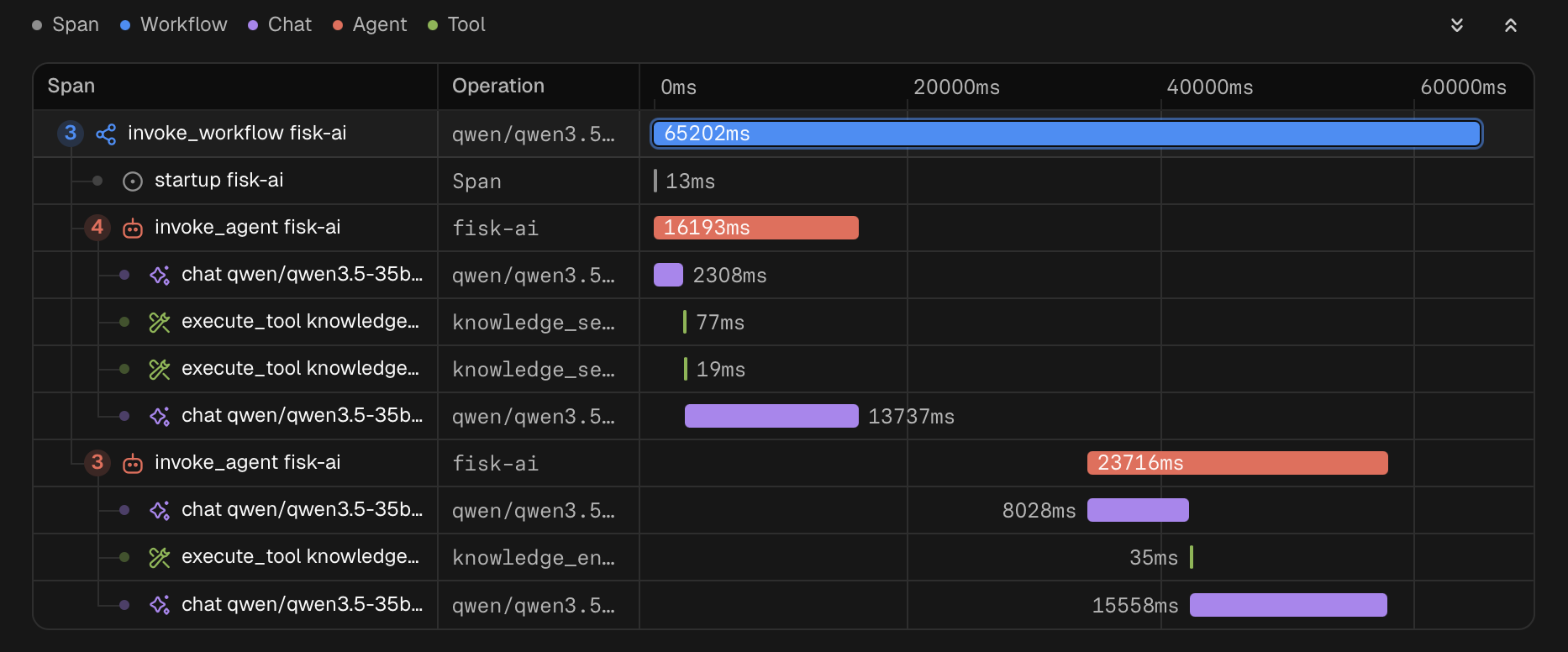
This session took six model responses and six tool calls over 22 seconds. One consumer_info call returned an error,
and knowledge_search took the most time. session query shows that call and its answer:
session stats <id> reports one session: its frame, the tokens of each model response, and a row per tool it called.
Item
Description
Agent
The agent identity that started the session, left out when the journal records none
Caller
Who a channel recorded as asking for the session, left out when there is none
Model
The model the session ran against
Status
open, or the reason the session ended
Created
When the session was created
Ended
When the session ended, left out for an open session
Iterations
Model responses across the whole session, against the per-turn cap when one was set
Wall clock
Creation to the last journal record
Tokens
Total against the token budget, then the split by tier
The iteration cap applies to each turn on its own, so a conversation of several turns can show more responses than
the cap. The wall clock runs to the last record journaled, so for a chat conversation continued over several days it
includes the time between turns.
The token total counts uncached input, output, cache reads and cache writes, weighed the same, which is what a token
budget counts. The Thinking column is the part of Out the model spent reasoning and is not added to the total a
second time.
Tools table
Column
Description
Tool
The tool the model named
Kind
The provider that answered: application, builtin, remote, custom, mcp or unknown
Calls
Calls the model made to the tool
Dispatched
Answered calls that were handed to the tool’s provider
Not run
Answered calls that were not handed to the provider, such as a call a policy denied or the operator refused
Unanswered
Calls with no result yet
Errors
Answers that came back as an error
Time
Total time of the tool’s timed calls
A result journaled before the provider kind was recorded cannot say whether the call ran. It counts in neither
Dispatched nor Not run, and its kind shows as unknown. One marked as a remote call in that older format shows as
remote and counts as dispatched.
Reading the Time column
A call’s duration is the gap between the record that ended the call and the record journaled immediately before it. The
agent dispatches tools one at a time, so no other tool ran in that gap.
The gap also holds anything the run did around the call without journaling it, such as policy hooks and waiting for
an operator to answer an approval prompt. A tool behind a confirmation can therefore show the operator’s response time
as well as its own.
A call that deferred its answer is timed to the deferral. The time until the answer arrived is not counted, since that
depends on whoever supplies it. An approval given while the run was suspended is not counted either.
The Time column sums the durations of a tool’s calls. When only some of the calls could be timed, it says how many
it covers, as in 1.10s (1 of 2 calls), and a dash means it covers none. Lines below the table say why:
Line
Meaning
Untimed
Calls that ended with a record carrying no time
Unanswered
Calls with neither a result nor a deferral, such as one a suspended run left behind
JSON
--json renders the same report as one JSON document. The example is trimmed to one model response and one tool.
terminal is absent for an open session. duration_ns is in nanoseconds, timed is how many calls it covers, and
untimed counts the calls that ended with no time recorded. undispatched is the Not run column. agent, caller,
updated, ended and each response’s time are left out when the journal does not record them.
Tool calls
session query <id> prints the tool calls of a session in the order they were made, each paired with the answer it
got. With no flags it prints every call.
Each call shows the tool, the call id, the loop iteration that made it and, unless --calls-only is given, its status:
answered, error or no answer yet. A call that deferred its answer also shows a Deferred line with what the tool said it is waiting on.
Input and answers that are JSON are indented, and any other answer, such as a command’s output, prints as it is.
Flag
Description
--tool NAME
Selects the calls to this tool, matched exactly; repeat to select several tools
--iteration N
Selects the calls made at this loop iteration
--errors
Selects the calls whose answer is an error
--calls-only
Prints the calls without their answers
--results-only
Prints only the answers, leaving out calls nothing has answered
--input-match PATTERN
Selects the calls whose input JSON matches this regular expression
--output-match PATTERN
Selects the calls whose answer matches this regular expression
--json
Renders the selected calls as one JSON document
Every filter given must match. --calls-only and --results-only cannot be combined. --input-match is applied to
the input JSON as journaled, which a model usually sends compact: "consumer":"SHIP matches both consumer_info calls of this session, and a
pattern holding the spaces of the indented form does not. A session with no matching calls prints No matching calls.
time is when the model response holding the call was journaled and answer_time when the answer was. answer is
the result record as journaled, so content holds the whole answer. A call that deferred carries a
deferred object, and a call with no answer has no answer. --calls-only leaves out answer and answer_time, and
--results-only leaves out input. calls is an empty list when nothing matches.
Finding sessions
session search lists the sessions in the store that match every filter given, newest first. It prints the columns of
session ls, and adds an Agent, Caller or Created column when a filter on that field is given.
$ fisk session search --status completed --since 2026-09-01
╭─────────────────────────────┬─────────────────┬───────────┬─────────────────────┬─────────────────────┬─────────────────────────────────────────────────────╮
│ ID                          │ Model           │ Status    │ Created             │ Updated             │ Prompt                                              │
├─────────────────────────────┼─────────────────┼───────────┼─────────────────────┼─────────────────────┼─────────────────────────────────────────────────────┤
│ 33Fp8QnWb3aZkR1vT0yXcLmE2sD │ claude-opus-4-8 │ completed │ 2026-09-22 11:14:03 │ 2026-09-22 11:14:24 │ report on the ORDERS stream and any consumers with… │
│ 2yKd9TqWm4RbX7cNz1LhVs0PfGe │ claude-opus-4-8 │ completed │ 2026-09-13 11:14:03 │ 2026-09-13 11:14:34 │ list the consumers on EVENTS                        │
╰─────────────────────────────┴─────────────────┴───────────┴─────────────────────┴─────────────────────┴─────────────────────────────────────────────────────╯
Flag
Description
--identity AGENT
Selects the sessions of this agent; a session journaled before the agent was recorded carries none and is left out
--model MODEL
Selects the sessions run against this model
--caller CALLER
Selects the sessions a channel recorded this caller for
--status STATUS
Selects the sessions with this status: open, completed, suspended, error, budget or max_iterations
--since WHEN
Selects the sessions created at or after this time
--until WHEN
Selects the sessions created before this time
--match PATTERN
Selects the sessions whose prompt matches this regular expression
--json
Renders the matching sessions as one JSON document
--since and --until take a duration counted back from now (24h, 7d), a date taken as local midnight
(2026-09-01), or an RFC3339 time. --status open selects every session with no ending: one still running, one with a
turn in flight, and one that journaled something after it last ended, such as a chat conversation that was continued.
--model, --caller and --identity compare exactly. A search that matches nothing prints No sessions matched.
JSON
{
"runs": [
{
"run_id": "33Fq1cVx7MhN0bTe4KpWz9RgYuA",
"agent": "nats-ops",
"caller": "alice",
"model": "claude-opus-4-8",
"status": "open",
"created": "2026-09-23T11:14:03Z",
"updated": "2026-09-23T11:14:05.9Z",
"prompt": "which streams have no consumers?" },
{
"run_id": "33Fp8QnWb3aZkR1vT0yXcLmE2sD",
"agent": "nats-ops",
"model": "claude-opus-4-8",
"status": "completed",
"created": "2026-09-22T09:14:03Z",
"updated": "2026-09-22T09:14:24.81Z",
"ended": "2026-09-22T09:14:24.81Z",
"prompt": "report on the ORDERS stream and any consumers with pending messages" }
],
"no_agent_excluded": 1}
This is session search --identity nats-ops --json. status is open or the reason the session ended, and prompt
holds the whole prompt, which the table trims. agent, caller, model and ended are left out when a session
has none. no_agent_excluded counts the sessions --identity left out only because they carry no agent, and is 0
without --identity. runs is an empty list when nothing matches.
Older journals
A journal written before records carried a time and the agent’s name still reads, with less to report.
session stats shows no Agent line, reports the wall clock as not recorded in this journal, and shows - in the
Time column with an Untimed line below the table. Tokens, calls and errors are still reported. In its JSON the
calls count in untimed with duration_ns at 0, and the JSON of session query leaves out time and
answer_time. The file backend reports such a session’s updated time as the journal file’s modification time.
search --identity leaves out every session that carries no agent and says how many it left out:
$ fisk session search --identity nats-ops
╭─────────────────────────────┬──────────┬─────────────────┬───────────┬─────────────────────┬─────────────────────────────────────────────────────╮
│ ID                          │ Agent    │ Model           │ Status    │ Updated             │ Prompt                                              │
├─────────────────────────────┼──────────┼─────────────────┼───────────┼─────────────────────┼─────────────────────────────────────────────────────┤
│ 33Fq1cVx7MhN0bTe4KpWz9RgYuA │ nats-ops │ claude-opus-4-8 │ open      │ 2026-09-23 13:14:05 │ which streams have no consumers?                    │
│ 33Fp8QnWb3aZkR1vT0yXcLmE2sD │ nats-ops │ claude-opus-4-8 │ completed │ 2026-09-22 11:14:24 │ report on the ORDERS stream and any consumers with… │
╰─────────────────────────────┴──────────┴─────────────────┴───────────┴─────────────────────┴─────────────────────────────────────────────────────╯

1 more session matched every other filter but carries no agent, so --identity left it out. It was journaled before the agent was recorded.
The agent filter a channel applies to its own listing, such as the web channel’s,
includes a session that carries no agent. --identity excludes it. To see such sessions from the command line, search
without --identity or use session ls.
Remote agents
--nats-context points a terminal at an agent somebody else is running rather than starting one in this process:
$ fisk run --nats-context production "how many streams are there"
identity in the configuration names which agent to talk to, and you must set it. A default or a name derived from the
application binary is shared by every agent built the same way, so the run could reach any of them.
The worker calls the model, runs the tools and writes the journal. Flags that describe that work are refused rather than
ignored: --api-key, --base-url, --trace, --http-debug, --verbose, --state-dir and --no-telemetry. Setting
one of these through an environment variable is ignored without an error, since you did not type it.
MCP client
mcp_clients imports the tools of third-party MCP servers into an agent run, alongside the wrapped application’s
commands, the built-ins and any remote tools. Each entry names one server and selects a transport by which of command
and url it sets: command starts the server as a child process and speaks stdio to it, url reaches an
already-running server over streamable HTTP. Setting both is an error, and so is setting neither. Stdio and streamable
HTTP are the only transports, and an endpoint that speaks the older HTTP+SSE transport is not supported.
Two entries sharing a name is an error when the file is parsed, and so is two entries whose effective alias is the
same, since that alias prefixes every tool they both expose.
Naming
Every imported tool is named <alias>_<tool>, always, where the alias defaults to the server name. remote_tools
prefixes only on a clash. MCP servers use short generic tool names such as search and read, where a clash is the
common case, and a name derived only from its own server does not move when another server’s tool list does.
A collision against a local tool, a remote tool or another server’s is still possible. At the start of a run it fails
the run, naming the tools that collided. fisk info reports it and carries on. A tool arriving while a run is under
way whose name is taken is left out and reported, and the run continues.
Variable and file references
env, headers and url values hold any number of ${VAR} references, each replaced by the value of that
environment variable, so a credential lives in the variable rather than in the file. A value mixes literal text with
references freely, as in Bearer ${DOCS_TOKEN} and ${HOME}/cache. A $NAME without braces is literal text and
references nothing. command and args are literal throughout.
A ${file:PATH} reference is replaced by the content of the file at PATH, which is how a Docker Compose secret
arrives: Compose mounts it at /run/secrets/<name> and cannot expose it as an environment variable. Trailing
whitespace is dropped, so the newline an editor or Compose leaves at the end of the file is not sent as part of the
token, and an empty file is an error. A relative PATH resolves under root_directory. The path runs from file: to
the first }, so a path holding a } cannot be written. Both forms work anywhere, including together in one value:
References resolve when a session connects, not when the configuration is parsed. Parsing checks their syntax and
reads no variable and no credential file, so a host holding none of the credentials still runs fisk info and
fisk mcp against the configuration.
A variable that is not set, or a file that cannot be read, fails the connect, naming the variable or the path and the
server.
Some services authenticate in the endpoint rather than in a header, by query parameter as in
https://mcp.example.net/mcp/?apiKey=${DOCS_TOKEN}, or by a path segment as in
https://mcp.zapier.com/api/mcp/s/${ZAPIER_KEY}/mcp. url takes references for that reason.
What is printed
Whatever a url’s references resolved to is replaced by REDACTED wherever it appears in an error or warning about
that server, the endpoint an SDK or HTTP error quotes included, as long as the resolved value is at least eight
characters. A shorter one is never searched for, since replacing a string that short would blank the digits and words
it matches all through an unrelated message. Every endpoint printed anywhere is also redacted on its structure: the
userinfo before the host, the value of every query parameter, and the fragment. The scheme, host, port, path and
parameter names stay, so an operator recognizes the entry from their own file, and a reference is shown as written so
it names the variable rather than its value.
Warning
A credential written into a URL path segment as a literal is printed in full, because nothing can tell a path segment
holding a token from one naming a route. Put a path credential in a variable and reference it. A token under eight
characters is printed either way, since the value redaction skips a string that short and the structural redaction
leaves the path alone.
A stdio entry prints its command line, and each argument goes through the same URL redaction, so an
npx -y mcp-remote https://host/sse?key=... bridge does not print its key.
Timeouts
timeout covers everything that happens for one server before the run starts, and it is applied twice: once around
starting or reaching the server and the initialize handshake, and again around listing its tools. An entry that is slow
at both steps takes up to twice the configured value, 60s at the default, before the run gives up on it. Unset it
defaults to 30s.
Servers are connected one after another and listed one after another, so an entry that answers slowly or not at all
delays every entry behind it by up to its own timeout. The timeout keeps that delay finite rather than preventing it:
three entries that answer the handshake and then never return a tool list hold the run for 90 seconds at the default
before it is refused.
A call to an imported tool is limited by harness.tool_timeout, like every other tool.
Trust posture
An imported MCP tool is never confirm-gated. ai:confirm and harness.confirm_tags reach the wrapped application’s
commands, and the server applies no gate on its side either, so a call the model makes to an imported tool runs
unapproved at both ends. include and exclude are therefore the only control an operator has over what a third
party’s server can do in a run.
An imported MCP tool is never served on. Neither fisk mcp nor the a2a tool endpoint advertises one to its own
clients, whatever expose.agent.tools selects: serving it would re-advertise a third party’s tool under this agent’s
identity, and a client cannot tell which of the tools it is offered came from where.
A stdio server is a program of someone else’s choosing running as the operator’s user. It gets this process’s
environment with the credential variables removed, the same scrub a command tool’s subprocess gets, and the entry’s
env applied on top.
Failures and a moving tool set
A server that cannot be started, reached or listed fails the run, since the prompt may depend on tools that are not
there. A tool the run cannot use, one with no description or a schema whose root is not an object, is skipped with a
reason and the run continues on the rest.
A server can tell a live session that its tool list changed. The run re-lists that server, applies the entry’s filters
and names the survivors, and the model sees the new set on its next call. A tool batch already dispatched runs against
the set it was dispatched with, and no other server’s tools move.
Set watch_tools: true on the entry to hear that. It is off by default, and with it unset the tool list read when the
session connects stands for the life of that session: a server that adds or removes a tool mid-run is not heard, and
under fisk serve, where the sessions outlive the runs, the list read at startup stands until the session is replaced.
The default is off because subscribing opens a long-lived stream that the MCP SDK reconnects when it ends, and a server
that answers the stateless server/discover handshake but refuses to resume that stream loses its whole session rather
than only the subscription. A run against such a server then starts with none of its tools and fisk info reports it
unavailable. Turn the key on for a server known to hold the stream open.
Seeing what a server offers
fisk info connects every configured server and prints an MCP clients section: where each is reached and over which
transport, how long it took to answer, how many tools it advertised, how many the filters kept, the name each was
imported under, and any tool left out with the reason. Discovery there is best-effort, so a server that is down is
reported rather than failing the command. Its imported tools appear in the tool table with the alias in the Source
column.
fisk serve connects the configured servers once at startup and shares those sessions across every run it hosts, so a
long-lived worker is not starting and stopping a stdio child around each job. A server that cannot be reached stops the
worker from starting, and the startup banner names the servers every hosted run imports from. Those runs share the
server’s working directory, its authentication and its rate limits.
Human in the loop
When enabled, fisk gives the model built-in tools to ask the operator a question at the terminal and wait for the
answer. They are off by default and only available when running the agent:
harness:
  human_in_the_loop:
    enabled: true
Enabling it offers these tools:
ask_human_confirm - a yes/no question. Returns {"confirmed": true} or {"confirmed": false}
ask_human_select - choose one of a list of options the model provides. Returns {"selected": "<option>"}, or
{"selected": null} if no choice was made
ask_human_input - a free-text value, optionally pre-filled with a default the operator can accept or edit. Returns
{"value": "<text>"}, or {"value": null} if none was given
Optional communication from the agent
The model decides when to call the HITL tools, shaped through the prompt. They suit decisions the model should not make
alone: confirming a destructive action, choosing between options that depend on operator intent, or supplying a value it
cannot derive. The question is rendered on the terminal (stderr, so a piped final answer stays clean), and the
model-supplied text is stripped of terminal control sequences first so it cannot spoof what is shown. Each tool denies
by default: with no terminal attached the call returns a negative answer (no confirmation, no selection, no value) and a
reason rather than hanging on a prompt no one can answer, and they are never exposed over MCP, where there is no
operator. Tool calls within a turn run one at a time, so a prompt has the terminal to itself.
If you interrupt a question, or close the input, fisk does not treat that as a reply. The run stops there and the
conversation is kept, and when you continue it the same question is asked again. No answer is recorded, so a run you
interrupt never carries a decision you did not make.
Required tool use confirmations
These mechanisms put a human in the loop:
human_in_the_loop (a configuration flag) lets the model ask its own question through a fisk-provided
ask_human_* tool, with no application command involved. The human answers a question the model chose to ask.
ai:confirm (a command tag) lets the application author gate an ordinary, non-interactive command so the operator
must approve it before it runs. The human is a checkpoint on a command the model wanted to run anyway; nothing about
the command itself changes.
Reach for human_in_the_loop when the model should decide when to check in; reach for ai:confirm when a normal
command should run only with the operator’s say-so, typically something destructive or irreversible.
Command tags covers the tag in full.
Memory
Memory gives the model a small key/value store that persists across runs, so it
can keep durable notes (a layout it worked out, a convention, the outcome of an
investigation) and pick them up next time rather than rediscovering them. It is
opt-in and agent-mode only; like the human-in-the-loop tools it is never exposed
over MCP.
Warning
Memory is shared state. Treat what a memory contains as data the model saved, not as trusted instructions.
Enable it under harness.memory. The backend field selects where memories are
kept; it defaults to file, so the minimal configuration is just:
harness:
  memory:
    enabled: true
When enabled the model is offered four tools: memory_list (keys and their
descriptions), memory_read (one memory by key), memory_write (save a memory
with a key, a one-line description, and a body), and memory_delete. A key uses
letters, digits and ., _, = or - (no slashes or spaces), which keeps it
valid both as a filename and as a NATS KV key. memory_write creates by default
and refuses to overwrite an existing key unless called with overwrite: true, so
the model does not silently clobber a note; the create still fails cleanly if two
writers race for the same new key.
read_only: true serves memory_list and memory_read and withholds the other two, for a run that should use what
earlier runs saved without changing it. The store itself is unaffected, so anything else writing to it still does.
At the start of a run the stored keys and descriptions are injected into the
system prompt as an index so the model knows what it has saved; memory_list is
the live view during the run. Turn the index off with no_index: true.
A memory body is capped at 64 KB and a store holds at most 1024 entries. Both
limits are shared by every backend, and a write that would exceed them fails
cleanly. The on-disk format is shared too, so a value written by one backend
migrates to another unchanged.
fisk info shows a Memory section with the resolved backend and, for the
jetstream backend, the bucket, NATS context and key prefix, so you can confirm
where memory is stored without starting a run.
Two backends ship today: file (the default) and jetstreamVersion0.0.3.
File backend
The file backend keeps each memory as a markdown file named for its key under
the configured directory, which defaults to memory/<identity>.
A relative directory, including that default, resolves under the store base when a
deployment sets one and against the working directory otherwise; an absolute
directory is used as-is. The identity is the agent’s name, set with the
identity configuration field and defaulting to the application binary’s base
name; the configuration reference covers it in detail. Point two
agents at the same directory and they share a memory; leave the default and each
agent keeps its own.
JetStream backend
The jetstream backend keeps memories in a NATS JetStream KV bucket instead of on
disk, so a fleet of agents can share durable memory over a broker. It uses the
connection from the configured nats_context, the same one remote tools use, and
binds to a bucket that must already exist: the agent never creates it, so you own
the bucket’s durability policy.
Create the bucket first, without a TTL so memories do not silently expire and with a
max value size that fits a full entry (the 64 KB body cap plus the small frontmatter
header stored with it), up to 1024 entries:
nats --context production kv add agent-memory --history=1 --max-value-size=69600
The backend fails at run start, rather than degrading silently, if the bucket does
not exist, has a TTL set, or caps values below that full-entry size.
By default each agent’s keys are namespaced under a prefix equal to its identity
(stored as <identity>.<key>), mirroring the file backend’s per-identity directory
so two agents pointed at one bucket do not collide. Set options.prefix to a shared
value for agents that deliberately share memory, or to "" for a flat, unprefixed
keyspace:
harness:
memory:
enabled: truebackend: jetstreamoptions:
bucket: agent-memoryprefix: fleet-shared # agents with the same prefix share memory; "" is flat
Read-before-update
The jetstream backend adds a safety guard the file backend cannot: an overwrite
must follow a read of the current value, and is refused if the memory was not read
or has changed since it was read. The model then reads the current value and
retries. This is the same read-before-edit discipline that keeps an editor from
clobbering a file it has not seen.
The read counts for the whole conversation rather than one turn. A memory read on
Monday and edited on Friday in the same conversation is overwritten without a fresh
read, as long as nothing else wrote to it in between; if something did, the write is
refused and the model reads again before retrying. One conversation’s reads never
authorize another’s overwrite.
The check uses the KV entry’s revision, which makes it an atomic
compare-and-swap: when two agents share a bucket and both try to update the same
memory, the second write is rejected rather than silently overwriting the first.
The file backend’s last-writer-wins overwrite would quietly drop that change, so a
shared or concurrent deployment wants this backend.
The guard is on by default. Set no_require_read_before_update: true to allow blind
overwrites, matching the file backend’s behavior:
We can use memory to ensure our agent never repeats jokes; change thesystem_prompt as follows:
harness:
memory:
enabled: truesystem_prompt: | Tell short jokes using Cows!
You have tools that can render a cow saying short sentences, when asked
use the tools to tell funny jokes.
You tell cow jokes, no other kinds of jokes, strictly jokes about cows.
If asked to tell non cow jokes, refuse and show no joke.
Do not use emoji, keep general narration short, just stick to the jokes
Save the jokes you told to a single memory file with all the past jokes
and make sure you dont repeat jokes you previously told.
Finish your turn by making a funny quip related to the joke or cows or similar
We will get a new joke every time - be ready to get some awful jokes after a while :)
Safety
When Fisk AI runs a command in a CLI tool it passes a slice of arguments to the exec system call. No shell is involved
that can be escaped or influenced.
App Builder is often involved and calls shell scripts, so App Builder commands need to be written defensively.
Use type hints on arguments for ints, floats and so on
Use is_shellsafe(value) on string input arguments
Use escaping when passing arguments to commands, for example {{ .Arguments.message | escape }}
Tag commands with the various helper tags so the harness understands the intent
Mark every mandatory argument as required
Fisk AI has no tools that can interact with arbitrary files on the system. The only way it interacts with the system is
through the supplied tools or the Memory feature.
Every command the agent runs gets the same protections:
Its output combines stdout and stderr, preserving order, and is capped at 64 KiB so a chatty command cannot flood the model’s context
The ANTHROPIC_API_KEY is stripped from its environment, so a tool can never read the agent’s own credentials
LLMFORMAT=1 is set, signalling fisk applications to render output suited to an LLM rather than a terminal
Local LLMs
Local LLM hosting tools like ollama, LM Studio and others support exposing an Anthropic-compatible API. Fisk AI can
communicate with those tools.
To support a large number of tools, Fisk AI uses the
Tool Search Tool, which these local
runners do not support. When targeting a locally hosted model, the total tool count may need to stay around 15.
I set these environment variables before invoking fisk to access my local Anthropic API instead of reaching to the internet.
The base_url is validated only as a well-formed http or https URL naming a host, with no embedded userinfo
credentials. Plain http is accepted for any host, since a local runner, a host gateway and a service on a private
network all serve over it.
MCP server
Instead of running an agent loop, Fisk AI can serve a Fisk application’s commands over the
Model Context Protocol so another client, such as Claude Desktop or Claude Code,
calls them directly as tools.
The tool set, the input schemas, and the tag rules are the same ones the agent uses. Only the caller
changes: where the agent drives the tools with an LLM against a prompt, an MCP server hands the same tools to whatever
client connects and lets it decide when to call them.
Note
Serving over MCP is opt-in. The configuration must carry an expose.agent.mcp block, otherwise fisk mcp refuses
to start.
Starting a server
Serving over MCP needs less configuration than an agent: there is no agent loop, so system_prompt and llm.model are
not used. A minimal config needs only the application to introspect, a tool selection, and the expose.agent.mcp block:
The transport is HTTP, the streamable MCP transport. The port is taken from --port (or FISK_AI_MCP_PORT); if unset,
from expose.agent.mcp.port in the config; otherwise it defaults to 8080. All progress and logging go to stderr.
Use fisk info to preview which tools a configuration exposes before starting the server:
$ fisk info --config nats.yaml
Connecting a client
Wire an MCP client to the server by pointing it at the running URL. For Claude Code:
$ claude mcp add --transport http nats http://127.0.0.1:8080
MCP mode uses only the parts of the configuration that describe the application and the tool set. An
identity becomes the MCP server name, defaulting to fisk when unset; system_prompt, llm.model, and the
agent-only harness settings are ignored.
Field
Description
application_path
path to the Fisk application binary to introspect and serve; optional, omit it to serve only the enabled built-ins
expose.agent.mcp
the opt-in block that enables MCP serving; must be present
expose.agent.mcp.port
default listen port when --port and FISK_AI_MCP_PORT are unset, default 8080
expose.agent.mcp.address
host or IP to bind when --address and FISK_AI_MCP_ADDRESS are unset, default 127.0.0.1 (loopback); use 0.0.0.0 to listen on all interfaces
expose.agent.mcp.instructions
free-text guidance sent to clients on connect
expose.agent.mcp.confirm_over_mcp
how confirmation-gated commands behave when a client cannot be asked
expose.agent.mcp.max_concurrent_tools
maximum tool calls run at once; 0 or unset uses the default 2, negative is rejected, capped at 1024
expose.agent.mcp.tool_timeout
how long a single served tool call may run, for example 60s; unset uses the default 30s
include / exclude
select which commands and built-ins are served, matched on tool name (regex) or tag
expose.agent.tools
narrow the served set further within the include/exclude selection, over commands and built-ins alike
identity
the MCP server name; optional
Instructions
expose.agent.mcp.instructions sets a block of free text sent to clients when they connect. A client may pass it to the
model as a hint about how to use the server, which suits orientation the individual tool descriptions are too terse to
carry:
expose:
  agent:
    mcp:
      instructions: |
        These tools wrap the NATS CLI. Prefer stream_info before stream_edit,
        and treat all subjects as relative to the FOO account.
How tools are exposed
Each command becomes an MCP tool named by its command path, for example stream_info, with its input schema and a
description built from the command’s help. Both the short help and any long help are surfaced to the client, so a
command that carries detailed long help gives the model richer guidance than a one-line summary alone.
Each tool carries a readable title annotation holding the space-separated command path, so stream rm rather than the
underscore tool name, and the behavioral hints its behavior tags declare:
Tag
Annotation
ai:read_only
readOnlyHint: true
ai:destructive
destructiveHint: true
ai:additive
destructiveHint: false
ai:idempotent
idempotentHint: true
Untagged commands send no hints at all, leaving the client on the MCP defaults, which treat a tool as destructive and
open-world. A confirmation gate does not change these hints: a command tagged both ai:read_only and ai:confirm is
still advertised as read-only.
Approval itself is not expressed as an annotation, because annotations are advisory hints a client may ignore rather
than a control channel.
Every tag a command carries, reserved and free-form alike, also reaches the client as description text, as described
under Command tags over MCP below.
The served tools are the agent’s include/exclude selection, narrowed further by expose.agent.tools when it is set.
With neither, every command is served, subject to the tag rules below, along with every enabled built-in that declares
MCP exposure: the knowledge tools when harness.knowledge is enabled, and read_file and
base64_encode when harness.tools lists them. Tool selection uses the same regular expressions over the tool name
as the agent, and a built-in is matched by its name, so exclude: {tools: [^knowledge_read$]}
serves the other knowledge tools without it. A built-in carries no tags, so an include by tag alone removes every
built-in unless a pattern names it back. A tool call runs the command and returns its result, limited by tool_timeout
per call and max_concurrent_tools in flight at once.
fisk mcp prints a note for each enabled built-in it does not serve, with the reason: the tool is reachable only in an
agent run, or a filter excluded it.
Command tags over MCP
The reserved command tags are honored over MCP, differing from the agent loop where noted:
Tag
Behavior over MCP
ai:deny
never exposed, the reliable way to keep a command off MCP entirely
ai:no_defer
no effect, since MCP does not defer tools behind a tool-search tool
ai:confirm
exposed and gated through elicitation rather than a local operator prompt
behavior tags
advertised as tool annotations, as described above
All of a command’s tags, reserved and free-form alike, are included in the tool description as a trailing Tags: ...
line, the same as in the agent, so a client’s prompt can reference them.
Confirmation over MCP
Commands tagged ai:confirm, or a configured confirm_tags tag, require approval before they run. There is no local
operator on the MCP path, so Fisk AI requests approval from the calling client through MCP elicitation: before running a
gated command it asks the client to approve, showing the server name, the resolved command line, and the tag that gated
it, and runs the command only on an explicit approval. A refusal, a dismissal, or any elicitation error denies the call
and returns an authoritative result the model is told not to retry.
A built-in tool whose harness.tools entry sets confirm: true is gated the same
way. Its prompt shows the tool’s trace line in place of a command line, read_file <path> for example, and names
ai:confirm as the gate.
Not every client supports elicitation. expose.agent.mcp.confirm_over_mcp chooses what happens when the connected
client cannot be asked:
Value
Behavior
auto
default; ask clients that support elicitation, run the command ungated for clients that do not
always
ask clients that support elicitation, refuse the command for clients that cannot be asked
never
never ask, run gated commands ungated regardless of client support, delegating approval to the client’s own UI
expose:
  agent:
    mcp:
      confirm_over_mcp: always
Warning
Elicitation is a request, not an enforcement boundary. A client is free to auto-approve, and under auto or never a
client that cannot elicit runs gated commands ungated. For a command that must never be reachable over MCP, use
ai:deny rather than relying on confirmation.
A client that already has its own approval UI may prompt twice under auto or always; set never when the client’s
own gating is trusted and the second prompt is unwanted.
What is not served
The built-in operator tools are agent-mode only and are never exposed over MCP, since there is no local operator on the
MCP path:
Tools imported from remote agents and MCP servers are not re-served either; they are reachable only in an agent run.
Safety
Every served command gets the same per-command protections as the agent: it runs as an argument
vector rather than through a shell, its arguments are checked against the command’s schema, its ANTHROPIC_API_KEY is stripped,
its output combines stdout and stderr and is capped at 64 KiB, and LLMFORMAT=1 is set.
The threat model is wider than an agent run:
Any client that can reach the server’s port can invoke every exposed tool with any schema-valid arguments, the
knowledge base and the enabled harness.tools built-ins included. ai:deny, include/exclude and
expose.agent.tools are the gate on what is reachable, so scope the exposed set deliberately.
There is no agent loop, prompt, or token budget limiting total use. tool_timeout and max_concurrent_tools limit a
single call and how many run at once. Neither limits how many calls a client makes, so do not expose the server on an
untrusted network.
Command output is returned to the connected client rather than to Anthropic, so whoever connects sees whatever the
commands print.
Confirm-tagged commands are gated by elicitation, a request the client fulfills rather than an access control the
server enforces. Use ai:deny, not confirmation, for anything that must never be reachable over MCP.
Knowledge (RAG)
Knowledge gives an agent search tools over a locally built index of its own markdown and text documents. They run
in-process and cite what they return, so it can ground its answers in project documentation rather than its training
data.
In AI terms this is a RAG (retrieval-augmented generation) system contained entirely in a single binary and a single
process. It is aimed at keeping source data local and private. It runs with or without a local embedding model; without
one it uses full-text search alone.
Everything ships in the one fisk binary. The index is a single SQLite file built and queried in-process, with no
external database. A local embeddings server is the only optional external process, and only when semantic search
is turned on.
Enabling knowledge
Knowledge is off by default. You get full-text search without any LLM requirements.
harness:
knowledge:
enabled: truepaths:
- docs/
Build the index and search it from the command line, then run the agent, which now has the knowledge tools:
$ fisk knowledge index docs/    # build the index, incremental, no embeddings needed
$ fisk knowledge search "backpressure"
$ fisk run "how does backpressure work?"
The index is incremental. A second knowledge index re-reads only files whose content changed, detected by hash, and
reconciles deletions when a full configured root is walked.
Two retrieval tiers
The lexical tier is always on, has no dependencies, and is the default. Vector search is opt-in and requires an
embeddings model.
Lexical search
Lexical search finds only exact words present in the text. Synonyms and concepts do not match.
The lexical tier is an FTS5/BM25 full-text index. It is always active when knowledge
is enabled and needs no embedding model or other dependencies. Command output calls this tier lexical.
Vector search
Semantic search recalls on meaning rather than wording. A natural-language question finds the right section even when it
shares no keywords with it: asking “how do I stop the agent spending too much” can surface the section on budgets though
that section never says “spending”. This suits an agent, which phrases a search in its own words rather than the
documents’ exact terms.
Fusing the two tiers keeps lexical’s precision on named terms while adding this semantic reach, so the hybrid result is
usually better than either tier alone.
It needs a local embedding server, such as Ollama or LM Studio, running at both index and query time.
Add an embeddings block to turn on the vector tier. When it is set, each chunk is embedded through a local
OpenAI-compatible embeddings server, and a query is answered by fusing the lexical and vector rankings with Reciprocal
Rank Fusion behind the one search call.
text-embedding-embeddinggemma-300m, used in the examples here, is a good default to start from for local embedding: a
small (300M-parameter) Gemma-based model that runs comfortably on CPU or modest hardware, is multilingual, and is well
supported by the local runtimes this feature talks to, such as Ollama and LM Studio. The feature stays model-agnostic,
any OpenAI-compatible endpoint works, and it is a sound default absent a specific reason to prefer another.
The embedding model is user-chosen, so nothing about it is assumed. fisk knowledge doctor probes the configured
server and reports the model, its vector dimension, and whether its output is normalized. After turning embeddings on,
rebuild the index so the vectors are populated:
$ fisk knowledge doctor
$ fisk knowledge index --reindex
$ fisk knowledge stats
Changing the model, its dimension, or a prefix changes the vector identity and forces a --reindex. The index refuses a
mismatched model upfront, before embedding anything, rather than silently returning wrong rankings.
Tier line
All invocations of related tools will print a line indicating configuration and active state:
A configured embeddings server that is unreachable at query time degrades to lexical-only, rather than failing the
search. A configured embeddings server that is unreachable at index time errors, so an index the user asked to be
semantic is never silently built lexical-only.
When to enable embeddings
Start with lexical search. It has nothing to run and no per-query cost, and it is often enough on its own. Add
embeddings when the searches that matter are worded differently from the documents.
Aspect
Lexical (default)
Hybrid (with embeddings)
Matches on
shared words, exact terms
meaning, plus shared words
Best for
identifiers, command names, error strings
natural-language questions, paraphrased queries
Needs
nothing beyond the binary
a local embedding model and server
Per-query cost
none
one embedding call
Index cost
text index only
a --reindex to embed the corpus
The two are not exclusive: enabling embeddings keeps the lexical tier and fuses the two, so nothing is lost by turning it
on beyond the extra model to run.
Configuration
The harness.knowledge block mirrors harness.memory. An absent block, or enabled: false, means off.
default index roots used when knowledge index is run with no path argument
directory (string)
store location; a relative value resolves under the store base when set, else the working directory; default knowledge/<identity>
top_k (integer)
default retrieval count, default 5, hard ceiling 20
max_injected_tokens (integer)
cap on the total retrieved text fed to the model, default 6000
expand_to_section (boolean)
widen each result from the chunk that ranked to its whole heading section, default false; see Whole sections
read_tool (boolean)
offer the model knowledge_read, which returns the sections a citation names, default false; see Reading by citation
embeddings
optional block; its presence turns on the vector tier
citations (array)
ordered rules rewriting a document path into how the corpus is cited outside itself; see CitationsVersion0.0.6
An absolute directory is used as-is; a relative value, including the default knowledge/<identity>, resolves under
the store base when one is set and against the working directory otherwise. The identity is the agent’s name, so two
agents pointed at the same directory share an index and the default keeps each agent’s index its own.
The store base is a deployment concern for running many agents in one process, not an agent setting: a programmatic
caller passes store_dir, and the knowledge command takes a matching --store-dir flag or FISK_AI_STORE_DIR
environment variable. An absolute directory both the agent and the knowledge command read from the same config
needs neither, and is the surest way to keep them pointed at the same index.
Whole sections
A section longer than about 1200 bytes is packed into several chunks, so a search ranks them separately and returns the
one that ranked. expand_to_section widens each result to the chunks around it that sit in the same heading section,
subsections included, so the model reads the section instead of a slice of it. Ranking still runs on the small chunks,
and nothing is reindexed.
Each result may grow to max_injected_tokens / top_k tokens, so a search feeds the model no more text than it does
today and only spends the budget differently. At the defaults that is 1200 tokens per result, about four chunks; at
top_k: 20 it is 300 tokens, which one chunk already fills, and nothing grows. The walk also stops at the edge of the
document and at the first chunk under a sibling or an ancestor heading.
Two results in one section come back as one, under the better-ranked one’s citation. A result that grew carries a span,
docs/foo.md#5..#9, naming the range of chunks its text covers; its citation stays the chunk that ranked.
knowledge search --expand and --no-expand override the key for one query, which is how to compare both ways over
your own corpus before setting it for every agent run.
Reading by citation
read_tool offers the model a third tool, knowledge_read. It takes the index_ref of a result and returns that
section from the index again, with before and after taking as many sections either side of it as the model asks for.
Where expand_to_section widens every result and pays for it on every search, this pays only where the model decides it
needs more, so the two are usefully set the opposite way around.
It reads the document, not one heading’s part of it: before and after count sections in document order and cross
heading boundaries, which the expansion walk never does. A model asking for a range of sections is not the walk
wandering.
One call returns at most max_injected_tokens / 2 tokens, 3000 at the default, which is around ten chunks. The cited
section always comes back whatever its size; the sections around it are added while the block stays inside that limit.
A block that reached the limit, or the edge of the document, carries a note saying which one stopped it, and its span
is where to start the next call.
The tool is served over MCP as well, beside the other two, whenever read_tool is set and the tool filters leave it
in.
Embeddings
The embeddings block is only read when the vector tier is on. It describes a local OpenAI-compatible endpoint that
fisk POSTs to at <base_url>/embeddings.
Field
Description
base_url (string)
OpenAI-compatible base URL; requests go to <base_url>/embeddings
model (string)
the embedding model name to request
api_key_env (string)
name of an environment variable holding the API key, never the secret itself; optional
api_key_file (string)
path of a file holding the API key, such as a Docker Compose secret; optional
timeout (duration)
per-request timeout, default 30s
query_prefix (string)
text prepended to a query before embedding; optional, default empty
document_prefix (string)
text prepended to a chunk before embedding, supports {title}; optional, default empty
api_key_env names an environment variable rather than carrying the secret, so no secret lives in agent.yaml and none
is logged. api_key_file names a file holding it instead, which is how a Docker Compose secret arrives at
/run/secrets/<name>; a relative path resolves under root_directory. The file is read once when the store opens, so a
file that is missing or empty fails before the agent loop starts, and trailing whitespace is dropped so the newline an
editor or Compose leaves at the end is not sent as part of the token. Setting both keys fails config load. Prefixes
default to empty because the model is user-chosen and a wrong prefix is worse
than none; the models that need one document it. Run knowledge doctor to see whether a chosen model expects a prefix.
Note
The base_url may be http or https. The embeddings endpoint is only ever contacted when the vector tier is on;
the lexical path makes no network calls.
EmbeddingGemma prefixes
text-embedding-embeddinggemma-300m is trained with task-specific prompts, so it expects a prefix on both sides: a query is embedded
under a retrieval instruction and a document under a title-and-text template. Setting them to the model’s documented
values improves retrieval; leaving them empty still works but embeds text bare, the way the model was not trained to see
it.
harness:
knowledge:
enabled: truepaths:
- docs/embeddings:
base_url: http://127.0.0.1:1234/v1model: text-embedding-embeddinggemma-300m# trailing space is requiredquery_prefix: "task: search result | query: "document_prefix: "title: {title} | text: "
Citations
Version0.0.6 A citation rule rewrites the document path in a
knowledge citation into how the corpus is cited outside itself. Most often that is a URL a reader can open, but a rule
renders a ticket key, an internal document id or a page title as readily. Rules are written under
harness.knowledge.citations and the first whose pattern matches wins.
Without rules a citation stays the raw <relpath>#<ordinal> token, which names a file on the machine that built the
index. A reader who has never seen that filesystem cannot open it. The rewrite happens in the tool result, before the
model sees it, so the model applies no publishing scheme of its own.
The first rule maps a Hugo section page, so docs/content/knowledge/_index.md is cited as
https://docs.example.net/knowledge/. The second maps every other page and appends the anchor of the cited section. A
path neither rule matches is cited as the raw token, since a corpus that is only partly published is the normal case.
The second pattern also matches docs/content/knowledge/_index.md, capturing knowledge/_index, so reversing the two
cites every section page as https://docs.example.net/knowledge/_index/.
Warning
Quote every replace value. YAML reads a plain scalar starting with # as a comment, so replace: #${anchor} loads
as an empty value and fails validation; one starting with { reads as a flow mapping and fails as a type error.
What rules match against
Rules match the path the indexer walked, stored verbatim. A corpus indexed from ./docs stores docs/foo/bar.md and
takes relative patterns. One indexed from /srv/docs stores /srv/docs/foo/bar.md and takes absolute ones.
knowledge sources shows which form is stored.
Indexing a single file stores the path exactly as typed, so fisk knowledge index ./docs/x.md stores ./docs/x.md
with its leading ./, which an anchored ^docs/ rule misses.
Rules are tried in the order written. A general rule placed above a specific one takes the paths the specific rule was
written for, and the specific rule never runs.
Note
A site root page at docs/content/_index.md has no directory between content/ and the file name, so
^docs/content/(.+)/_index\.md$ skips it and the general rule cites it as https://docs.example.net/_index/, an
address the site does not serve. Give the site root a rule of its own, above both.
Replacement syntax
A replacement expands $1, $name and ${name}, and $$ writes a literal dollar. A name is a capture group of that
rule’s own pattern, or one of these three:
Name
Description
${ordinal}
position of the cited section within its document, zero-based
${heading}
the deepest crumb of the section’s heading breadcrumb
${anchor}
that heading slugged into a URL fragment
A capture group of the same name wins, so a pattern writing (?P<heading>...) gets its own capture rather than the
section heading. {anchor} without a dollar is a literal. Go’s expander reads $1x as a reference to a group named
1x rather than as group 1 followed by an x.
The renderer percent-encodes every substituted value for a URL path, leaving / alone since a capture routinely spans
directories, so a heading of One-shot runs reaches ${heading} as One-shot%20runs.
knowledge sources cites whole documents and supplies none of the three, and a chunk with no heading leaves
${heading} and ${anchor} empty. The renderer trims a citation left ending in a bare #. Where the operator writes
a literal between the # and an empty value, as in #section-${heading}, the citation ends #section-.
${anchor} slugs a heading the way github-slugger does, which is the
fragment Hugo, Docusaurus and GitHub all generate. It lowercases the heading, deletes anything that is not a letter,
digit, underscore, space or hyphen, turns spaces into hyphens, and trims hyphens from both ends. It deletes the
punctuation rather than collapsing it, which is where the two differ: Don't Panic slugs to dont-panic on those
three and to don-t-panic under a collapsing rule, and a browser given a fragment no heading answers to opens the page
at the top. A generator that slugs differently needs its rules checked against a few real headings.
Validation at config load
Each rule is validated when the config loads, and the error carries the rule’s position as citations[0], so a mistake
fails the run rather than publishing a citation with a piece missing. A rule is rejected when:
pattern does not compile
pattern is empty, since that matches every path and leaves every later rule dead
replace is empty, since that maps every path the pattern matches to nothing
replace names a group that is neither a named group in that rule’s own pattern nor one of ordinal, heading and
anchor
replace uses a $n beyond what the pattern captures
fisk: error: invalid harness.knowledge.citations[0] replace "https://docs.example.net/$1x/": $1x is neither a named capture group in the pattern "^docs/content/(.+)\\.md$" nor one of ordinal, heading, anchor
The two reference checks exist because Go’s expander renders an unresolved reference as empty text and reports no
error. $1x on a rule with one group is read as a group named 1x, and without the check it would publish a URL
missing a path element.
What the operator sees
knowledge search prints the raw token as each result’s heading, so it can still be pasted into knowledge show, and
prints the mapped citation as a Mapped field beneath it. A result no rule matched has no Mapped line.
$ fisk knowledge search "http debugging"
tier: lexical (FTS5) - no embeddings configured

  docs/content/agents/basic.md#11:

       Mapped: https://docs.example.net/agents/basic/#http-debugging
      Section: Running the agent > Shell mode > HTTP debugging
        Chunk: As a debug or learning aid, all the HTTP requests can be logged to `http-debug.log` using the `--htt...

  notes.md#0:

      Section: Rollout notes
        Chunk: HTTP debugging was turned on for the staging agent during the migration and left on for a week. Noth...
knowledge sources and knowledge match each gain a Mapped column, blank where no rule matched. knowledge sources
closes with a count of how many documents no rule reached. A rule that matches nothing sends raw paths to the model and
reports no error anywhere, and that count is where it shows. The column and the count appear only when citation rules
are configured.
$ fisk knowledge sources
tier: lexical (FTS5) - no embeddings configured
╭───────────────────────────────┬────────┬─────────────────────┬────────────────────────────────────────╮
│ Path                          │ Chunks │ Last Indexed        │ Mapped                                 │
├───────────────────────────────┼────────┼─────────────────────┼────────────────────────────────────────┤
│ docs/content/agents/_index.md │ 3      │ 2026-08-28 14:05:29 │ https://docs.example.net/agents/       │
│ docs/content/agents/basic.md  │ 12     │ 2026-08-28 14:05:29 │ https://docs.example.net/agents/basic/ │
│ notes.md                      │ 1      │ 2026-08-28 14:06:09 │                                        │
╰───────────────────────────────┴────────┴─────────────────────┴────────────────────────────────────────╯

1 of 3 documents matched no citation rule and is cited by path
knowledge sources cites whole documents, so only capture groups fill there. knowledge match cites each document at
its first matching chunk and fills ${ordinal} as well, so a rule using ${ordinal} shows different values on the two.
knowledge show takes the raw token and not a mapped citation. A regular expression does not run backwards, so no
chunk can be found from what a rule produced.
What the model receives
The knowledge tools put the mapped citation in citation and the raw token in index_ref. Their descriptions tell
the model to cite citation verbatim and to treat index_ref as an index key it never shows a reader, so the mapping
needs no prompt engineering from the operator. Where no rule matched, citation carries the raw token, which the
descriptions also state.
They also put the document path in path, as the index recorded it and without the chunk ordinal, so no citation
rule touches it. The descriptions tell the model to keep it off the page and to hand it to a file-reading tool where the
operator offers one, which is how a model that read one section reads the rest of the document. A relative path
resolves from the directory the agent runs in, so it reaches the document only when the agent runs where the index was
built. Index with absolute knowledge.paths when the two directories differ.
Each result also carries ref, a six-character id derived from the index reference, so the same chunk gets the same
ref from every search and from knowledge_read, on any node and across a resumed session. A UI that renders
citations can have the model name a section by its ref and key its sources by it, and the reference stays unique
across every tool call in a conversation, where a position in one call’s results does not. The tool descriptions say
only that the id exists; the UI’s own prompt tells the model how to write a marker, since that depends on how the UI
renders one. A reindex that moves a chunk to a different ordinal changes which chunk a ref names, as it does
index_ref.
What the mapping cannot reach
A path regex cannot express front matter slug: or url:, aliases, or an i18n path scheme, so a document whose
published address is set in its own front matter needs a rule of its own or stays unmapped
github-slugger appends -1 and -2 to a heading it has already seen in a document, and the chunker keeps no
occurrence index, so two ## Options sections in one document produce the same ${anchor} and the second cites the
first
${ordinal} is zero-based and shifts on every reindex, so a citation built from it goes stale
The agent tools
When knowledge is enabled the agent is offered these tools, along with instructions.
knowledge_search
knowledge_search runs the lexical search, adds and fuses the vector search when the vector tier is on, and returns
the ranked sections.
Each result carries a citation token of the form <relpath>#<ordinal>, the file path relative to the index root and the
chunk’s position in that file, alongside the human-readable heading path of the section. It also carries ref, a
short stable id for the section, unique across tool calls, which a UI that renders citations keys its sources by.
Results are returned to the model as untrusted reference data, framed as material to draw on rather than as
instructions. When the store has no index yet the tool returns a soft index_not_built status rather than failing the
run, so a missing index never bricks agent startup.
knowledge_enumerate
Version0.0.4knowledge_enumerate is the tool form of
knowledge match, with the same syntax. The model routes here
before answering that something is absent, then reads what it needs with knowledge_search.
knowledge_read
knowledge_read returns the text an index_ref names, along with the sections either side of it that the call asks
for. It is offered only when harness.knowledge.read_tool is set; see Reading by citation for
the arguments and the limit on one call.
It is the way an agent with no file-reading tool reads more of a document than a search returned, and the answer to a
citation rule that renders a URL: the model quotes that URL and takes the content from the index instead of fetching it.
CLI commands
The fisk knowledge command builds and inspects the index. It is separate from the agent’s tools; the CLI never runs
the agent. Every command reads --config (default agent.yaml) and prints the tier line.
Command
Description
knowledge index [paths...]
incremental build; requires a path argument or a configured knowledge.paths
knowledge watch [paths...]
watch the configured paths and re-index on change, coalescing edit bursts
knowledge search <query>
retrieve from the CLI for tuning; prints citation, heading, and a snippet
knowledge match <query>
list every document containing the words, as a complete set; aliases enumerate, whichVersion0.0.4
knowledge words [pattern]
list the words the documents actually use, with document counts; aliases vocab, termsVersion0.0.4
knowledge show <relpath#ordinal>
print one chunk verbatim, resolving a citation token
knowledge sources
list indexed files with chunk counts and last-indexed time
knowledge doctor
preflight and general consistency checks for the index and embeddings requirements
knowledge rebuild
rebuild the search index from the stored text, without re-embedding Version0.0.4
knowledge stats
tier banner, document and chunk counts, vector count, pinned model, store size
knowledge rm <source...>
remove specific sources’ chunks by path
knowledge reset
wipe the index; the bare form refuses and names --force
Indexing is incremental and per-file: a file whose hash is unchanged is skipped, a changed file is re-chunked,
and a walk of a full configured root reconciles deletions. Indexing walks markdown and text files only, by the
.md, .markdown, .txt, and .text extensions, and always excludes the store directory itself and the memory/
directory.
Which documents mention a word
Version0.0.4 The search functions answer “what do the documents say
about this” and return the sections that scored best.
knowledge match answers what search cannot: which documents mention a word. It returns a complete list of all
matching documents. An empty result means the documents do not contain the words.
$ fisk knowledge match "retention policy"
$ fisk knowledge match deprecated --paths-only
$ fisk knowledge which api -deprecated
Complete, not literal
The set is complete: every indexed document containing the words is listed. It is not literal. Matching is by word
stem, so deprecated also finds deprecate and deprecation, and it merges words that share a stem: universe and
university both reduce to univers. Case always folds. Diacritics fold only within Latin-1, so cafe finds café,
but strasse does not find Straße and viet does not find Việt. A complete answer therefore includes documents
about a word that was not typed, and excludes spellings it might have been expected to reach.
Query syntax
Form
Example
Matches
words side by side
deprecated api
documents containing both, anywhere in the document
a quoted phrase
"retention policy"
the words adjacent, within one section
a leading minus
api -deprecated
documents with the first and without the second
body:
body:retention
the section body only, not its heading
heading:
heading:retention
the section heading breadcrumb only
What words the documents use
Version0.0.4knowledge words lists the vocabulary of the index,
which is every word the documents actually contain.
$ fisk knowledge words              # the whole vocabulary
$ fisk knowledge words depre        # only words containing "depre"
$ fisk knowledge words '^depre'     # only words starting with it
The argument is a regular expression used to narrow the listing.
A short list is shown with its counts, since a short list is there to be compared:
Word           Stem       As written   Any form
deprecation    deprec              9         17
deprecated     deprec              6         17
deprecate      deprec              2         17
As written counts documents holding that exact word. Any form counts documents holding any word sharing its stem,
which is the number knowledge match <word> reports.
A long list is shown as plain words several to a line, because a vocabulary runs to thousands of words and is scanned
for one rather than read row by row.
Store location and layout
The index is project-local by default. It lives at knowledge/<identity> relative to the working directory, supporting
the one-project-per-directory workflow where an agent.yaml, a memory/ directory, and a knowledge/ directory sit
side by side. A store base relocates that default under it, and the directory field overrides the location outright.
Warning
The store uses SQLite WAL and its shared-memory sidecar, so every process must be on the same machine. Do not place the
store on a network filesystem such as NFS or SMB.
Serving over MCP
The knowledge tools are served over MCP as well as to the agent. Enabling knowledge is the whole opt-in: a
configuration with harness.knowledge enabled and an expose.agent.mcp block serves knowledge_search and
knowledge_enumerate, and knowledge_read too where read_tool is set:
The tool filters remove one by name. exclude: {tools: [^knowledge_read$]} at the top level, or under
expose.agent.tools, serves the other two without it; an include by tag alone removes every knowledge tool, since a
built-in carries no tags, and tools: [^knowledge_] beside the tags names them back. Serve search and enumerate
together: a client that can rank but cannot enumerate cannot tell an absent term from a low-scoring one, which is the
whole reason the second tool exists, and fisk mcp prints a note when a filter leaves one without the other. See
MCP for binding, ports, and the rest of the serving configuration.
Security
The index holds the verbatim text of every indexed document, unencrypted on disk. The file and its sidecars are created
0600 inside a 0700 directory.
Retrieved chunks are framed as untrusted reference data and stripped of terminal control sequences before any TUI
render, so indexed text cannot spoof the display or inject instructions.
Embeddings secrets are supplied by environment-variable name and never logged, and are stripped from the environment of
model-chosen command tools, so a tool cannot read the embeddings credential. The request timeout is enforced.
Over MCP two gates apply, and both must pass: the tool itself declares whether it may ever be served over MCP, and
the include, exclude and expose.agent.tools filters remove any it should not serve. The filters can only narrow
the tools declared servable, never widen past them. Of the knowledge tools only the read-only ones declare MCP
exposure; no index or write path is reachable over MCP, and no built-in declares a2a exposure at all. Enabling knowledge on a
configuration that also serves MCP serves the knowledge base to every client that can reach the port, so exclude the
tools where that is not wanted.
knowledge_read returns stored text by reference rather than by query, so a client holding a reference reads the
document around it a section at a time. The limit on one call is max_injected_tokens / 2, and the tool is served
only where harness.knowledge.read_tool is set.
knowledge_enumerate returns a complete set rather than a ranked sample, so a client that can reach it can inventory
which documents mention which terms without reading any of them. That is less text than knowledge_search discloses
per call and more structure. Both matter when deciding what to bind.
Channels
A channel supplies work to an agent and returns the answer. A work queue, a NATS request subject and an HTTP listener
are channels today; a caller in the same process would be a channel too.
The fisk serve command hosts an agent behind the channels. The queued-jobs channel polls a work queue. The prompts
channel answers a request on a NATS subject. The Slack channel answers people who mention a bot in a thread. The web
channel answers a browser over HTTP. The agent loop is the same in each case and does not see the difference.
fisk serve also hosts endpoints that produce no work. Serving tools answers another agent’s tool call
directly, running one tool. It starts no agent loop, so the behavior on this page does not apply to it.
Note
Queued jobs, prompts from other agents, Slack and the web listener are the channels that ship today.
Channels and fisk serve are available since Version0.0.5.
Channel capabilities
Channels differ in what they can offer a run:
Capability
Description
Streaming
whether a caller sees output as it is produced
Elicitation
whether a run can ask a person a question mid-run
Follow-up turns
whether a conversation continues after the first answer
Caller identity
what the channel reports about the caller
What each shipped channel offers:
Channel
Streaming
Elicitation
Follow-up turns
Caller identity
Queued jobs
no
no
no
unverified sender field
a2a prompts
yes
optional
yes
unverified sender field
Slack
no
yes
yes
the Slack user who spoke
Web
yes
yes
yes
nobody is authenticated
No caller waits for a queued job, so that channel does not stream output and does not take a second turn.
A web turn ends on any question it asks, since the page that would answer is reading the response. The answer arrives on
the page’s next request.
The prompts channel sends output to the caller as the worker produces it. It returns a conversation token with every
prompt it accepts. Send that token on a later request to continue the conversation.
To let a run ask the caller a question, set expose.agent.a2a.prompts.elicit. Leave it unset and the agent asks
nobody.
Confirmation-gated tools
An agent with nobody to ask still offers every tool to the model, including the confirmation-gated ones. The model can
call one. The confirm gate then refuses the call and tells the model why.
Where to go next
Serving: the serve command and the settings every channel shares
Queued jobs: take whole units of work from a Choria work queue
Slack: answer people in a Slack workspace, one thread being one conversation
Web: answer a browser over HTTP, one thread being one conversation
Serving tools: serve this agent's tools to other agents over NATS
Answering prompts: take prompts from other agents and stream the run back to them
Subsections of Channels
Serving
The fisk serve command hosts an agent behind the endpoints its configuration enables. It runs until interrupted. The
agent is the one fisk run drives: tool set, prompt, model and harness settings come from the same
configuration file.
Queued jobs takes each job off a work queue, runs it, and stores the answer for the submitter to read
later.
Answering prompts takes a prompt from another agent and streams the run back while that agent waits.
Serving tools runs one tool for another agent and starts no agent loop.
Note
At least one endpoint must be enabled. fisk serve exits with an error when the configuration enables none.
Starting a worker
A minimal configuration has the application path, the tool selection and one channel. Here that channel is
queued jobs:
identity: workerapplication_path: /usr/local/bin/natsnats_context: productionsystem_prompt: | You inspect NATS servers on behalf of an operator. Answer concisely.include:
tools:
- ^stream_expose:
agent:
jobs: {}
$ fisk serve --config nats.yaml
The startup banner lists the endpoints it started and the settings every run uses:
The banner adds an Agent Context line when the agent’s nats_context differs from the queue’s.
Each endpoint prints its own section below. It shows the addresses that endpoint answers on and the limits it uses.
Answering prompts and serving tools show examples.
Shared resources
fisk serve builds the model provider, the session store, the memory store, the knowledge index and the NATS
connection once at startup. Every run shares them. A missing stream or bucket fails the process immediately instead of
failing whatever job happens to arrive first.
Warning
A worker whose storage does not exist fails at startup. Under a supervisor that restarts on failure it crash-loops.
When the knowledge index does not exist at startup, each run opens the index for itself, so an index built after the
worker started is visible to later runs.
Concurrency
Each channel limits its own runs, so a process serving two channels at two runs each is running four.
--workers sets how many queued jobs run at once, overriding expose.agent.jobs.workers:
$ fisk serve --config nats.yaml --workers 4
--workers affects the queued-jobs channel only. The prompts channel takes its count from
expose.agent.a2a.prompts.workers and refuses a caller when every slot is busy.
A work queue has a concurrency setting of its own that limits every worker on it together. Setting workers above what
the queue allows leaves slots idle rather than raising throughput.
Timeouts
harness.tool_timeout limits a single tool call, in fisk serve and fisk run alike. The default is five minutes.
0s removes the limit, for commands that run for hours.
Note
--workers overrides the configuration file. harness.tool_timeout in the file overrides the built-in default.
The timeout stops a command and its process group. It does not stop an in-process handler that ignores its context.
Where tools run
Command tools run in the worker’s own working directory unless --work-dir names another. It must be an absolute path
that already exists.
Every run shares it. Set the worker count to 1 when a tool writes local state that concurrent runs would corrupt.
Note
A CLI that reads a context or a profile of its own does not inherit the agent’s nats_context, so pass the selection
explicitly where it matters.
Shutdown
On the first interrupt the worker drains. It takes no new work, and runs in flight continue to their next resumable
point:
draining: no new work is taken and running work stops where it can resume. Interrupt again to stop now
A second interrupt stops the worker at once. The queue redelivers any queued job still running, and the redelivery
resumes from the journal. The prompts channel answers its callers with a failure instead.
A drain stops every endpoint, so a worker also serving tools stops answering peers at
the same point. A worker with no channel has nothing to resume:
draining: the endpoints stop answering. Interrupt again to stop now
Sessions
Each channel journals its runs, so an interrupted run resumes instead of making the same model calls a second time.
Sessions need a store every worker can read. On one machine the default file backend is enough. Across machines,
configure a shared harness.sessions backend. Without one, a job redelivered to a different worker cannot read the
journal and starts again.
When two workers reach the same journal, the second one claims it. The claim is written before the run starts, and the
first worker sees it before its next tool call and stops. Only a tool already running can execute twice.
Settings a channel run ignores
The following settings narrow the MCP and a2a tool endpoints, not a run served over a channel:
expose.agent.tools selects what is served over MCP and a2a. A channel runs the whole agent loop, so it uses the
agent’s own include and exclude instead
the waiver that lets a tool-serving configuration omit identity, system_prompt and llm.model does not apply to a
channel, since a run needs all three
Safety
A served run is a full agent loop driven by caller-supplied prompt text, running every tool the configuration allows.
The channel’s own admission check is therefore the only access control: queue publish permission for queued jobs, NATS
publish permission for prompts.
harness.tool_timeout limits each tool call and llm.budget limits the run. A caller may lower the budget, never
raise it. The tool safety rules described in the Reference hold here as everywhere else:
commands run as an argument vector rather than through a shell, each argument is checked against the command’s schema,
and credentials are stripped from tool environments.
Queued jobs
The queued-jobs channel takes whole units of work off a Choria asyncjobs work
queue, runs the agent loop against each one, and stores the answer back on the task. The submitter holds no connection
to the worker: it enqueues a task, and reads the answer off the task record once a worker has written it.
Note
The channel is opt-in. The configuration must carry an expose.agent.jobs block, otherwise fisk serve has no queue
to bind to.
The queued-jobs channel is available since Version0.0.5.
Creating the storage
A worker requires its storage to exist. Create it with ajc, version 0.4.0
or newer.
The task store holds every job and the answer written back to it:
$ ajc tasks initialize
The work queue holds the jobs waiting to be taken:
Run time, retry cap and concurrency are properties of the queue, not of the agent configuration. The worker reads them
from the consumer at startup and prints them on the banner. The run time must be longer than a job takes, or the queue
redelivers work that is still running.
A worker started before either exists fails:
fisk: error: building the jobs endpoint: connecting to queue "FISK_AI": storage not ready: stream CHORIA_AJ_TASKS does not exist, create it with 'ajc tasks initialize'
Submitting work
A caller enqueues a task with the queue engine’s own client. The task must name the configured queue and task type,
and its payload is a v1 prompt request:
Item
Value
Queue
expose.agent.jobs.queue, default FISK_AI
Task type
expose.agent.jobs.task_type, default fisk-ai:run
Payload
an io.choria.fisk-ai.v1.request.prompt message
A queue has nobody waiting on it, so the three other kinds of request are refused here: they act on a conversation
somebody is watching.
The request holds the prompt and the framing every v1 message needs:
The submitter supplies the task id, or the engine mints one. The worker hashes it with the serving identity to get the
session the run journals under, so a job creates a session or resumes one an earlier delivery of the same task made,
and reaches nothing else on the worker. Every id the queue accepts works, a leading dash and a colon included.
Optional fields narrow what one job may do:
Field
Description
context
supporting material offered alongside the prompt
budget.max_tokens
lowers the token budget for this job
budget.max_iterations
lowers the model-call cap for this job
A budget may only lower what the configuration allows. A value above the configured limit is ignored.
The worker refuses a payload it cannot run and does not retry it, recording the reason in the task’s LastErr. This
covers:
an oversized payload
a payload that is not a valid v1 request
a payload that is not an io.choria.fisk-ai.v1.request.prompt, or whose prompt is empty
Reading the answer
The answer is stored on the task itself as a v1 result message:
The request field echoes the id the caller submitted, and recipient names the caller that asked. input_tokens
counts every input token the job consumed. cache_read_tokens and cache_create_tokens are subsets of that total, not
additions to it.
A failed run is still a completed job. The worker stores a v1 error message with a stop_reason and acknowledges the
task. It is not retried: a model refusal or an exhausted budget fails the same way on redelivery.
Stop reason
Meaning
end_turn
the agent finished and answered
budget_exhausted
the token budget ran out
max_iterations
the model-call cap was reached
suspended
the run stopped at a point it can resume from
error
the run failed
Where the failure is one a caller can act on, the stored error also carries a code beside its stop_reason. It is
the same vocabulary the prompts protocol sends on a terminal
message, and these are the ones a job reaches:
Code
Meaning
provider_busy
the model provider had no capacity or refused a rate-limited call; submit the same job again shortly
provider_refused
the agent cannot use its model provider at all; an operator has to fix its credentials or its model name
context_exceeded
the conversation holds more than the model’s context window takes, so the model refused the call; start a new conversation or send less context
A job whose session journal another writer holds reaches none of these: the run ends with no outcome, so the worker
returns the job to the queue and stores no answer at all, and the redelivery runs it.
An error with no code is a failure this vocabulary does not name, and the message text is what says how it failed.
Redelivery
The worker journals every run under the session its task id derives. When a worker dies mid-job, the redelivery
derives the same session and resumes that journal instead of starting again.
A job whose session already completed is answered from the journal, without running the agent or calling the model.
This is the case when a worker finished a job and died before acknowledging the task.
Note
Deploying a changed tool set while jobs are in flight fails their resume check, and those jobs are retried until the
queue’s try limit and then expire. Drain a worker before replacing it.
Configuration
Every field under expose.agent.jobs has a default, so an empty block is valid.
expose:
agent:
jobs:
# The work queue to consume. It must already exist.queue: FISK_AI# The task type this worker handles. Tasks of another type on the# same queue are left alone.task_type: fisk-ai:run# How many jobs this process runs at once. The --workers flag# overrides it.workers: 1# The NATS context the queue is reached over, defaulting to the# top-level nats_context. It is dialed separately, so the queue may# live on a different cluster from the session store.nats_context: production# Bounds a task payload in bytes before anything decodes it.max_payload: 524288
Field
Description
queue
work queue to consume, default FISK_AI
task_type
asyncjobs task type handled, default fisk-ai:run
workers (int)
jobs run at once, default 1
nats_context
NATS context for the queue, defaulting to the top-level nats_context
max_payload (int)
payload cap in bytes before decoding, default 524288
A worker only claims tasks of its configured task_type. Submit a different type and the task stays in the queue until
it expires, with no error logged at either end.
Safety
Publish permission on the queue is the only access control. Anyone who can enqueue a task of the configured type runs
the full agent loop with prompt text of their choosing, against every tool the configuration allows. Restrict publish
permission on the queue’s subjects the way any other NATS resource is restricted.
The rest of what applies to any served run is covered in Serving.
Slack
The Slack channel hosts the agent behind a Slack bot. Somebody mentions the bot, a thread opens, and that thread is one
conversation for as long as people keep mentioning the bot in it. A question the agent asks is posted as a message with
buttons, and it may be answered days later.
Note
The channel is opt-in. The configuration must carry an expose.agent.slack block, and the worker reads
SLACK_APP_TOKEN and SLACK_BOT_TOKEN from the environment.
The connection is Slack’s socket mode, so the worker listens on no address and needs no public URL.
Socket mode is the transport the channel connects over. app_mention is the only event it subscribes to. Interactivity
carries the button presses and the answers typed into a question back, so without it an answer to a question never
reaches the worker.
Scope
What it covers
app_mentions:read
receiving the mention that opens or continues a thread
chat:write
the status message, the answer, the questions, the notes
channels:history
reading the conversation around a mention in a public channel
groups:history
the same in a private channel
users:read
resolving a user id to the name the model and the log see
Warning
Changing an app’s scopes or events does nothing until the app is reinstalled to the workspace. A worker whose bot
token predates the change starts, connects, and then fails calls it has no scope for.
The credentials come out of the app:
Token
Where it comes from
Value
SLACK_APP_TOKEN
Basic Information, an app-level token with connections:write
starts xapp-
SLACK_BOT_TOKEN
OAuth and Permissions, the bot user OAuth token
starts xoxb-
Neither appears in the configuration file. A missing one fails at startup naming the variable, and a token Slack
refuses fails there too: the worker calls auth.test before it accepts anything.
Invite the bot to a channel with /invite @fisk-ai, then mention it.
Starting a worker
identity: helperapplication_path: /usr/local/bin/natssystem_prompt: | You inspect NATS servers for the people in this Slack workspace. Answer concisely.include:
tools:
- ^stream_expose:
agent:
slack: {}
A Slack turn runs the whole agent loop, so identity, system_prompt and llm.model are all required. The waiver
that lets a tool-serving configuration omit them does not apply.
What a thread shows
A mention starts a turn, and that turn posts a status message it edits while the run works:
:thinking_face: Thinking..., :hammer: Calling tools..., :books: Searching knowledge.... The message names a
family of tools rather than the tool being run, because everybody in the channel reads the thread.
Each line opens with an emoji, so a thread scrolled past shows which turns worked and which did not before anybody
reads the words:
The turn is
The line reads
waiting for a worker
:hourglass_flowing_sand: Queued...
thinking
:thinking_face: Thinking...
using the memory tools
:brain: Accessing memory...
using the knowledge tools
:books: Searching knowledge...
using any other tool
:hammer: Calling tools...
waiting on somebody
:question: Waiting for an answer...
The emoji is part of the line, so the notification a phone shows carries it too.
The status message carries a Stop button while the turn is running, and anyone in the thread may press it. The bot
finishes the step it is on and stops there. Everything the thread has said is kept, so mentioning the bot again carries
on from that point rather than starting the conversation over.
The answer is posted as a message of its own, and the status message becomes a link to it. Slack sends no notification
for an edit, so a turn that answered by editing its own status message would have pinged somebody with Thinking...
and told them nothing.
The answer goes out as markdown for Slack to render. The channel cuts it at 12,000 bytes and ends it with a note where
it did not fit. Everything else the channel says is plain text it wrote itself.
no_progress turns the status message off. The answer, the questions and the refusals are posted either way, and the
Stop button goes with the status message.
Who is speaking
Every line the model reads is prefixed with the speaker, as their name and the markup that addresses them:
Ana Silva <@U024BE7LH>: the deploy went out at four
Ben Cole <@U0LM3D6TP>: and disk climbed right after
The name comes from the profile: the real name, then the display name, then the handle. It falls back to the user id
under all three, and to the id alone where users:read was not granted, which the worker logs as a warning the first
time it resolves each person.
The markup is what notifies somebody. Slack sends a notification for <@U024BE7LH> and none for a name written out,
so an answer that addresses people by name reaches nobody’s phone. The bot does not use it unless you say so, which is
a line in system_prompt:
system_prompt: |
  You inspect NATS servers for the people in this Slack workspace. Answer concisely.

  Each line of the conversation is prefixed with the speaker's name and their Slack id, as
  "Ana Silva <@U024BE7LH>". When you address someone, write that <@...> markup rather than
  their name, so they are notified.
Questions
A tool that needs a person asks in the thread, as a message of its own. It opens by mentioning whoever started the
turn, so they are notified, and anybody in the thread may answer whether or not they asked the question.
Question
The thread shows
a yes/no question
Yes and No
a confirmation gate
Allow once, Allow for this conversation, and Decline
a selection
the options as a numbered list in the message, and a button per number under it
a free-text question
a field to type the answer into, sent by pressing enter
The first three carry Dismiss beside them, which answers the tool that a person was reached and gave no answer. The
gate’s Decline is its dismissal: the gated command not running is the whole of what declining a gate can mean.
A selection puts the options in the message rather than on the buttons because a button label is cut at 75 characters,
where the message holds 3000. Twenty-five options share those characters, so a long option is cut to its share of them
and every option is on the list.
Nothing expires. The question stays in the thread until somebody answers it, and the bot carries on from that answer
whenever it arrives: a minute later, on Thursday, or after the worker has been restarted in between. The status message
reads :question: Waiting for your answer. in the meantime, and the question message records who answered and what
they chose.
answer_grace is how long the bot stays on that thread before it goes back to answering other people. It changes
nothing about how long an answer is accepted for.
The worker never sees a plain reply in the thread. Only app_mention is subscribed, so words typed under a question
reach it through the question’s own field or through a mention and no other way, and every question message says so. A
mention answers a free-text question; while any other kind is open the channel refuses the mention with a link to the
question.
Warning
Allow for this conversation on a confirmation-gated command covers the whole thread, not one turn and not the
person who pressed it. Anybody who can mention the bot in that thread runs that command from then on.
How a turn ends
The status message says what became of the turn:
Ending
The thread shows
the agent answered
the answer as its own message, and :white_check_mark: Done: see the answer
the agent answered nothing
:white_check_mark: I finished, but had nothing to say.
a question is unanswered
:question: Waiting for your answer.
Stop was pressed
:octagonal_sign: Stopped. Mention me in this thread to carry on.
a gate was never approved
:octagonal_sign: Nobody answered my question in time, so I stopped. Answer it and I will carry on.
the worker drained
:octagonal_sign: I was shut down part way through. Mention me to carry on.
the token budget ran out
:octagonal_sign: This conversation has used its allowance. Start a new thread to carry on.
the model-call cap was reached
:octagonal_sign: I ran out of steps on this one. Mention me to carry on.
the run failed or crashed
:x: and one line saying so
The budget and the step cap read as parked rather than as faults, since both lines tell the person where to carry on.
A run that finished with nothing to say reads as answered, the run having finished.
No ending names a session, a tool call or a Go error. The worker log has all three, and a thread is read by everybody
in the channel.
Where something went wrong on the way to the answer, such as a tool that ran out of time or a memory index the bot
could not read, one message under the answer says so in a sentence. It names the kind of problem and nothing a tool
returned.
Capacity
workers turns run at once. A mention that arrives with no slot free shows Queued... until one frees. Once
max_waiting threads are already waiting, the next mention gets a short reply asking the person to come back in a few
minutes, which is better than watching a queued message for three of them.
Three lines typed in ten seconds are one thought, so further mentions from the same person reach the bot as one
follow-up turn, up to max_coalesced messages. A mention from somebody else gets a turn of its own behind that one,
with its own status message and its own answer.
A turn that ended waiting on a question, or that somebody stopped, cannot take those extra lines. The thread gets them
back as I did not get to: ..., so the person can see which of their messages went unanswered and send them again.
Shutdown and faults
A drain stops the channel taking mentions. A thread whose turn was still waiting is told the turn will not run, and a
turn already going stops where the next mention can carry it on and says so on its status message. The connection
closes last, so a turn still finishing keeps receiving stop presses and answers to its questions.
The socket mode client reconnects on its own, so a dropped connection is logged and waited out. A revoked or invalid
token is a fault: fisk serve drains and exits non-zero, and a supervisor restarts the worker.
Warning
A worker that dies mid-turn leaves a status message that never changes again. Slack does not send the mention a
second time, and nothing tidies the message up at startup. The conversation survives: the next mention in that thread
carries on from what the journal holds.
One worker per bot token
Run one fisk serve per bot token. Slack allows an app up to ten socket connections and spreads envelopes across them,
which this channel cannot use: the threads it is running and the questions it is holding are in process memory, so a
button press delivered to a process that holds neither reaches nothing.
A press that lands on a worker with no record of the question still works, because the interaction is self-describing
and the session derives from the thread. Everything else, from a Stop press to a mention folded into a running turn,
needs the process that holds the turn.
Sessions
The session is a hash of the serving identity, the team, the channel and the thread, so two agents in one workspace
keep their conversations apart and one agent keeps two threads apart.
A thread is a conversation, so the channel needs a session store it can read: fisk serve refuses to start the Slack
channel without one. Threads outlive workers, so a deployment across machines wants a shared harness.sessions
backend rather than the default file store.
Configuration
Every field under expose.agent.slack has a default, so an empty block is valid.
expose:
agent:
slack:
# Turns this process runs at once. --workers does not reach it.workers: 5# Messages of surrounding conversation a turn reads.context_lines: 20# Turns off the status message, and the Stop button with it.no_progress: false# How long a question is held before the run defers.answer_grace: 30s# Admitted turns waiting for a worker before a mention is refused.max_waiting: 10# Messages folded into one follow-up turn.max_coalesced: 5
Field
Description
workers (int)
turns running at once, default 5
context_lines (int)
surrounding messages a turn reads, default 20
no_progress (boolean)
turns off the status message and the Stop button, default false
answer_grace (duration)
how long a question is held before the run defers, default 30s
max_waiting (int)
admitted turns waiting for a worker, default twice workers
max_coalesced (int)
messages folded into one follow-up turn, default 5
workers defaults to 5 where the other channels default to 1. A thread is a person waiting, and with one worker the
second person to ask anything watches a queued message until the first person’s run finishes.
--workers sizes the queued-jobs intake and does not reach this channel. context_lines covers both reads a turn
makes: the conversation around a mention that opens a thread, and what was said in a thread since the bot last replied.
Safety
Channel membership is the whole of the access control. Anybody who can see a channel the bot is in can run the full
agent loop against every tool the configuration allows, and can answer any question the agent asks there. Whoever can
invite the app decides who reaches the tools.
Every run records its caller as the Slack username and user id, and nothing consults that record for a decision.
The rest of what applies to any served run is covered in Serving.
Web
The web channel hosts the agent behind an HTTP listener a browser reaches. A page POSTs a turn, the run streams back on
the response, and the thread the page named is one conversation for as long as the page keeps posting to it. The turn
runs the same agent loop every other channel runs.
Note
The channel is opt-in. The configuration must carry an expose.agent.web block, and that block must list at least one
origin. Available since
Version0.0.6.
Warning
Nothing on these routes is authenticated. Anyone who reaches them can read, continue and delete any conversation this
channel holds.
Two frontend protocols are mounted, the Vercel AI SDK UI message stream
and AG-UI, and the configuration chooses
neither: turning one off prevents nothing an enabled one allows. The routes, the request and response shapes, the status
codes and where this channel departs from each protocol are in the web protocol.
Frontends
The AI SDK UI message stream answers on <base_path>/vercel.
Vercel’s useChat reads it, and AI Elements is the component set built on that
hook: chat furniture vendored into a page as source by the shadcn command rather than imported as a library. This
format was built first because an agent that runs commands wants components that already exist. A page needs its
transport pointed at this channel’s endpoint and nothing more, and a stock frontend works unchanged: it sends its whole
history, and the worker answers from its own journal instead.
AG-UI answers on <base_path>/agui, and two third-party frameworks read it.
assistant-ui speaks it through its own AG-UI package and
posts at the endpoint directly, with nothing between the page and the worker.
CopilotKit runs a runtime route of its own, so a deployment on it puts that route in
front of the worker.
The two differ on how a page approves a confirmation-gated command. An AG-UI client draws the question as an interrupt,
and the standing allow, running the command and not asking about that tool again, is one of the three answers the
protocol carries. The AI SDK’s approval is a boolean, so the standing allow and the three human-in-the-loop questions
travel in a field of Fisk’s own; a client that never sets that field still works, with an approval that runs the command
once or refuses it.
assistant-ui hands an interrupt to the page rather than drawing it, so a console built on it writes the panel that
renders each question and submits the answer.
Starting a worker
identity: nats-opsapplication_path: /usr/local/bin/natssystem_prompt: | You inspect NATS servers for whoever is at the console. Answer concisely.llm:
model: claude-sonnet-5include:
tools:
- ^stream_expose:
agent:
web:
listen: 127.0.0.1:8080base_path: /fisk/v1origins:
- http://localhost:5173
$ fisk serve --config web.yaml
The banner names the address, the pages allowed to read the answers, every route it mounted and how many turns it runs
at once:
Serving nats-ops/1.2.0:

         Endpoints: web
             Model: claude-sonnet-5
          Sessions: file
         Knowledge: disabled
       MCP Clients: none configured
         Telemetry: disabled
    Tool Directory: /var/lib/fisk-ai
      Tool Timeout: 5m0s

  Answering in a browser:

            Listen: 127.0.0.1:8080
         Base Path: /fisk/v1
           Origins: http://localhost:5173
            Routes: POST /fisk/v1/vercel, GET /fisk/v1/vercel/sessions/{id}, POST /fisk/v1/agui, GET /fisk/v1/agui/sessions/{id}, GET /fisk/v1/card, GET /fisk/v1/sessions, DELETE /fisk/v1/sessions/{id}
           Workers: 5
The address is the bound one, so a configuration naming port zero prints the port the system gave it.
A web turn runs the whole agent loop, so identity, system_prompt and llm.model are all required. The identity must
be one an operator chose: it is hashed into every journal this channel writes, so a name derived from the application or
left at the default is refused at startup.
The listener binds while the worker starts, so a port already in use fails before the banner.
Configuration
expose:
agent:
web:
# Host and port to bind.listen: 127.0.0.1:8080# Path prefix every format is mounted under.base_path: /fisk/v1# The pages allowed to read the answers. Required.origins:
- http://localhost:5173
Field
Description
listen
host and port to bind, default 127.0.0.1:8080
base_path
path prefix the formats are mounted under, default /fisk/v1
origins (array)
pages allowed to read the answers, required and with no default
listen defaults to loopback because an empty address binds every interface on port 80.
base_path must start with a slash. fisk serve refuses fisk/v1, since Go’s ServeMux reads a pattern with no
leading slash as a host and a path, registers it, and answers 404 to every request.
origins names each page as a browser sends it in the Origin header: scheme, host and optional port with no path.
There is no default and no wildcard, so nothing reaches this channel until an operator names where the console is
served from. An entry of *, an entry carrying a path, and a block with no entries at all are each refused at startup.
Five turns run at once, with no key to change it. A request arriving above that is refused with 503 and a
Retry-After: 5 header rather than left holding an open response.
The agent card
GET <base_path>/card answers the agent’s self description: its identity, its version, the model that answers a prompt,
the tools it holds and the behavior each declares. A console reads it to draw the agent. What an operator writes into it
sits beside identity rather than inside the web block:
identity: nats-opsdisplay_name: NATS Operationsdescription: Inspects and operates the production NATS cluster.icon_url: https://example.net/nats.pngprompts:
- who can publish to ORDERS? - what changed in the auth config today?
Key
Description
description
what the agent is for, in the operator’s own words
display_name
the human name, where identity is the name a caller addresses; up to 128 bytes
icon
an emoji drawn beside the name, up to 16 bytes
icon_url
an https URL of an image drawn beside the name, up to 512 bytes
prompts
things a person can ask this agent, up to 8 of up to 256 characters each
A reader with no display_name shows the identity. A console offers the prompts to somebody who has never used the
agent, so they read as the words to send rather than as a description of what it does. icon_url is a claim this agent makes and nothing verifies: the
card is checked for an https scheme, a host and the length, and whether to fetch the image is the console’s decision.
The card is built for each request, so a worker restarted with a different model or a different tool set answers with
what it is running now. A value the card cannot carry fails there: an icon_url that is not https or names no host,
a display_name, an icon or a prompt over its limit, and a ninth prompt. The channel answers the request 500 and
logs the value.
Note
The a2a endpoint builds its card once and refuses a bad value at startup, so the worker does not start. The web
channel refuses it per request, so the same value starts the worker, answers every other route, and fails only on the
card.
What a turn logs
Each turn writes one line when it ends, A turn ended, carrying the reason it ended, the error where there was one, and
whether it ended on a question. Every line the channel writes carries channel=web, the session the thread runs in, the
caller the request claimed and the turn id. A turn that put a question logs that too, with the kind of question and the
tool call it belongs to.
The reasons are completed, suspended, error, budget and max_iterations. A turn that ended on a question reads
as suspended: the run stopped where the next request continues it.
A refused request is logged too, naming the origin, the Host or the worker count it arrived above.
Deployment
Nobody is authenticated
Every request is anonymous. Neither format reads a caller name a request can be held to, the run records its caller as
unverified, and nothing in the agent decides anything on it. Anyone who reaches the session endpoints lists, opens and
deletes any conversation this channel holds.
On loopback that is adequate. Anywhere else it needs an authenticating proxy in front of the listener, which is the only
thing that keeps one person out of another person’s conversation.
TLS goes in front
A page served over https cannot call an http endpoint, so a deployment naming an https:// origin puts a TLS proxy in
front of this listener. That proxy also authenticates the caller.
Several workers
Several fisk serve processes may sit behind a load balancer. The channel holds nothing per thread: a thread is a
session in the store, an answer to a question lives for the one turn that carries it, and a second turn on a thread
already running is refused by the journal’s own claim rather than by a map in one process.
Those workers need one journal they all read. The file backend is a directory on one machine, so two workers on it
answer the same thread from different conversations and show different session lists. A deployment of more than one
worker sets harness.sessions.backend: jetstream, covered in
Sessions.
Origins and the Host header
The worker enforces the origin list itself, before it reads a request body. CORS decides who may read an answer, while a
cross-origin POST still reaches a handler and still runs a turn, the browser only withholding the answer from the page.
A request carrying an Origin outside the list is refused 403. A request carrying no Origin is not a browser’s
cross-origin request and passes.
While the listener is on a loopback address the worker also checks the Host header, and refuses one that does not name
a loopback address on the bound port. That stops a page on the internet reaching the listener through a name its own DNS
resolved to loopback. On any other address the check is off: the proxy in front owns the public name and passes the
browser’s Host through unchanged.
Sessions
A conversation is a session in the store. The channel hashes the serving identity with the thread id the page sent, and
stores it under a w- prefix, so a page reaches only the conversations this agent minted for it and a thread id
belonging to a Slack conversation opens a new conversation of its own.
Listing, opening and deleting all filter to that prefix and to the identity on the journal, so one store shared by
several channels keeps a Slack thread and a peer’s prompt out of the browser’s list, and two agents on one JetStream
stream keep their conversations apart. A conversation journaled before the identity field existed carries none, and the
listing shows it.
A thread is a conversation, so the channel needs a session store it can read and fisk serve refuses to start it
without one. The endpoints that list, open and delete are in the web protocol.
Safety
A web turn is a full agent loop driven by prompt text from an unauthenticated request, running every tool the
configuration allows. Reaching the listener is the whole of the access control, so an operator decides who may reach it,
with the origin list deciding only which page may read the answers.
Nothing the channel writes is escaped for a browser. Tool output, tool arguments, the model’s own text and the command
line a confirmation gate shows are all model-supplied or tool-supplied, and a console escapes them before they reach the
page.
The rest of what applies to any served run is covered in Serving.
Serving tools
The a2a endpoint exposes the wrapped application’s commands to other agents over NATS as callable tools. A peer reads the
agent’s card and invokes one of them. No prompt is sent and the agent loop does not run, so the model, budget and
session settings do not apply.
Note
The endpoint is opt-in. The configuration must set expose.agent.a2a.serve_tools: true, otherwise fisk serve exposes
no tools over a2a.
Serving tools is a endpoint of fisk serve since
Version0.0.5. The fisk a2a command is gone, and a configuration
carrying the old expose.agent.agent_to_agent key is refused at startup.
A worker serving only tools needs no system_prompt and no llm.model. It does need application_path: built-in
tools are never served, so an agent with no wrapped application serves nothing.
Importing those tools into another agent is remote_tools in that agent’s configuration, covered in the
Reference.
Tool selection
expose.agent.tools applies on top of the agent’s include and exclude, and each filter matches every tool by name
or, for a command, by tag. One file can run every stream_ tool in a job and serve two of them to peers.
A tool carrying ai:confirm or a configured confirm tag is left off the card, because no operator is behind a served
call to approve it. Use ai:deny to keep a command out entirely.
Built-in tools are never served, since none declares a2a exposure. The startup banner lists the enabled ones as
withheld, each with its reason.
tool calls run at once; default is the CPU count clamped to 2 to 8
tool_timeout (duration)
limit on one call this agent answers; default 30s
request_timeout (duration)
wait for a peer’s next message; default 2m, minimum 30s
In a container the concurrency default reads the container’s CPU limit, not the host’s, and the banner prints the
concurrency in use. --workers sizes the queued-jobs intake and does not reach these. harness.tool_timeout limits a
tool call inside the agent loop.
request_timeout limits a call this agent makes to a peer. The peer answers with a set of messages: an
acknowledgement, a keepalive every ten seconds while the tool runs, then the reply. The timeout applies to the gap
between those messages, so this agent waits for as long as the keepalives arrive, and harness.tool_timeout ends the
call. A card fetch is a single message, so the same value covers a whole card fetch.
The same value is how long the prompts endpoint holds a question it put to a caller, see
Answering questions. Raising it for a slow peer raises that
window too.
An agent that only calls other agents still needs request_timeout, so a block holding nothing else is valid:
expose:
  agent:
    a2a:
      request_timeout: 30s
Any other expose.agent.a2a block must set serve_tools: true or a prompts block, or fisk serve exits with an
error.
The server refuses a call that arrives with every slot in use rather than queueing it. The ack carries
accepted: false, and the tool.reply carries is_error: true with code: capacity. The identity is a NATS queue
group, so a retry is delivered to whichever member is free next.
Running with other endpoints
A single fisk serve process runs a channel and this endpoint on one NATS connection:
Adding a prompts block to the same a2a block also answers prompts, covered in
Answering prompts.
Shutdown and faults
A drain stops the endpoint answering and removes the identity from its queue group, so the worker takes no further tool
calls. Prompts stop with it, both endpoints using one transport and one identity.
A drain does not wait for a call that is already running. The call runs to completion with nowhere to reply to, and a
command it started may outlive the worker. tool_timeout stops a call that does not finish.
An error on any of the service’s subscriptions stops the whole micro service, taking discovery, tools and prompts for
that identity down together. fisk serve logs it, drains the runs in flight and exits non-zero, so a supervisor
restarts the worker. A drain stops the service by the same path, and is logged rather than reported as a fault.
Safety
Whoever can publish to choria.fisk-ai.tool.<identity> can run every tool on the card. NATS permissions are the whole
of the access control: a served call carries no verified caller, so nothing can distinguish one peer from another.
The tool safety rules described in the Reference hold here as everywhere else: commands run
as an argument vector rather than through a shell, each argument is checked against the command’s schema, and
credentials are stripped from tool environments.
Answering prompts
The prompts channel takes a prompt from another agent over NATS and runs the agent loop over it. The caller waits and
receives an acknowledgement, then the events the run produces, then the answer or the failure.
Note
The channel is opt-in: without an expose.agent.a2a.prompts block fisk serve answers no prompts. Available since
Version0.0.5.
The request and reply shapes, the event vocabulary, the error codes, cancelation and the question protocol are in
the prompts protocol.
Configuration
identity: nats-workerapplication_path: /usr/local/bin/natsnats_context: productionsystem_prompt: | You operate NATS. Answer with what you did and what you found.llm:
model: claude-sonnet-5include:
tools:
- ^stream_expose:
agent:
a2a:
serve_tools: truetool_timeout: 60sprompts:
workers: 2
Answering a prompt runs the whole agent loop, so the configuration needs identity, system_prompt, llm.model and
nats_context. application_path is optional: an agent with only built-in tools, or with none, still answers
prompts.
identity must be one you wrote. It is the subject peers reach this worker on and the queue group it joins, so a name
taken from the application binary or left at the default would put unrelated agents into one group, sharing each
other’s work.
Key
Description
workers (int)
how many prompts this process answers at once, default 1
elicit (boolean)
let a run put its questions to the caller, default false
Every field defaults, so an empty prompts block enables the endpoint.
$ fisk serve --config prompts.yaml
Serving nats-worker/1.2.0:

         Endpoints: a2a/prompts
                    a2a
             Model: claude-sonnet-5
     Agent Context: production
          Sessions: file
         Knowledge: disabled
         Telemetry: disabled
    Tool Directory: /var/lib/fisk-ai
      Tool Timeout: 5m0s

  Answering prompts over a2a:

            Requests: choria.fisk-ai.task.nats-worker
             Cancels: choria.fisk-ai.cancel.nats-worker.*
             Workers: 2
    Answering a prompt runs the agent loop and reaches every tool the top-level include and exclude selected.

  Serving tools over a2a:

           Discovery: choria.fisk-ai.discovery.nats-worker
               Tools: choria.fisk-ai.tool.nats-worker
         Concurrency: 4
        Tool Timeout: 1m0s
             Exposed: stream_ls
                      stream_info
workers is how many prompts the process answers at once. --workers does not change it; that flag applies to the
queued-jobs channel.
elicit lets a run ask the caller the questions it would otherwise put to an operator at a terminal: whether a
confirmation-gated command may run, and the three human-in-the-loop questions.
Anyone who may answer this identity’s questions can approve a confirmation-gated command in a run. An answer carries
no verified caller identity.
The worker holds a question for expose.agent.a2a.request_timeout, and its worker slot with it. That key sits on the
a2a block rather than inside prompts, and raising it for a slow peer raises the question window too. What travels
on the wire is in Answering questions.
Every agent that answers prompts also answers discovery, so fisk discover <identity> reports what this worker is
running, described in Asking what an agent is.
Concurrency and shutdown
Each prompt holds a worker slot from acknowledgement until the run ends. No setting limits total run time;
harness.tool_timeout limits a tool call and llm.budget.call_timeout limits a model call. With workers: 1, one
long run makes the worker refuse every other caller until it finishes. A run whose caller keeps sending waiting is
one such run, and it holds its slot for as long as the caller sends them.
An interrupt starts a drain, which takes the identity out of its queue group, so the worker accepts no further
prompts. The worker waits for runs already under way and answers their callers. A prompt acknowledged but not started
ends with draining, one of the codes in
Refusals and endings. A second interrupt cancels the runs in
flight and answers each caller with failed.
A drain stops restarting the window of a question already outstanding, so it ends within one window and the runs
behind it finish. A caller sending waiting at that point still gets an ack, but the ack no longer restarts the
window.
Tool selection
A run started this way reaches every tool the top-level include and exclude selected, exactly as a queued job does.
expose.agent.tools selects what peers may invoke directly over MCP and a2a, and does not affect a run.
A command tagged ai:confirm, or a configured confirm tag, needs an approval before it runs. Without elicit the run
has no operator to ask, so the model sees the tool, calls it, and the worker refuses the call before the command runs.
The worker logs how many such tools the run loaded. With elicit the question goes to the caller, as Answering
questions describes.
Sessions
The worker mints a conversation token and journals every run under its hash. A crash leaves a resumable run, and a
deferred tool call has a journal to answer into. A caller holding the token continues that conversation; a caller that
wants the work redone from scratch sends the prompt without one.
conversation on a request is echoed on every reply and never names a journal. It is the caller’s own correlation tag,
free for grouping whatever it likes, and the token names the conversation.
Journals from this channel are named t- and a hash, so an operator reading fisk session ls can tell a prompt’s
journal from a queued job’s. A session listing shows the last run’s outcome, so a conversation resting between turns
reads as completed, and the prompt column shows the conversation’s first prompt.
The worker records the token and the caller’s claimed name with the journal, so a caller that lost a token can ask an
operator for it instead of losing the conversation. Find the conversation with fisk session ls, which lists the first
prompt and the time each journal was last touched, then read both values with fisk session show <id>. The listing has
no token column, because a token is a credential and ls output is often pasted into tickets.
Safety
NATS publish permission on choria.fisk-ai.task.<identity> is the only access control: anyone holding it runs this
agent’s tools against a prompt of their choosing. A request carries no verified caller identity, and sender is an
unverified claim the worker records and logs.
A caller needs publish on the request subject. Canceling needs publish on choria.fisk-ai.cancel.<identity>.>, and
answering questions needs publish on choria.fisk-ai.elicit.<identity>.>. The reply set arrives on the caller’s own
inbox.
Anyone holding the cancel permission who learns a request id can cancel a run they did not start. Anyone holding the
answer permission who learns a request id and a question id can approve a confirmation-gated command in a run they did
not start, and can hold that run’s worker slot for as long as they keep sending waiting.
A conversation_token is a credential on the same terms: holding it is the authorization to add a turn to that
conversation, and any holder can continue a conversation, whoever started it. It carries more
than a fresh prompt does, because a standing approval an earlier turn recorded is restored with the conversation, so
with elicit set a turn can reach a confirmation-gated command that somebody else approved. Tokens carry 128 bits of
randomness and cannot be guessed, so treat one as a secret: this agent neither logs it nor puts it in an error message,
and a caller should not either.
The session store is shared with the other channels of this identity, and each names its journals in a space of its
own: a conversation here is a hash of the identity and the token, and a queued job is a hash of the identity and its
task id. So a queue submitter that learns one of these journal ids and spells it as a task id gets a journal of its
own rather than this conversation.
The worker records the token in the conversation’s journal, so anyone who can read the session store can read the token
and continue that conversation. This gives away no access that reading the store did not already give, since the same
access reads and writes those journals directly, but the store needs the same protection the tokens do. The caller’s
name is recorded beside the token, and it is the unverified claim from the sender field.
The worker logs the caller, the request id and the session as a prompt is accepted, runs and ends:
The worker logs the window it gave a question and, when the question closes, how long it held it and how many
waiting messages the caller sent. An operator reads from these which caller is holding a worker, and for how long:
level=INFO msg="Asked the caller a question" channel=a2a/prompts request=docs1 caller=peer1 question=3Hzq7RvnWMtU0XstDiYlhG8OMxz kind=approve wait_ms=120000
level=INFO msg="A question was answered" channel=a2a/prompts request=docs1 caller=peer1 question=3Hzq7RvnWMtU0XstDiYlhG8OMxz held=14m32s acks=21
The tool safety rules in the Reference apply here as everywhere else.
Telemetry
Fisk AI exports OpenTelemetry traces and metrics over OTLP/HTTP, following the GenAI semantic conventions. One run is
one trace: how long it took, which model calls it made, which tools it ran, and where the tokens went. It applies to
fisk run, to the runs fisk serve hosts, and to knowledge searches served by fisk mcp. The a2a endpoint, which
serves tools to other agents without running the loop, exports a span per served call and joins the caller’s trace.
Note
Traces and metrics go only to the collector configured below. The Fisk project receives
nothing, and export is off by default. Prompts and tool results are not exported unless
content capture is turned on.
A single session with two prompts:
Turning it on
Add a telemetry block and point it at a collector:
This build speaks OTLP/HTTP, port 4318. Pointing it at 4317 is the OTLP/gRPC port and is rejected at startup.
Every setting is in the reference. Transport credentials are never in the file: the
standard OTEL_EXPORTER_OTLP_HEADERS and friends configure the connection, so the same configuration sends to a
collector, Grafana Tempo, Honeycomb or any OTLP/HTTP endpoint.
--no-telemetry suppresses export: for one run on fisk run, and for the whole process on fisk serve,
which reports whether telemetry is on in its startup banner.
A local collector
Save as otelcol.yaml and run otelcol-contrib --config otelcol.yaml:
Then run the agent. The run’s summary line ends with the trace id, and the full-screen UI shows it on the end card:
Run summary: model=claude-sonnet-5 llm_calls=2 tool_calls=1 tokens=1832/241 thinking=0 latency=4.1s trace=4bf92f3577b34da6a3ce929d0e0e4736
With --verbose the run also reports what reached the collector. An export that did not arrive is always reported.
What a trace looks like
A one-shot run:
invoke_agent <identity>            the whole run
├── startup <identity>             loading tools, opening stores, importing remote tools
│   └── memory_index               the start-of-run memory listing
├── chat <model>                   one model call, one event per HTTP attempt
├── execute_tool <name>            one tool call
│   ├── retrieval                  a knowledge_search
│   │   └── embeddings <model>     one request to the embeddings server
│   └── invoke_agent <remote>      a tool served by another agent
└── chat <model>
retrieval covers knowledge_search. knowledge_enumerate gets its own span of that name, since it never ranks and
never uses vectors.
A full-screen run wraps the same work in a workflow, one agent invocation per turn:
A resumed session is a new trace, not a continuation. A trace spans two processes only across an a2a call, where the
request carries the caller’s trace context. Group by gen_ai.conversation.id
to see a session’s whole history. A resumed run’s first chat span continues the iteration numbering, so
fisk.llm.iteration starting at 17 is expected.
Attributes
Standard gen_ai.* attributes carry the model, the token usage, the tool names and the stop reasons. Fisk-specific
ones use a fisk. prefix.
memories the start-of-run listing returned, absent when it failed
fisk.knowledge.tier.configured
retrieval
hybrid or lexical, as configured
fisk.knowledge.tier.effective
retrieval
the tier that ran, absent when neither retriever did
fisk.knowledge.top_k
retrieval
the effective result ceiling, after defaulting and clamping
fisk.knowledge.search.status
retrieval
ok, index_not_built, index_empty
fisk.knowledge.sections
retrieval
sections returned
fisk.knowledge.indexed_chunks
retrieval
corpus size, absent when there is no index
fisk.knowledge.degraded, .degraded_reason
retrieval
the fallback to lexical and why
fisk.knowledge.enumerate.status
knowledge_enumerate
ok, index_not_built, corpus_empty, query_empty
fisk.knowledge.matched, .documents, .truncated
knowledge_enumerate
the matched set, what was returned, and whether they differ
fisk.knowledge.limit, .min_body_matches
knowledge_enumerate
the options that shaped those counts
fisk.knowledge.indexed_documents
knowledge_enumerate
corpus size, absent when there is no index
fisk.embeddings.inputs
embeddings
texts in this request
fisk.embeddings.purpose
embeddings
query or dimension_probe
Group tool calls by fisk.tool.outcome: a policy denial, an unknown tool and a failed command all return an error to
the model, and only this tells them apart.
A run with content capture on carries the gen_ai.* content attributes and fisk.content.*
alongside these.
On execute_tool, fisk.memory.backend and .location are present on memory tool calls only, so filtering on them
selects the calls that reached the store. They describe the tool that ran, which a PreToolUse hook can change, and
they are span attributes rather than metric labels: on the tool duration histogram the backend would be empty for
every tool that is not a memory tool. They stay on startup as well, which is where a run that binds a store but
never calls a memory tool reports it.
Model call attempts
One chat span can be several HTTP requests: the Anthropic SDK retries a rate limit or a transport failure inside the
call. The span covers the whole call, and each attempt is recorded as an event on it.
Event
When
fisk.llm.http_response
an attempt got a response, whatever the status
fisk.llm.http_error
an attempt got no response at all
Attribute
Where
Meaning
fisk.llm.http_attempt
both events
one-based attempt number within this model call
fisk.llm.http_duration_ms
both events
how long the attempt took
http.response.status_code
fisk.llm.http_response
the status the attempt received
error.type
fisk.llm.http_error
the failure class, provider unless the run was canceled or timed out
http.request.resend_count
the chat span
retries after the first attempt, absent when there were none
A call that took ten seconds with http.request.resend_count of 3 spent most of it waiting on retries, not on the
model. The status code is on the events rather than the span because a span attribute would be last-attempt-wins and
report 200 for a call that spent most of its time being rate limited.
Nothing about the request or the response body is recorded: not the URL, which can carry credentials in its userinfo,
not the headers, and not the response body or the error text. An attempt is a status code, a duration and an ordinal.
Remote agents
A tool served by another agent gets an invoke_agent <remote> span inside the execute_tool span that dispatched it.
It covers the a2a call.
Attribute
Meaning
gen_ai.operation.name
invoke_agent
fisk.tool.remote_agent
the agent the call was sent to
gen_ai.tool.name
the tool named on the wire
error.type
how the call ended, absent on success
error.type separates the failures that look alike from the model’s side:
Value
Meaning
remote_unavailable
no agent answered, or the deadline passed first
remote_capacity
the agent answered and refused: it is at its concurrency limit and ran nothing
tool_error
the call was answered and the tool failed on the far side
canceled, timeout
this run stopped, not the peer
other
anything else
The request carries this span’s trace context, so a peer running Fisk AI puts its own span for the call in this trace
and a slow remote call shows where the time went. A peer that exports nothing, or one that is not Fisk AI, still shows
only as a slow span here.
The two sides can still disagree about when the call ended. A served call reports that it is running every ten seconds,
so a caller gives up only when those stop or when harness.tool_timeout ends the whole call, and a span closed as
remote_unavailable under a server span that is still open means the caller stopped hearing from a peer that kept
working.
Knowledge
fisk.knowledge.tier.configured and .tier.effective differing means the vector tier was configured and did not run.
fisk.knowledge.degraded_reason says why, from a fixed set: embeddings and timeout are the embeddings server,
index_meta is the index’s own metadata failing to read, canceled is the run stopping. Only index_meta is a
problem with the store rather than the server, and it is the one case that opens no embeddings child span.
fisk.knowledge.sections counts sections and fisk.knowledge.documents counts documents; several sections routinely
come from one file, so the two are not comparable.
The embeddings span carries server.address, server.port and, when a response arrived,
http.response.status_code. The dimension probe is lazy and cached per process, so the first search of a run makes two
embeddings requests; fisk.embeddings.purpose tells them apart. A server that cannot be reached never lets the probe
cache, so every later search makes a probe request and no query request.
retrieval and embeddings do not add up to the execute_tool span above them: the tool renders its tier banner and
trims results to the injection budget after the store has returned.
Indexing is not instrumented. fisk knowledge index and fisk knowledge watch start no telemetry, so the knowledge
spans are constructed and discarded there.
fisk mcp does export them. A knowledge_search that arrived over MCP opens the same retrieval and embeddings
spans an agent run does, and each is its own trace with retrieval at the root: there is no run above it. Everything
else fisk mcp serves is uninstrumented, so a config that exposes no knowledge tools exports nothing.
Metrics
Metric
Attributes
gen_ai.client.token.usage
operation, provider, model, gen_ai.token.type
gen_ai.client.operation.duration
operation, provider, model, error.type
gen_ai.invoke_agent.duration
agent name, terminal reason, interactive
gen_ai.invoke_agent.inference_calls
as above
gen_ai.invoke_agent.tool_calls
as above
gen_ai.execute_tool.duration
tool name, kind, outcome, error.type
fisk.knowledge.degraded_searches
fisk.knowledge.degraded_reason
fisk.session.append.duration
fisk.session.backend, error.type
gen_ai.invoke_agent.* is recorded per turn, treating a one-shot run as one turn.
fisk.session.append.duration times each write to the run journal, and is recorded only for a checkpointed run. It is
a metric rather than a span because a run appends once per record, so a span each would outnumber every other span in
the trace. The file backend writes locally and sits in the lowest buckets; the jetstream backend makes a network
round trip per append, and this metric shows that difference. A failed append is recorded with its error.type, so the
time spent before a failure is visible rather than missing.
fisk.knowledge.degraded_searches counts searches that fell back to lexical. It is a metric rather than a span
attribute alone because spans are sampled: with sample_ratio below 1.0 most degraded searches never reach the
backend, and an embeddings outage silently costs every search its vector tier. There is no knowledge duration metric;
gen_ai.execute_tool.duration filtered on gen_ai.tool.name covers it.
gen_ai.token.type carries only input and output, so the histogram can be summed without grouping. Set
no_metrics: true to export traces alone.
Working out cost
gen_ai.usage.input_tokens includes cached tokens, and cache reads bill at roughly a tenth of the uncached rate. So:
cost = (input_tokens - cache_read - cache_creation) x uncached rate
     + cache_read                                  x cache read rate
     + cache_creation                              x cache write rate
     + output_tokens                               x output rate
fisk.llm.uncached_input_tokens is that first term already worked out, and is the same number the run summary prints.
gen_ai.usage.reasoning.output_tokens is the share of output_tokens the model spent reasoning. It is already
included in output_tokens, so it does not enter the calculation above; it is there because reasoning is not
displayed by default, which makes a dashboard the only place its cost is visible.
On a resumed run, gen_ai.usage.* on the root covers that process alone, so summing it across a session’s traces
gives the session total once. fisk.session.usage.* carries the cumulative view for comparison. The three
fisk.run.*tool_calls counters work the same way: each covers that process alone, and the remote and MCP counts
are subsets of fisk.run.tool_calls on every run, resumed or not.
Privacy
By default spans carry structure and timing: no prompt, tool argument value or tool result is exported, and error
messages are reduced to a fixed error.type class rather than their text.
Content capture changes that. With it on, the system prompt, the conversation, the model’s
replies, tool arguments and tool results are exported as span attributes. It is off unless the config turns it on.
The OpenTelemetry credential variables are stripped from tool subprocess environments whether or not telemetry is
enabled, so --no-telemetry does not re-expose a collector token. See the reference
Safety section for the full list and its limits.
Content capture
Off by default. With it on, a trace carries the conversation itself:
Whoever can read the traces can read the conversation, and an export cannot be recalled. Tool results are the
verbatim output of whatever command the model ran, and the system prompt includes the memory index. Content capture
bypasses the error.type reduction and every other limit described above. Use it for a short investigation against
a collector you control, not as a fleet default.
harness.pii is the one thing that reaches this: it scans the prompt and each tool result before the conversation
is built, so what it removed was never exported. It does not scan the system prompt or the memory index in it, and
its detection is best-effort, so treat what arrives as unredacted.
A run with capture on shows OTEL Enabled + content on the full-screen startup card and marks its summary line:
Run summary: model=claude-sonnet-5 llm_calls=2 tool_calls=1 tokens=1832/241 thinking=0 latency=4.1s trace=4bf92f35 content=exported
fisk info shows what would be captured, including the derived export batch size. Plain http:// to a non-loopback
host is rejected at startup while capture is on.
There is no command-line flag: capture is a config setting. --no-telemetry suppresses it along with the rest of the
export.
The content attributes
Attribute
Where
gen_ai.system_instructions
startup, once per run
gen_ai.input.messages
chat
gen_ai.output.messages
chat
gen_ai.tool.call.arguments
execute_tool
gen_ai.tool.call.result
execute_tool
fisk.content.from_index
chat, where this call’s messages start
fisk.content.truncated
the attributes on this span that were cut
fisk.content.dropped_messages
messages dropped to fit
Each is a JSON document in the shape the GenAI conventions define.
Never exported: a thinking block’s provider signature, and the payload of a provider-specific block such as a
server-side tool search result. Reasoning text is exported.
A denied tool call still exports its arguments. The system prompt is on startup rather than on each model call
because it does not change during a run.
Why gen_ai.input.messages holds only one message
messages: delta, the default, exports only what each model call added to the conversation, so no single span holds
the whole thing. fisk.content.from_index says where a span’s messages start; add it to the number of messages
exported and you get fisk.llm.messages on the same span. Consecutive model calls chain, so a gap means a span did
not arrive.
Set capture.messages: full to put the whole conversation on every model call. That is quadratic in the length of
the conversation: a thirty-iteration run exports thirty copies of a growing transcript.
Some content reaches no message attribute at all. A run that ends at the iteration cap, on the token budget, or on a
hook abort leaves its last tool results with no model call after them; those survive as gen_ai.tool.call.result on
the tool spans. Do not sum message attributes across the traces of one session either: a resumed run’s first model
call carries the whole restored conversation.
Sizing
Each attribute is capped at capture.max_bytes (256 to 65536, default 8192), measured on the encoded JSON. Over the
cap, whole messages are dropped oldest-first and then text is shortened, so the document always parses;
fisk.content.truncated and fisk.content.dropped_messages say what happened.
OTEL_SPAN_ATTRIBUTE_VALUE_LENGTH_LIMIT lowers the cap to match rather than being overridden, so the SDK never cuts
a document mid-structure.
Capture raises the size of every export, so the batch size is reduced and gzip is turned on. A collector may still
need its receive limit raised:
receivers:
otlp:
protocols:
http:
endpoint: 127.0.0.1:4318# Raise when content capture is on and exports are refused.max_request_body_size: 8388608
With sample_ratio below 1.0, content is exported only for sampled traces.
When it does not look right
What you see
What it means
a value ends in [truncated by fisk-ai: ...]
it hit capture.max_bytes; the marker names the original size
a value is cut off and the span has no fisk.content.truncated
your collector or backend cut it, not Fisk AI
gen_ai.input.messages holds one message
the delta; see above
no traces, and an export warning after the run
the batch was refused, usually on size with capture on
spans missing from a trace, and no warning at all
the span queue overflowed; the delivery line cannot see this
The other run outputs
Output
Scope
Contents
Use when
--trace FILE
one run, local
exact request and response bodies, including retries
debugging Fisk AI or the provider
--http-debug
one run, local
raw bodies to a fixed file, a subset of --trace
prefer --trace
run summary
one run, local
counters and latency
the receipt for the run that just finished
telemetry
many runs, many processes
structure and timing; the conversation only with capture on
which tool fails, where time goes, across a fleet
Reference
A Fisk AI agent is described by a single YAML configuration file. It has the path to the application, selects which of
its commands become tools, and sets the model, the prompt, and how the harness behaves. The run, mcp, and serve
commands all read the same file; each uses the parts it needs and ignores the rest.
The --config flag selects the file, defaulting to agent.yaml in the working directory:
$ fisk run --config nats.yaml "report on the ORDERS stream"
Each section below is a slice of that file: read it top to bottom and you have seen every
setting Fisk AI understands. Fields that are required are called out as such; everything else has a working default and
can be left out.
Note
Most agents need only a handful of these settings. The Agents guide walks through building one from
scratch; this page is the exhaustive list to reach for when you want to know exactly what a field does.
A minimal file
The smallest useful agent names the application, sets a model, and gives a prompt:
# agent.yaml - drive the NATS CLI as an agentapplication_path: /usr/local/bin/natsllm:
model: claude-sonnet-4-6budget:
max_tokens: 500000max_iterations: 50call_timeout: 120ssystem_prompt: | You manage NATS JetStream Streams using tools.
Everything after this point expands on those blocks and adds the optional ones.
A knowledge-only agent
application_path is optional. Leave it out to run an agent with no wrapped application, on the built-in tools alone.
This is useful for a knowledge agent that answers from an indexed corpus over knowledge:
# agent.yaml - answer questions from a local knowledge base, no wrapped appllm:
model: claude-sonnet-4-6system_prompt: | You answer questions using the knowledge_search tool over the indexed docs.harness:
knowledge:
enabled: true
With no application_path, the identity defaults to fisk; set an explicit identity to keep the
knowledge/<identity> and memory/<identity> stores separate when you run more than one such agent in a directory.
Identity and application
# The name of the agent. Used in discovery and reused as a NATS queue# group, so it must contain only letters, digits, "-" or "_". If you# leave it out it defaults to the application binary's base name, or to# "fisk-ai" when no application_path is set; set it explicitly when the# derived name carries a dot, a space, or other characters, which are# rejected, or to keep memory/knowledge stores separate between agents.identity: nats# Path to the Fisk application binary to introspect and run. OPTIONAL.# When set, the binary is introspected once at startup to obtain its# command tree and per-command JSON schemas. Leave it out to run an agent# on the built-in tools (knowledge, memory, human_in_the_loop and those# listed under harness.tools) and the tools remote_tools and mcp_clients# import, with no wrapped application.# Required only when expose.agent.a2a.serve_tools exposes the wrapped# application's tools.application_path: /usr/local/bin/nats# The system prompt describing what the agent should do. REQUIRED for a# "run" and for a channel that runs one, ignored by "mcp" mode and by the# a2a endpoint. Think of it as a one-file SKILL: describe the goals and# give broad guidance.system_prompt: | You manage NATS JetStream Streams using tools.
identity is load-bearing beyond a label: it is the NATS subject key when the agent serves or is discovered over
agent-to-agent, and the default memory directory is memory/<identity>. Keep it to the safe
character set so those uses stay valid.
application_path is optional for run and mcp modes and required only when expose.agent.a2a.serve_tools is set,
because no built-in is offered over a2a today and such an endpoint would have nothing to serve. When set, the target must
be built with a current Fisk (v0.9.0 or newer) that supports --fisk-introspect
and precomputed per-command schemas. When it is left out, Fisk AI skips introspection entirely and the agent runs on
its built-in tools and whatever remote_tools and mcp_clients import; see
a knowledge-only agent below.
Tool selection
include and exclude choose which tools the agent gets, of every kind: the application’s commands, the built-in
tools, the tools imported from remote agents and MCP servers, and an embedder’s custom tools. Each takes a list of
regular expressions matched against the tool name, and a list of fisk tags:
# Keep only the tools whose name or tag matches. When "include" is present,# a tool must match it to be exposed, whatever its kind.include:
# Regular expressions matched against the tool name: for a command, the# command path joined with underscores, so "stream info" is "stream_info";# for a built-in, its name, such as knowledge_search; for an import, its# final name, which is "alias_tool" when the importer prefixed it.tools:
- ^stream_ - ^consumer_info$ - ^knowledge_# Match commands by fisk tag. An empty string "" matches a tool with no# tags. The reserved ai:deny tag is always active and can never be# included back in.tags:
- scope:read# Remove matching tools. Applied as a filter: a tool that matches "exclude"# is dropped even if "include" allowed it.exclude:
tools:
- ^stream_rm$ - ^memory_delete$tags:
- scope:system
A command’s tool name is its command path joined with underscores, so a nested command like stream info becomes
stream_info. Grouping commands and hidden commands are skipped and never become tools. include and exclude can be
used together: for example include ^stream_ but exclude ^stream_rm$. Commands tagged ai:deny are dropped before
any of this runs and can never be added back.
Only a command carries tags. A built-in, an imported tool and a custom tool have none, so an include that lists tags
alone removes every one of them, and a built-in the agent still needs is named back with a pattern:
include: {tags: [ai:read_only], tools: [^knowledge_]}. An include that lists patterns alone removes every built-in
it does not name.
Run fisk info to preview the resulting tool set before a run.
Model and budget
The llm block selects the model and limits what the loop may do. llm.model is the only required field in it:
llm:
# The model identifier. REQUIRED. Accepts any value the Anthropic API# accepts; the well-known identifiers are listed under "Models" below.model: claude-sonnet-4-6# The model backend. Defaults to "anthropic" when unset, so most agents# never set it. Set it only to target a different backend that has been# built in; naming one that is not available fails at run start with the# list of providers that are.provider: anthropic# Limits on the agent loop so it cannot run without end. The two caps# have different scopes: max_iterations is per turn, max_tokens is# cumulative over a conversation.budget:
# Tokens a whole conversation may process, counted across every turn# of it. Default 500000. A conversation that reaches it takes no# further turn; start a new conversation or raise this. It counts# tokens rather than money: cache reads weigh the same as uncached# input here and are priced at a fraction of it.max_tokens: 500000# Cap on the tokens a single response may generate, distinct from the# cumulative max_tokens. Left unset it uses a built-in default that is# raised when thinking is on. Set it only to fit an endpoint whose# per-response limit is lower than that default; an explicit value wins.max_output_tokens: 0# Agent loop iterations one turn may take, a fresh allowance per# turn. Default 50.max_iterations: 50# Per-call timeout as a Go duration string, for example "60s" or# "2m". Default "120s".call_timeout: 120s# Controls whether the model exposes its reasoning, which some providers# call reasoning rather than thinking. The whole block is optional and# leaving it out is the default: nothing is sent and the model uses its own# behavior. Including it states a preference either way, so omitting it and# setting enabled false are different requests.## Older models that predate adaptive thinking (Sonnet 4.5, Haiku 4.5) reject# the parameter, and so may a proxy behind ANTHROPIC_BASE_URL. Both explicit# states send one, so remove the block for those rather than setting false.thinking:
# true asks the model to think and surfaces its reasoning separately from# the answer (thought-bubble lines on stderr in shell mode, folding blocks# in the TUI). false asks it not to think, which changes only a model that# would otherwise reason unaided.enabled: true# How hard the model works, which governs how deeply it reasons and how many# tokens it spends overall. Unset asks for nothing and the model uses its own# default. It sits beside the thinking block rather than inside it, so an# effort can be set without sending a thinking parameter.## The value is passed to the provider as written and is not checked against a# list of levels, because the levels belong to the model: Anthropic takes low,# medium, high, xhigh and max, other providers name their own, and a model# released after this build may take one Fisk AI has never heard of. A level# the model does not take is refused at the first model call, naming it.reasoning_effort: high# When true, disables Anthropic prompt caching for the run. Left off,# Fisk AI caches the stable prefix of each request to lower cost and# latency on multi-turn runs.no_prompt_cache: false# When true, disables server-side tool search: every tool is sent to the# model directly instead of being deferred behind a search tool at ten or# more tools. Left off, tool search is used automatically when the provider# supports it and the tool count crosses the threshold. Set true only for an# endpoint that does not implement it.no_tool_search: false
Larger models reason better on complex, long-horizon tasks; smaller models like Haiku are faster and cheaper for narrow
ones. When the agent exposes ten or more tools it relies on the model’s server-side tool search, which recent models
support and older ones do not; see Models.
Harness
The harness block governs how the agent harness behaves during a run, as distinct from the model (llm) or the tool
selection. Everything in it is optional and the whole block can be omitted to leave every setting at its default. These
settings apply to the agent loop only; mcp mode and the a2a endpoint ignore them.
harness:
# Opt-in built-in tools that let the model ask the operator a question# at the terminal (agent mode only).human_in_the_loop:
# When true, offers the model the ask_human_confirm, ask_human_select,# and ask_human_input tools. Off by default.enabled: true# Command tags that, in addition to the always-on ai:confirm tag, gate a# command behind operator approval before it runs. Matching is exact, not# a regex, and additive to ai:confirm. An entry that matches no loaded# command is reported as a warning at startup.confirm_tags:
- ai:destructive - impact:rw# Opt-in built-in tools the harness implements itself. Only a listed# tool is offered; today the names are read_file and base64_encode.# confirm gates each call behind operator approval the way ai:confirm# gates a command. options holds the tool's own settings, and an# unknown key is an error. See the tools guide for each tool's# arguments and options.tools:
- name: base64_encode - name: read_fileconfirm: trueoptions:
root: /srv/corpusmax_bytes: 1048576# Limits a single tool call, at a terminal and on a worker alike.# Unset uses the default of 5m; set 0s for no limit at all, which is# what a command that legitimately runs for hours needs.## The timeout cancels the call. A command is killed along with its# process group; an in-process tool stops only if it checks. A call# waiting on your answer runs as long as it needs. Separate from# expose.agent.mcp.tool_timeout and expose.agent.a2a.tool_timeout,# which limit a served call.tool_timeout: 5m# A hard off switch for the full-screen terminal UI: the agent always# uses line-by-line output, even on an interactive terminal, and the# command line cannot turn the UI back on. Use the --no-tui flag for a# one-off run instead. Negative switch, no effect in the line UI.no_tui: false# The full-screen UI rings the terminal bell each time a run blocks# waiting on you (an approval gate or an ask_human_* prompt). On by# default; set true to silence it. Negative switch, no effect in the# line UI.no_bell: false# Opt-in built-in key/value store that survives across runs (agent mode# only).memory:
# When true, offers the model the memory_list, memory_read,# memory_write, and memory_delete tools. Off by default.enabled: true# The store implementation. Defaults to "file", which keeps each# memory in a markdown file under a directory; it is the only backend# today.backend: file# By default the stored keys and descriptions are injected into the# system prompt at run start so the model knows what it has saved. Set# true to keep the store's contents out of the prompt. Negative switch.no_index: false# Serve memory_list and memory_read only, withholding memory_write and# memory_delete, so a run uses what earlier runs saved without changing# it. The store is untouched: anything else writing to it still does.read_only: false# Backend-specific settings. For the "file" backend: "directory", the# path memory files live under, defaulting to "memory/<identity>". A# relative directory resolves under the store base when a deployment# sets one and against the working directory otherwise; an absolute# directory is used as-is.options:
directory: memory# Scans prompts and tool results for personal data before the model, the# session store or telemetry sees them. Alone in this block it acts# without being asked for: leave it out and it redacts.pii:
# redact replaces each value found with a placeholder naming its type# and the run continues. reject refuses the text instead: a prompt is# denied and a tool result is withheld from the model. off scans# nothing. Defaults to redact.mode: redact# Where run journals are stored, which is what --resume continues.# Optional; absent it uses the "file" backend under the XDG state# directory. Sessions cannot be disabled: every run is a conversation.sessions:
# The store implementation. "file" (the default) keeps each session as a# JSON-lines journal under a directory. "jetstream" keeps them on a NATS# JetStream stream shared over a broker, using the nats_context above.backend: file# Backend-specific settings. For "file": "directory", the path journals# live under, defaulting to the XDG state directory; --state-dir# overrides it. For "jetstream": "stream", the name of an# operator-created stream to bind, for which --state-dir does not apply.options:
directory: /var/lib/fisk-ai/runs
human_in_the_loop lets the model decide when to ask; the ai:confirm tag and confirm_tags gate a command the model
wanted to run anyway. The two are compared in detail under Command tags and in the
Agents guide.
Point two agents at the same memory directory and they share a memory; leave the default and each keeps its own.
Treat what a memory contains as data the model saved, not as trusted instructions.
Command tags
Fisk commands can carry tags, set in their fisk definition or, for App Builder applications, in YAML. Any tag can be
matched by include/exclude. The ai: prefix is reserved for the tags Fisk AI interprets; a tag under that prefix
that is not one of the tags below does nothing and is reported as a warning at startup, by fisk info, by the MCP
server and by the a2a endpoint.
Control tags
These change what Fisk AI does with a command.
Tag
Meaning
ai:deny
Never expose the command; dropped before include/exclude and can never be added back. The reliable off switch.
ai:no_defer
Always send the command directly instead of deferring it behind the tool-search tool.
ai:confirm
Require the operator to approve the command at the terminal before it runs; always active, no config flag.
ai:confirm denies by default: no interactive terminal, or a prompt that cannot be shown, declines rather than runs. An
interrupt or an end-of-input at the prompt ends the run instead of declining, since the operator did not answer; on a
the conversation survives and fisk run --resume puts the question again. An “allow for the conversation”
answer is remembered by command regardless of its arguments: the conversation records it and honors it on every
resume. /clear and a --force resume across a changed
configuration drop it, and a resume with no terminal attached declines a gated command rather than honoring it.
harness.confirm_tags extends the same gate to any other tag your application already uses. Over MCP these gates are
requested through elicitation instead of a local operator prompt; over agent-to-agent, confirmation-gated commands are
not served at all. The full behavior is documented under Command tags in the Agents guide.
Behavior tags
These describe what the command does. They enforce nothing: they are advice, carried to the model, to MCP clients as
tool annotations, and to peer agents. Use
ai:deny and ai:confirm for control.
Tag
Meaning
ai:read_only
The command does not modify anything.
ai:destructive
The command may destroy or overwrite existing state.
ai:additive
The command changes state but only adds to it.
ai:idempotent
Running the command again with the same arguments has no further effect.
Most commands need one tag: ai:read_only for a read, ai:destructive for a delete. Leave a command untagged and
clients fall back to the MCP defaults, which assume the worst and treat it as destructive.
Each tag sets only what it names. ai:read_only does not imply ai:idempotent, and MCP clients ignore the destructive
and idempotent hints for a read-only tool. A command tagged both ai:read_only and ai:destructive is used as
destructive and the contradiction is reported as a warning.
Because these are ordinary tags, harness.confirm_tags: [ai:destructive] gates every destructive command behind
approval, and include: {tags: [ai:read_only]} serves the read-only commands and nothing else, since a built-in and an
imported tool carry no tags; add tools: [^knowledge_] to name the built-ins back. Both select on what the command
author remembered to tag, so they are a convenience rather than a boundary; ai:deny and name-based
include/exclude remain the reliable controls.
All of a command’s tags, reserved and free-form alike, are appended to the tool description Fisk AI sends the model as a
trailing Tags: ... line, so a prompt can reference them. Adding or changing a tag changes that description, which
changes the tool-set fingerprint a conversation is keyed on: one stopped before the change refuses to continue after
it.
Serving over MCP
To serve the same tools over the Model Context Protocol instead of running the agent
loop, add an expose.agent.mcp block. It is opt-in: without this block, fisk mcp refuses to start. MCP mode uses
only the fields that describe the application and the tool set; system_prompt, llm.model, and the harness settings
are ignored.
expose:
agent:
# The opt-in block that enables MCP serving. Must be present, even if# empty ({}), for "fisk mcp" to start.mcp:
# Default listen port, used when neither --port nor the# FISK_AI_MCP_PORT environment variable is set. Default 8080.port: 8080# Host or IP to bind to, used when neither --address nor the# FISK_AI_MCP_ADDRESS environment variable is set. Defaults to the# loopback address 127.0.0.1, so the server serves only local clients# unless you set this; use 0.0.0.0 to listen on all interfaces.address: 127.0.0.1# Free-text guidance sent to clients when they connect. A client may# pass it to the model as a hint about how to use the server, a good# place for orientation the terse per-tool descriptions cannot carry.instructions: | These tools wrap the NATS CLI. Prefer stream_info before
stream_edit, and treat all subjects as relative to the FOO account.# How confirmation-gated commands (ai:confirm or a confirm_tags tag)# behave when the connected client cannot be asked through# elicitation:# auto - default; ask clients that can elicit, run ungated for# clients that cannot# always - ask clients that can elicit, refuse for clients that# cannot be asked# never - never ask, run gated commands ungated, delegating# approval to the client's own UIconfirm_over_mcp: auto# Maximum tool calls run at once. 0 or unset uses the default 2, a# negative value is rejected, and the ceiling is 1024. It is separate# from the a2a knob because the MCP port can be network-reachable# (address 0.0.0.0), a wider trust boundary than a2a's NATS peers.max_concurrent_tools: 2# How long a single served tool call may run, e.g. 60s. Unset uses# the default 30s. Named tool_timeout, not call_timeout, to avoid# colliding with llm.budget.call_timeout, which limits a different# unit of work. Config-only; there is no flag or environment override.tool_timeout: 30s# Optional: narrow the served set further, within the top-level# include/exclude selection. With neither, every selected command and# every enabled built-in that declares MCP exposure is served (subject# to the tag rules). Same regex-over-tool-name and tag matching as the# top-level filters, over commands and built-ins alike.tools:
include:
tools:
- ^stream_ - ^knowledge_exclude:
tools:
- ^stream_rm$
The served tools are the agent’s top-level include/exclude selection, commands and built-ins together, narrowed
further by expose.agent.tools when set. identity, if set, becomes the MCP server name. Elicitation is a request the client fulfills, not an enforcement
boundary; for a command that must never be reachable over MCP, use ai:deny rather than confirmation. The
MCP server guide covers this mode end to end.
Agent-to-agent
Fisk AI agents can also serve tools to, and import tools from, one another over NATS with no LLM on the serving side.
Both sides use a named NATS context, given as nats_context. Serving is an
endpoint of fisk serve; the Serving tools guide covers it end to end.
Note
A2A capabilities are under development, this is included here for completeness but subject to radical change
# Name of a NATS context (as managed by "nats context" and resolved by# jsm.go) used to connect to NATS. REQUIRED when remote_tools is set or# when serving tools to other agents.nats_context: ngsexpose:
agent:
# What this agent answers for other agents over NATS, and how long it# waits on the calls it makes to them. Opt-in: without the block nothing# answers, and a block must set serve_tools or prompts unless it holds# request_timeout and nothing else. Both endpoints use one connection under one# identity. Its knobs are separate from the mcp block's because the two# servers sit on different trust boundaries (NATS peers vs anything# reaching a TCP port).a2a:
# When true, "fisk serve" answers tool calls from peers, serving one# tool per call and running no agent loop. It needs only# application_path, identity, nats_context and the tool selection: no# prompt and no model. Confirmation-gated commands are never served,# since there is no operator to approve them.serve_tools: true# Maximum tool calls run at once. A call arriving with every slot in# use is refused at once with a "capacity" code and no command is# started for it. 0 or unset uses the machine's CPU count clamped to# between 2 and 8 (a container's own limit, not the host's), a# negative value is rejected, and the ceiling is 1024.max_concurrent_tools: 4# How long a single served tool call may run, e.g. 60s. Unset uses# the default 30s. Config-only, no flag or environment override.tool_timeout: 30s# How long this agent waits for a peer to say anything, e.g. 30s,# where tool_timeout limits a call it answers. A served call is# answered with an acknowledgement, a message every ten seconds# while the tool runs, and then the reply, so this applies to the# gap between messages while harness.tool_timeout limits the call. A# card fetch is one message, so for discovery the# two are the same number. Unset uses the default 120s; 0s and a# negative are rejected, and a value under 30s is raised to it. An# agent that only calls other agents sets this with nothing else in# the block, which is valid.request_timeout: 120s# Answers prompts from peers by running the agent loop over each one# and streaming the run back. Its presence enables the endpoint and an# empty block works. Answering a prompt runs the whole loop, so# identity, system_prompt and llm.model are all required, and the run# reaches every tool include and exclude selected, not the served set.prompts:
# How many prompts this process answers at once, and the number# above which a caller is refused rather than made to wait.# Default 1. The --workers flag does not reach it: that sizes the# queue.workers: 2# Lets a run put its questions to the caller that sent the prompt:# an approval for a confirmation-gated command, or a# human-in-the-loop question. Default false: the worker refuses# every gated command. Anyone permitted to answer this identity's# questions can approve a gated command, and an answer carries no# verified caller identity. The worker holds a question for# request_timeout, and its worker slot with it. A caller answers# waiting before the window runs out to restart it, for as long as# somebody is reading the question.elicit: true# Import tools from one or more remote fisk agents over NATS and expose# them to this agent alongside its local tools.remote_tools:
- # The remote agent's identity (also the NATS subject key). REQUIRED.name: nats# A prefix for the imported tool names. Applied only when a bare name# would clash with a local tool or another remote's tool. Defaults to# "name".alias: nats# Select which of the remote agent's tools to import, matched against# the tool name only. A "tags" filter cannot be honored, since# discovery does not carry tags, and an exclude-by-tag is rejected at# startup.include:
tools:
- ^stream_exclude:
tools:
- ^stream_rm$
Imported tools keep their own name where it is unambiguous, and take the <alias>_<name> form only when the bare name
would collide. A run is strict: an unreachable or unimportable remote agent fails the run. fisk info is lenient
and reports each remote host’s reachability instead.
The timeouts around a2a each cover one thing. expose.agent.a2a.tool_timeout limits a call this agent answers for a
peer. expose.agent.a2a.request_timeout sets how long it waits for a peer to say anything before treating it as gone.
harness.tool_timeout limits any tool call the loop makes, remote ones included, so it is how long a remote call may
take in total. llm.budget.call_timeout limits a model call and reaches nothing on the network.
MCP clients
mcp_clients imports the tools of third-party MCP servers into an agent run, alongside the wrapped application’s
commands, the built-ins and any remote tools. Each entry names one server and selects a transport by which of command
and url it sets: command starts the server as a child process and speaks stdio to it, url reaches an
already-running server over streamable HTTP. Setting both is an error, and so is setting neither. Stdio and streamable
HTTP are the only transports, and an endpoint that speaks the older HTTP+SSE transport is not supported.
mcp_clients:
- # Identifies the server in errors and prefixes every tool imported from# it. REQUIRED, and limited to letters, digits, "-" and "_".name: filesystem# A shorter prefix used in place of "name" on imported tool names, under# the same character rules. Defaults to "name".alias: fs# The program to start. Setting it selects the stdio transport; "url" and# "headers" may not be set alongside it.command: npx# Arguments to "command", one per entry. Both are literal text: a# "${VAR}" written in either reaches the program as it stands.args:
- -y - "@modelcontextprotocol/server-filesystem" - /srv/data# Environment variables for the child, applied on top of the environment# a command tool gets: this process's environment with the credential# variables removed. A value holds "${VAR}" references, replaced by the# variable's value, and "${file:PATH}" references, replaced by the# file's content, when the session connects. A relative PATH resolves# under root_directory, and the path runs to the first "}".env:
FS_STATE_DIR: ${HOME}/.cache/fs-mcpFS_TOKEN: ${file:/run/secrets/fs_token}# How long the server gets to start, finish the initialize handshake and# list its tools. Unset uses the default 30s; 0s and a negative are# rejected.timeout: 30s# Which of the server's tools to import. Regular expressions matched# against the server's own tool name, before the alias prefix. Include# runs first and exclude drops from what it kept. A "tags" filter is# rejected on either: MCP has no tag vocabulary, so a tag filter could# never be honored.include:
tools:
- ^read_exclude:
tools:
- ^read_media_ - # A server that is already running, reached over streamable HTTP.name: docs# The endpoint. Setting it selects the HTTP transport; "command", "args"# and "env" may not be set alongside it. It takes the same "${VAR}" and# "${file:PATH}" references as env and headers, for a service that# authenticates by query parameter or path segment.url: https://mcp.example.net/mcp# Sent on every request to the endpoint's host, and dropped from a# redirect that leaves it, so a server cannot redirect an Authorization# header to a host of its choosing.headers:
Authorization: Bearer ${DOCS_TOKEN}X-Docs-Tenant: ${file:/run/secrets/docs_tenant}timeout: 15s
Two entries sharing a name is an error when the file is parsed, and so is two entries whose effective alias is the
same, since that alias prefixes every tool they both expose. Every imported tool is named <alias>_<tool>, where the
alias defaults to the server name, and a collision against a local, remote or another server’s tool fails the run. A
call to an imported tool is limited by harness.tool_timeout, like every other tool. The
MCP client guide covers this end to end.
Queued jobs
expose.agent.jobs opts the agent in to taking whole units of work off a Choria asyncjobs work queue. Its presence is
the switch for fisk serve: without the block, the command refuses to start. Every field under it defaults, so an empty
block is a working worker.
expose:
agent:
jobs:
# The work queue to consume. It must already exist: the worker binds# to it and creates nothing, so its run time, retry cap and# concurrency stay with whoever owns the queue. Default "FISK_AI".queue: FISK_AI# The asyncjobs task type this worker handles. A task of another# type on the same queue is left alone, so a task submitted under a# type no worker handles stays queued until it expires, with no# error logged at either end. Default "fisk-ai:run".task_type: fisk-ai:run# How many jobs this process runs at once, default 1. The --workers# flag overrides it. It cannot raise throughput past the queue's own# concurrency, which limits every worker on that queue together.workers: 1# The NATS context the queue is reached over, defaulting to the# top-level nats_context. It is dialed separately from the shared# connection, so the queue may live on a different cluster from the# session store and remote tools.nats_context: production# Caps a task payload in bytes before anything decodes it, default# 524288. It is the only limit on a third party's input to an endpoint# whose sole access control is permission to write to the queue.max_payload: 524288
A job runs the whole agent loop, so it uses the agent’s own include and exclude rather than expose.agent.tools,
which selects only what is served over MCP and a2a. It needs identity, system_prompt and llm.model like any other
run, where a worker serving only tools needs none of them. The Queued jobs guide covers
submitting work and reading answers.
Telemetry
telemetry exports OpenTelemetry traces and metrics over OTLP/HTTP. It applies to fisk run, to the runs fisk serve
hosts, and to knowledge searches served by fisk mcp. The a2a endpoint exports nothing. Nothing is exported unless
enabled is true.
OTLP/HTTP base URL; /v1/traces and /v1/metrics are appended. Unset, the standard OTEL_EXPORTER_OTLP_* variables apply, defaulting to http://localhost:4318.
service_name
Service name reported to the backend. Unset, it falls back to OTEL_SERVICE_NAME, then identity, then fisk-ai.
sample_ratio
Head sampling ratio from 0.0 to 1.0. Default 1.0. An explicit 0 samples nothing.
no_metrics
Exports traces only. Metrics are on with telemetry.
capture
Exports the conversation itself, not only structure and timing. Off by default; see below.
Content capture
Setting
Description
capture.enabled
Exports the system prompt, the conversation, model replies, tool arguments and tool results. Default false.
capture.messages
delta (default) exports what each model call added; full exports the whole conversation on every call.
capture.max_bytes
Cap per content attribute, measured on the encoded JSON. Default 8192, from 256 to 65536.
Everything the model saw and everything the tools returned reaches the collector, including the verbatim output of
commands the model ran, and an export cannot be recalled. There is no command-line flag; only --no-telemetry, which
suppresses the whole export.
What harness.pii removes is gone before this sees it, since the scan runs as the text enters the conversation. That is
the only redaction on this path: everything harness.pii does not scan or does not detect is exported verbatim.
Plain http:// to a non-loopback host is rejected at startup while capture is on. The settings under capture are
ignored and unvalidated while capture.enabled is false. See the telemetry guide
for the attributes, sizing and collector limits.
Transport credentials are never written in the file. OTEL_EXPORTER_OTLP_HEADERS and the other standard OTEL_*
variables configure the connection, so the same configuration sends to a collector, Grafana Tempo, Honeycomb, or any
OTLP/HTTP endpoint without a change here. This build speaks OTLP/HTTP only: port 4318, not 4317.
Whether a run exports is decided in this order:
Condition
Result
--no-telemetry, NO_TELEMETRY, or OTEL_SDK_DISABLED=true
Off
telemetry.enabled: true
On
Otherwise
Off
Setting OTEL_EXPORTER_OTLP_* does not enable export on its own; a host-wide collector endpoint does not turn every
agent on the machine into an exporter. A run that finds those variables set while telemetry is off prints a note saying
so.
An invalid configuration fails at startup rather than exporting nowhere: an endpoint that is not an http or https
URL, an endpoint on port 4317, OTEL_EXPORTER_OTLP_PROTOCOL=grpc, a sample_ratio outside 0.0 to 1.0, or plain
http to a non-loopback host while an OTEL_EXPORTER_OTLP_*_HEADERS variable is set, which would send the credential in
the clear.
fisk info shows the resolved settings and where each came from. After a run, an export that did not reach the
collector is reported; --verbose also reports a successful one.
A run exports one trace covering the whole run, with spans for setup, each turn, each model call, each tool call, each
knowledge search, each request to the embeddings server and each tool served by a remote agent, plus the GenAI metric
instruments. A model call carries one event per HTTP attempt, so a retried call reports what it spent waiting.
Indexing is not instrumented. The Telemetry guide has a local collector to try it against, the span
tree to expect, and the attribute reference.
Models
Well-known Anthropic model identifiers are available as constants in the config package; any value the Anthropic API
accepts may be used in llm.model, local LLMs will have their own convention. fisk does not restrict what you enter here.
Constant
Identifier
Notes
ModelClaudeFable5
claude-fable-5
Most capable overall, for demanding reasoning and long-horizon agentic work; highest cost.
ModelClaudeOpus48
claude-opus-4-8
Most capable Opus tier; slowest and most expensive Opus.
ModelClaudeOpus47
claude-opus-4-7
Prior Opus release.
ModelClaudeOpus46
claude-opus-4-6
Earlier Opus release.
ModelClaudeOpus45
claude-opus-4-5-20251101
Earlier Opus release.
ModelClaudeSonnet5
claude-sonnet-5
Balanced capability, speed, and cost; good default.
ModelClaudeSonnet46
claude-sonnet-4-6
Prior Sonnet release.
ModelClaudeSonnet45
claude-sonnet-4-5-20250929
Earlier Sonnet release.
ModelClaudeHaiku45
claude-haiku-4-5-20251001
Fastest and cheapest; best for simpler tasks.
Every model in the table supports the server-side tool-search tool that deferred tool discovery relies on. Anthropic’s
tool search is generally available on Claude Opus 4.5, Sonnet 4.5, Haiku 4.5, and later; Claude Opus 4.1 and earlier, and
local models, do not support it. If you point llm.model at an older identifier or a local model while exposing ten or
more tools, the model is left holding only the tool-search tool with no way to reach the deferred commands and the run
stalls. With such a model, keep the exposed set below ten tools (around 15 for local runners) so every tool is sent
directly.
Command-line flags and environment
Some behavior is set per run on the command line rather than in the file. The flags override the file where they
overlap, except for the hard off switches (harness.no_tui), which the command line cannot re-enable.
Flag
Environment variable
Description
--config
Path to the configuration file. Default agent.yaml.
--api-key
ANTHROPIC_API_KEY
Anthropic API key. Required unless --api-key-file is set.
--api-key-file
ANTHROPIC_API_KEY_FILE
File holding the Anthropic API key, such as a Docker Compose secret at /run/secrets/<name>. Trailing whitespace is dropped and an empty file is refused. Refused beside --api-key, and refused with --nats-context as --api-key is.
--base-url
ANTHROPIC_BASE_URL
Anthropic API base URL to use, for example a local Anthropic-compatible runner. Either http or https, naming a host, with no embedded userinfo credentials.
--http-debug
HTTP_DEBUG
Dump Anthropic API request and response bodies to http-debug.log. The file holds the full conversation and is created mode 0600.
--no-color
NO_COLOR
Disable markdown rendering of the final answer, emitting raw text.
--no-tui
NO_TUI
Disable the full-screen terminal UI and answer one prompt with line-by-line output. The full-screen view holds a conversation of many turns; this answers one.
--verbose
VERBOSE
Show more verbose output.
--thinking
THINKING
Show the model’s reasoning, which is hidden by default. On fisk session show --transcript it includes reasoning in the transcript. The thinking=N token counter is reported either way.
--trace
Write a JSON-lines trace of every LLM request and response to a file.
--resume
Continue a stored conversation, by the session id fisk session ls shows or by a conversation token.
--force
Continue a stored conversation whose configuration has changed since it started. Standing approvals are dropped.
--state-dir
Override where the sessions of the agent this process hosts are stored, default $XDG_STATE_HOME/fisk-ai/runs. Refused with --nats-context, where the agent is elsewhere and keeps its own.
--nats-context
On fisk run, talk to an agent on this NATS context instead of running one in this process. The configuration’s identity names the agent and must be set.
--a2a-debug
Dump every a2a message between this terminal and the agent to a2a-debug.log. The file holds the conversation token, your prompts and all tool output; it is created mode 0600.
--no-telemetry
NO_TELEMETRY
Suppress OpenTelemetry export, whatever telemetry.enabled says. On fisk run it covers the run, on fisk serve the whole worker. The credential scrub still applies.
--workers
On fisk serve, how many jobs to run at once, overriding expose.agent.jobs.workers.
--work-dir
On fisk serve, the directory command tools run in. Must be an absolute path that exists. Defaults to the worker’s own working directory.
The MCP server port also reads FISK_AI_MCP_PORT, which --port overrides and which in turn overrides
expose.agent.mcp.port. Sessions, chat, and their durability semantics are covered under Session snapshots.
--workers overriding the file is the opposite of how harness.tool_timeout works, where a configured value beats the
built-in default. The worker count is a property of the process; the tool timeout is a property of the agent.
Safety
The configuration is the boundary on what the model can reach: application_path fixes the one binary it can drive
(and with no application_path set the agent can drive no external binary at all), include/exclude and ai:deny
fix which of its commands become tools and which built-ins and imports stay in, and nothing outside that set is
callable.
Commands run as an argument vector rather than through a shell, each argument is checked against the command’s schema, the
ANTHROPIC_API_KEY is stripped from their environment, output is capped at 64 KiB, and LLMFORMAT=1 is set. The
Agents and MCP guides describe the full threat model for each mode.
The OpenTelemetry export credentials are stripped from tool environments too: OTEL_EXPORTER_OTLP_HEADERS and its
per-signal forms, and the mTLS variables OTEL_EXPORTER_OTLP_CLIENT_KEY, OTEL_EXPORTER_OTLP_CERTIFICATE and
OTEL_EXPORTER_OTLP_CLIENT_CERTIFICATE with their per-signal forms. This happens whether or not telemetry is enabled,
so --no-telemetry does not re-expose a collector token. The mTLS variables name a file path rather than holding a
secret, so removing them from the environment hides the location of the key, not the key: a tool running as the same
user can still read that file if it knows where to look.
Spans carry structure and timing, tool names and argument key names, and no prompts, tool arguments or results.
Setting telemetry.capture.enabled reverses that for every one of them, and for the error.type reduction as well,
since a tool’s error text is part of its result.
Personal data
harness.pii scans the prompt and each tool result as it enters the conversation, before the model, the session store
or a telemetry collector sees it, and either replaces what it finds or refuses the text. It redacts unless configured
otherwise. fisk info reports the mode in effect, and a run says so the first time it acts.
It looks for BANK_ACCOUNT, CLOUD_RESOURCES, CREDIT_CARD, DATE_OF_BIRTH, DRIVERS_LICENSE, EMAIL,
MEDICAL_ID, OTP, PASSPORT, PHONE, PHYSICAL_ADDRESS, SECRETS and SSN. mode is its only key:
nothing narrows or widens that set. A value of another kind reaches the model as written, including a national
identity number that is not a US SSN, an account identifier internal to your own systems, and a person’s name in
prose.
Detection is pattern matching and is best-effort in both directions: it misses real values (a valid US social security
number went undetected in testing) and it flags text that is no such thing. It lowers what leaks; it does not gate it,
and no decision to send data somewhere should rest on it.
Credentials are scanned alongside personal data: API keys with a recognizable prefix (sk-…, sk-or-v1-…, sk-ant-…,
xoxb-…, ghp_…), bearer tokens, and NATS credentials and nkey seeds. These are matched by their own shape, so a key
pasted into a prompt or printed by a tool is found wherever it appears, not only where it is assigned to a name. A
credential with no distinctive shape is not found: an opaque value is indistinguishable from a git SHA or a base64 blob,
and a rule wide enough to catch it redacts those too.
Four limits are worth knowing before relying on it:
It does not see the system prompt, the memory index that prompt carries, the model’s own replies, the arguments the
model writes for a tool call, a result a caller supplies for a deferred call, or the history a resume restores. A
session journaled before the feature was turned on keeps what it recorded.
Redaction is one-way. A placeholder the model reads out of a file goes back into that file through the next tool
call, since there is no restore path. Asking an agent to edit a file whose contents are redacted will corrupt it.
The scan is the last point the text passes, not the first. A prompt sent to an agent over a2a is already on the
broker, in the task record and in any wire log before the agent that answers scans it.
What the operator sees is what the model was given. A redacted tool result reads as redacted in your own terminal,
for data on your own machine, because the same trace reaches a caller who is not at it.
Design
The rest of the documentation describes what Fisk AI does. This section describes how it is built and why the design
turned out the way it did.
The material here targets contributors, reviewers, and anyone auditing the harness before trusting it with a production
tool. It names real packages, files, and symbols, and it states the invariants the safety story depends on.
Code map: A guided read of the codebase: architecture, subsystems and the flows that connect them
Protocol: The wire contracts a program in another repository builds against
Subsections of Design
Roadmap
This is a rough development roadmap, this isn’t set in stone - as we explore this area of development we might find additional
features to add or directions to take.
This would give you guidance on our goals though.
Expand the RAG system with a GraphRAG layer
While the RAG system we have is sufficient for the kinds of use cases we target today - project documentation etc - it just
is not good enough for all kinds of data we might encounter.
Ideally we use a LLM to extract taxonomies out of source material and then create a Graph from that. RAG to find the starting
point, Graph queries to get the relationships. This allows us to answer questions like List all episodes of the TV Series Criminal Minds that had a female perpetrator.
We need to integrate with job systems like Choria Async Jobs to facilitate
external work arriving into our sphere.
Imagine a Webhook listener that receives a webhook and opens a Job. At this point the webhook is handled, the Agent will
pick it up, do the work and update the record with the outcome
Finish the A2A system
Today we have tool calling using request-reply but no LLM prompting ability. We have the data types but nothing is wired
up to them to facilitate true A2A
Choria Transport
Once the A2A system is mature expose it on the Choria transport with strong Identity, Authentication, Authorization and
Auditing.
Move API out of internal package
A large goal of this project is to create libraries that can be used to build all sorts of AI Agent within the Choria ecosystem.
At the moment the libraries, while being developed and refactored, are all in internal. The aim is to make these public.
This would coincide with a end to end POC against Kestra doing complex problem solving using workflows
as tools. This system would be running in a Orchestrator that creates new agents in containers.
Code map
Fisk AI turns a fisk command-line application into an LLM agent by introspecting its command tree and exposing the allowed commands as tools. This section is a reading guide to how that is implemented, for contributors, reviewers, and anyone auditing the harness before trusting it with a production tool.
Snapshot
Generated 2026-08-25 against tag v0.0.5. Commits after this one may make parts of this map stale.
The mental model
There is one core and several faces. A fisk application is introspected once into a set of tools; a YAML file narrows that set and decides what needs approval; and then the same selection is driven by a model in an agent loop, served to an MCP client, or served to other agents and to people. Three durable stores sit underneath, and none of them is part of the conversation the model sees until the harness decides to put it there.
One core, four faces, three stores. A terminal run reaches its own agent over the same protocol it uses to reach somebody else's.
What the design optimizes for
Nothing is silently weakened. A configured confirm tag that matches no tool is warned about, because leaving it unreported would give a false sense of safety. A tool-name collision aborts the run rather than shadowing, because shadowing a gated command would strip its gate. A tag-based exclude on a remote host is rejected outright, because discovery carries no tags and the filter could never be honored.
Failures land at startup. An unknown backend, a typo in an options block, a bucket with a time-to-live, an unreachable peer, a stale knowledge manifest: all of them stop the process before the model is contacted, and the error names the key to change.
Untrusted text stays data. Model-written memories and retrieved documents are fenced, labeled as data rather than instruction, sanitized at write time, and sanitized again at render time.
Every page names the files and symbols it describes, states the invariants the safety story depends on, and says where something is declared but not yet wired.
Explore
Architecture: How the packages layer and which patterns repeat across them
Configuration: Parse agent.yaml once, default it, and validate it for the command that asked
The agent loop: Call the model, run the tools it asks for, journal each step, under a budget
Tools and introspection: Turn a fisk command tree, peer agents and MCP servers into one flat tool set
Model providers: Speak one neutral conversation model and translate it at a single boundary
Memory: Store model-written notes under validated keys and scoped overwrites
Knowledge: Index operator documents into one SQLite file and answer with citations
Durable state: Journal every step, fold it back into a resumable run, and keep the task record apart
Serving: Host an agent behind channels and speak one validated protocol to peers
Telemetry: Report a run as OpenTelemetry spans and metrics without letting content leak
The terminal: Render one conversation the same way live, replayed and piped
Reference: The command surface, the source map and the vocabulary
Subsections of Code map
Architecture
A package’s imports place it in one of four layers. The root holds commands and presentation, the middle holds agent and serve, and the leaves import nothing else from this repository.
An arrow is an import. The bottom band is the rule that keeps the middle band free of cycles.
The two hard leaves
config imports the standard library, a duration parser and a YAML library. internal/telemetry imports the standard library and OpenTelemetry.
Because config cannot see the rest of the tree, two lists are hand-maintained duplicates: the OTLP credential variable names, mirrored in telemetry, and the built-in tool names a harness.tools entry can enable, mirrored in the builtin package’s constructor table. Both are pinned by a test assertion so they cannot drift.
Because telemetry cannot see the rest of the tree, its constructors take primitives rather than domain types, and its error classes are unforgeable values rather than a classifier over somebody else’s sentinels. The HTTP middleware’s type is written out longhand rather than named, and the llm package declares both halves as type aliases, so the value satisfies the interface without either package importing the other.
Patterns that repeat
A registry with backends. Memory, sessions, tasks, model providers and a2a transports all follow the same shape: a factory registered from init under a name, a RequiresNats style option so the host resolves a backend’s needs without naming any backend, and a Register that panics on an empty name, a nil factory or a duplicate. Each registry has one or two implementations today, and adding a third needs no change in the host.
Failures land at startup. An unknown backend, a typo in an options block, a bucket with a time-to-live, an unreachable peer, a stale knowledge manifest: each stops the process before the model is contacted, and the error names the key to change. One decoder handles every backend’s options block, so no backend can relax the rule.
Nothing is silently weakened. A configured confirm tag matching no tool is warned about, because leaving it unreported would give a false sense of safety. A tool-name collision aborts the run rather than shadowing, because shadowing a gated command would strip its gate. A tag-based exclude on a remote host is rejected outright, because discovery carries no tags and the filter could never be honored.
Untrusted text stays data. Model-written memories and retrieved documents are fenced, labeled as data rather than instruction, sanitized at write time and sanitized again at render time.
Closed vocabularies are structs, not strings. The telemetry error class, the degrade reason and the MCP transport are each a struct wrapping a string, because a string type is convertible from any string and passing an error’s own text would compile.
State is derived, never cached beside its source. Counters, resume position and the committed conversation are all recomputed from the journal, so they cannot drift from what happened.
Resources are borrowed. A run uses every injectable store, connection and session as given, and never closes one. A host builds them once and shares them across runs; a CLI run falls back to building its own.
Where a decision is enforced
Concern
Enforced by
Which tools exist
The flat namespace built at run start; collisions abort
Which tools the model may see
Config include and exclude over every kind, after ai:deny is stripped unconditionally
Which tools need a human
The confirm gate, on the union of the original and rewritten call
Which tools reach a peer
The exposure methods on the interface, plus expose.agent.tools on top of include and exclude
Whether a conversation may continue
The run fingerprint, split into hard, blocking, tools and budget classes
What may leave the process on a span
Closed vocabularies and constructors that own their own attribute sets
The library standard
The packages under internal/ are being prepared to leave it, so others can build agents on them. agent, llm, telemetry, toolkit, memory, rag, runstate, util, conns, serve and agenttest are held to a public standard: names, signatures and doc comments are contracts.
Logic an embedder would have to reimplement does not belong in package main; the root holds command registration, flag parsing, presentation and wiring. A library supplies the value and the caller decides what to do with it, so where something is the CLI’s business, the library returns it or takes it as a parameter rather than deciding.
a2a, mcpserver, serve/asyncjobs and tasks are not there yet and their current APIs are not contracts. remotetools and tui are not libraries at all: one is the agent’s own run-path helper, the other is terminal presentation that happens not to live in the root.
agenttest is the embedder-facing test surface, and several of its fakes double as an audit: a compile-time assertion fails if an injectable interface stops being implementable from outside its own package using only exported identifiers.
Concurrency
One run is one goroutine. Every event, hook and prompt call happens on it, so a per-run sink holds state without locking. MCP advisories arrive on another goroutine and land in a mutex-guarded queue the loop drains where it takes tools for a call. The tool set is an atomic pointer to a whole immutable set.
A host runs many such goroutines with per-channel slot pools. They share the knowledge store, the MCP session set, the model provider, and stores that resolve per-run state per call rather than at construction. Each of those is read-only or safe for concurrent use.
Every command starts by reading agent.yaml. One file drives run, serve, mcp, info, knowledge, discover and session, so a bad entry fails the same way whichever command reads it.
Where it lives
config is a single file, config/config.go, holding the Config struct and every nested block, the parser, the defaults, the validator and about seventy accessors. It imports the standard library, fisk for duration parsing, and a YAML library. Nothing else from the tree.
Three stages, in order
ParseConfigForMode is the single funnel.
Unmarshal strictlyDisallowUnknownField makes a typo a hard error. UseJSONUnmarshaler fills every json.RawMessage block with canonical JSON, so a per-backend options block decodes identically whether the file was written as YAML or as JSON.
Prepare Derive the identity, normalize enumerated strings, parse every duration into a matching ...Parsed field, and apply defaults. This step mutates in place.
Validate for a mode The checks that always run, then the ones the calling command needs.
One parser, three validation modes. The mode is chosen by the command, not written in the file.
What each mode requires
Mode
Used by
Requires
ModeMCP
mcp, info, knowledge, discover, session, and run against a remote worker
The always-on checks and nothing more
ModeAgent
run hosting its own agent
llm.model; identity and system prompt unless the run is MCP-only; a NATS context alongside remote_tools or jobs
ModeServe
serve
Per endpoint. Jobs, Slack and a2a prompts each need a named identity, a prompt and a model; a2a.serve_tools needs an application path and a named identity
The always-on checks cover what any command pays for getting wrong: identity charset, global_flags without an application_path, remote tool hosts, and every mcp_clients entry.
ModeMCP is the most lenient on purpose. fisk info parses in it so it can report on a configuration it could not run.
Zero is not one answer
A duration of 0s means something different in each block.
Key
0s means
harness.tool_timeout
Unbounded. The operator asked for no limit
mcp_clients[].timeout
Rejected. An unlimited startup holds the whole run against a server that never answers
expose.agent.a2a.request_timeout
Rejected. The transport reads a non-positive value as its own shorter default, so 0s would shorten the wait rather than remove it
expose.agent.slack.answer_grace
Rejected. It would defer every question the instant it was asked
llm.budget.call_timeout
Rejected. It reaches the provider as a deadline already in the past, and every call fails with a context error that names nothing
telemetry.sample_ratio is a *float64 because an explicit 0 would otherwise arrive as the Go zero value, be defaulted back to 1.0, and send every trace to a paid backend. llm.thinking is a pointer for three states: absent says nothing to the provider, {enabled: true} asks for thinking, {enabled: false} asks for it off.
Switches that default on are spelled negatively for the same reason: no_tui, no_bell, no_prompt_cache, no_tool_search, no_metrics, no_index, no_progress. An absent bool unmarshals to false, so a positive metrics: true could not be told apart from an unset one.
Where a mistake lands
Stage
Examples
Parse
An unknown key, a malformed or out-of-range duration, a negative budget, an illegal identity or alias, a duplicate MCP server name, an mcp_clients entry with neither or both transports, a ${VAR} or ${file:PATH} syntax error, api_key_env beside api_key_file
Command startup
fisk mcp with no expose.agent.mcp block, fisk serve with no endpoint enabled, a knowledge subcommand with knowledge disabled, telemetry endpoint resolution, ${VAR} and ${file:PATH} resolution at connect, a missing NATS stream or bucket
Run
A provider name that no linked backend answers to, a reasoning effort the model rejects on the first call, embeddings settings validated when the knowledge store opens
A confirm_tags entry that matches no loaded tool is the one case that produces a warning rather than a failure, because the tool set is only known after introspection.
Load-bearing decision
The package never reads the environment or a credential file on its own. ExpandReferences takes a lookup function and a file reader instead of calling os.LookupEnv and os.ReadFile, because the commands that parse a configuration are not the commands that connect. ${VAR} and ${file:PATH} syntax is checked at parse time and resolved at connect time, so fisk info can describe a file whose secrets are not present. ReadCredentialFile is the one reader every caller uses: it trims trailing whitespace and refuses an empty file.
Load-bearing decision
Identity is the name other agents send traffic to. When it is derived from the application basename rather than written by an operator, identityDerived records that and IdentityIsNamed() reports it. Every serving path requires a named identity, because a fleet of unrelated agents built from one shared executable would otherwise register under a single name and answer each other’s traffic. For Slack, identity is also the first field hashed into a thread’s journal.
Credentials
Secrets stay out of the file and out of tool subprocesses.
${VAR} and ${file:PATH} references
Recognized in mcp_clientsenv, headers and url. A value in command or args is taken literally. A relative PATH resolves under root_directory.
api_key_file and --api-key-file
The embeddings token and the model key each take a file beside their environment variable, for a Docker Compose secret. Setting a file beside its variable fails config load for api_key_file and the command for --api-key-file.
CredentialEnvNames()
Strips OTLP credential variables from every tool subprocess whether or not this agent enables telemetry. These are ambient operator variables, a tool never needs them, and gating on config would mean --no-telemetry puts the token back into every tool subprocess.
RedactURL
Applied to anything that prints an MCP endpoint. It leaves the path intact, and some hosted MCP providers put the credential in the path.
Slack credentials are absent from the file entirely and come from SLACK_APP_TOKEN and SLACK_BOT_TOKEN.
Two blocks to read carefully
expose.agent.tools narrows only MCP and a2a.serve_tools, the two endpoints that hand a caller this agent’s tools. It does not narrow jobs, slack or a2a.prompts, which hand the agent a whole unit of work and run the full loop over the top-level tool selection.
llm.budget.max_tokens counts tokens processed. It weights a cache read the same as an uncached input token although the two are priced differently, and its 500000 default was chosen to stay out of the way of ordinary use. It does not cap spend.
Not yet wired
remote_agents is declared on Config and read by nothing. Working remote-agent functionality is remote_tools. A2ATransport() returns the constant nats, with the config key deferred until a second transport exists.
Next
Configuration decides what the run may do. Continue to The agent loop for what it then does, or Tools and introspection for how the selection becomes a tool set.
The agent loop
One iteration calls the model once, runs whatever tools it asked for, and feeds the results back.
Where it lives
internal/agent splits in two. agent.go is setup and teardown: load tools, resolve the provider, build stores, resolve the session, install hooks, and own the panic barrier. runner.go is the loop itself. Supporting files: toolset.go, hooks.go, events.go, approvals.go, pii.go, mcplive.go.
One iteration
Poll for suspend Only at the loop boundary, and before the iteration index is consumed, so a suspend does not burn one.
Take the tool set once A snapshot serves the model call and its whole tool batch. A tool removed mid-batch cannot strand a call the model already made.
Call the model Under the per-call timeout the provider owns.
Journal the assistant turn before running any tool A crash mid-batch resumes without paying for the model call a second time.
Execute each tool call Validate arguments, apply the confirm gate, trace, dispatch, journal the result.
Feed the results back All results become one user message and the loop iterates. If anything deferred, nothing is appended and the run suspends.
The dashed edge is where the tool results re-enter the conversation. Nothing crosses it while a call is unanswered.
What one tool call passes through
executeTool has eight exits and one deferred span covering all of them. In order:
Registry lookup An unknown name is counted under its own kind and answered with an error result the model can adapt to, and the run warns. The call is never dispatched.
Describe and check gating on the original call Done before any hook, so PreToolUse sees what the model actually asked for.
PreToolUse May deny, or rewrite the tool and its arguments. A rewrite targeting an unregistered tool or carrying invalid JSON aborts the run rather than dispatching a malformed call.
Argument validation Runs before the gate, so an operator is never asked to approve a structurally invalid call. A fisk command drops a missing required flag silently, so without this the failure would only surface as the command's own exit.
Confirm gate Fires if either the original or the effective tool is gated.
Trace and dependencies The tool receives a prompter or a work directory only if it said it needed one.
Takeover check The last check before an irreversible effect. A run taken over on a shared store stops here rather than at its next append.
Execute, then PostToolUse A timeout message is substituted before the hook runs, so hook, journal, event sink and model all see the same output.
A non-zero command exit is deliberately not an error outcome. It is an answer the model should reason about, and counting it would make the error rate meaningless.
Load-bearing decision
The gate fires on the union of the original and effective calls, so a PreToolUse hook cannot strip a gate by redirecting a gated call to an ungated tool.
Budgets and timeouts
Limit
Scope
Zero means
llm.budget.max_output_tokens
One model reply. Defaults to 8192, raised to 16384 when thinking is on
The built-in default
llm.budget.max_tokens
Cumulative across the conversation: input, output, cache reads and cache writes
Unbounded
llm.budget.max_iterations
An absolute position, grown by the configured amount on each accepted follow-up
Refused
llm.budget.call_timeout
One provider call, enforced inside the provider
Refused
harness.tool_timeout
One tool call, as a context deadline
No limit
The cumulative check runs before a tool batch and at the head of a follow-up turn, but deliberately after a completed answer is returned, because those tokens are already spent.
The tool timeout has two exemptions: an operator who asked for none, and a tool marked operator-paced, where the deadline would cancel the operator’s own question rather than a runaway command. A command tool is really killed with its process group; an in-process tool stops only when its handler observes the context.
Approval, deferral and suspend
human_in_the_loop adds the ask_human_* tools to the run. The confirm gate is independent of it: it stands in front of a tagged command and is default-deny, so with no prompter it refuses before asking anything.
The gate checks for a prompter, then for an already-expired context, and only then consults standing and one-shot grants. A grant restored from a journal therefore cannot run a gated command with nobody present.
A grant is honored from the moment it is given but staged, and written only after the triggering call is answered or deferred. A crash in between loses the grant, and the resume asks again for a command it is about to re-run. There is no standing denial, so a run that ended before the operator answered cannot persist a decision they never made.
A deferral is a tool saying it will answer later. The call is journaled as deferred, grants are flushed, and the run ends suspended. A deferred call is never dispatched again; its turn finishes only when an answer is supplied through the checkpoint.
Load-bearing decision
A turn is never committed while a tool_use has no result. If anything in a batch defers, nothing is appended to the conversation and the run suspends with the batch intact.
Hooks
In loop order. All run on the single run goroutine.
Hook
Fires
Can
RunStart
Once, before a session is created or opened
Abort
UserPromptSubmit
On each prompt entering the conversation
Deny, rewrite
PreModelCall
Before each model call, above the provider
Abort
PostModelCall
After each reply, including a truncated one
Abort, but not durably: the turn is already journaled
PreToolUse
Before validation, gate, trace and execution
Deny, rewrite the tool and its arguments
PostToolUse
After execution, before the trace and journal
Replace the output
TurnEnd
At an interactive continuation boundary
Abort
RunEnd
At teardown, after stores close, including on a crash
Nothing
PreToolUse is the only reliable place to block a tool.
PII scanning
The guard wraps UserPromptSubmit and PostToolUse, and the run installs it itself so every path into the loop is covered. It composes with the caller’s hooks rather than replacing them: the caller’s hook runs first and the scan reads whatever it left behind, including its rewrite.
Under redact a hit rewrites the text. Under reject a prompt is denied and a tool output is replaced with a fixed withholding message. A scan that fails is treated as a hit, and the cause reaches the operator through an advisory and the log rather than the model. The operator warning is raised once per run, because a chat redacting on forty tool calls would bury its own answer.
A mode other than off whose scanner will not build fails the run, because carrying on would send unscanned text to the model with no sign that scanning had stopped.
Setup and teardown
Tool assembly runs in a fixed order into one flat namespace, and every collision aborts the run rather than shadowing, because shadowing a confirm-gated command would strip its gate.
The panic barrier is registered after the telemetry spans so it unwinds first. It captures the stack before running any caller code, fires RunEnd exactly once, delivers the stack to the event sink inside its own recover, and substitutes a PanicError for the returned error. The stack stays off that error because the error may cross to a remote peer. It covers this goroutine only, not fatal runtime errors.
MCP advisories arrive on another goroutine and land in a mutex-guarded queue the loop drains where it takes tools for a model call, so an advisory arrives with the call that carries the set it is about. The tool set itself is an atomic pointer to a whole immutable set, so a reader never sees one change under it.
Next
Continue to Tools and introspection for how the set the loop dispatches against is built, or Durable state for what the journal holds and how a resume reads it.
Tools and introspection
A fisk application is introspected once into a set of tools. Peer agents, MCP servers, harness built-ins and caller-supplied Go functions land in the same namespace, and the model addresses every one of them by a single flat name.
Where it lives
internal/toolkit holds the vocabulary every kind shares: the Tool interface, tag behavior, the confirm predicate, the prompter and deferral. internal/toolkit/fisk turns a CLI command tree into tools, internal/toolkit/functool backs everything else, and internal/toolkit/builtin holds the harness’s own. internal/mcpclient and internal/remotetools import from elsewhere.
One namespace, five sources
Sources are assembled in a fixed order. A name already taken aborts the run rather than shadowing what holds it.
The contract
Kind-specific policy is never folded into Tool; consumers reach for narrow capability interfaces instead.
Exposure is the deliberate exception to that rule. It sits in the interface so the compiler forces every new kind to answer it, since a new kind would otherwise reach MCP or a2a with no exposure decision recorded.
A tool that does not implement BehaviorDescriber is safe, because consumers fall back to conservative defaults. A tool that cannot answer Confirmable is refused by both serving surfaces, because “needs no gate” and “cannot report a gate” must not look the same.
fisk.FiskCommandTool runs a subprocess of the wrapped application; functool.Tool backs everything else, discriminated by whether its spec names a remote agent or an MCP server.
Kind
The accounting axis: application, builtin, remote, custom, mcp, unknown. A log line and a metric label carry the kind.
Presentation
The visibility axis: command, remote, self-rendered, traced. A built-in presents as self-rendered or traced while being one kind; an MCP tool presents as remote while being accounted as MCP.
Outcome
Output plus an optional exec record. The presence of that record is the whole discriminator: a command's output is wrapped in a CommandResult envelope, an in-process tool's is passed through as the JSON the caller asked for.
Introspecting a fisk application
Running <binary> --fisk-introspect returns the command model. Hidden commands and their subtrees are skipped, grouping nodes are not tools, and only leaves become tools, named by joining the command path with underscores. Every leaf must arrive with a precomputed schema or the whole load fails.
The introspection subprocess gets thirty seconds when the caller supplied no deadline, and its output is capped at 16 MiB. Over the limit is a rejection rather than a truncation, because the document has to decode whole.
Model arguments reach the binary only as argv, never through a shell. Exposed global flags are merged into each command’s schema by cloning rather than mutating, since the model schema is reused on every request, and they are placed after the command path and before the -- separator so they always read as flags.
Command output is captured through a single writer on both streams, so stdout and stderr keep their interleaving, and held to a head-and-tail ring within 64 KiB so a runaway command cannot grow the process.
The reserved tag vocabulary
ai:deny, ai:no_defer and ai:confirm change what the harness does. The behavior tags are advice.
Tag
Effect
ai:deny
Stripped before include and exclude run, and it can never be added back on any surface
ai:no_defer
Always sent to the model directly, never hidden behind tool search
ai:confirm
Always gated, matched unconditionally, so leaving it out of confirm_tags cannot weaken it
Operators gate further tools by listing them under confirm_tags, and any tag works, not only ai: ones. The trigger reported in the prompt prefers ai:confirm when present, and otherwise names the first of the tool’s own tags found in the operator’s list, in the tool’s tag order, so the message is deterministic.
Load-bearing decision
The behavior vocabulary describes and does not enforce. No behavior tag gates a call, because the tool supplies its own tags and could drop ai:destructive to escape the gate. The gate is ai:confirm plus the operator’s confirm_tags; the reliable off switch is ai:deny.
Conflicting tags resolve conservatively and never fail a run: the tags come from a binary the operator often cannot edit, so one mistagged command must not stop everything. read_only combined with a write tag loses read_only, and destructive beats additive. Resolution happens after all tags are collected, so it does not depend on order. An unrecognized ai: tag is a warning, since a private one is legitimate.
Collisions
The run builds a taken map in a fixed order: application tools, then human-in-the-loop, memory, knowledge, a2a peers, MCP servers, and custom tools last.
Source
On a clash
Built-ins
Abort the run, naming the tool to exclude or rename
a2a peers
Prefix with the host alias, but only when a local tool holds the name or more than one host exposes it, and then symmetrically for all of them
MCP servers
Always prefix with the server alias, so a name depends only on the server it came from and nothing is renamed when another server’s list changes
Custom tools
Abort. An injected tool may never shadow anything, and may not claim to be remote or MCP-backed
The a2a naming decision is a global pass over the whole set rather than a per-host one, and residual collisions are found by counting final names. Both make the outcome independent of discovery order.
Importing from an MCP server
Connection is per server, in configuration order, with each server’s own startup timeout covering transport setup and the handshake. A single failure closes everything already opened. The client advertises nothing: no roots, no sampling handler, so a foreign server cannot spend this agent’s model budget, and no elicitation handler.
A third-party tool descriptor is validated before it can reach the model API. A missing name, a schema that is not an object, a root type other than object, or a missing description each fail the import, because all definitions travel in one request and one bad descriptor would fail every call in the run.
A run import is strict: any server error or collision fails the run. The discovery path used by fisk info is lenient, connects to each server alone, closes as soon as names are read, and returns tools that are structurally not callable.
On a mid-conversation tools/list_changed rebuild, a collision is skipped and recorded rather than failing the run, because a third party is editing its own list.
Stdio children inherit the environment minus the credential union, rather than getting a replaced one, because a child with no PATH or HOME cannot run the servers operators actually wire up. Resolved URL secrets of eight characters or more are replaced everywhere they might be printed, longest first so a value containing another is replaced whole. Configured header names are dropped from any cross-host redirect.
Deferred loading
Past ten tools, counting deferrable plus built-ins, definitions are deferred and the model reaches them through tool search. Built-ins are never deferred. The threshold is re-evaluated per tool set, so a set that grows starts deferring and one that shrinks stops.
A tool set is immutable. A change arrives as a whole new set published to the source the loop snapshots.
Serving surfaces gate differently
Over MCP the calling client is asked through elicitation, and anything that is not an explicit approval fails closed. Over a2a, confirm-gated tools are dropped at selection time, because no operator stands behind a served call. Both surfaces refuse a deferred result: the answer would arrive against a session the path does not have.
functool.New enforces the matching rules at construction. A remote or MCP-backed tool may not also declare a confirm gate, since gating another party’s tool is not this process’s to do, and a tool that declares exposure may not be remote, MCP-backed or gated, because re-serving somebody else’s tool under this agent’s identity needs an operator’s explicit opt-in, and a spec has nowhere to record one.
Not yet wired
Nothing sets a2a exposure on a functool spec today, so only fisk command tools reach that surface. A built-in that declared it would be served the moment a2a is enabled, unless a filter removed it.
Next
Continue to Model providers for how a tool definition is rendered for the API, or Serving for the surfaces that hand these tools to somebody else.
Model providers
internal/llm describes a conversation in types that name no vendor. internal/llm/anthropic is the only package in the tree that imports the Anthropic SDK; every other package speaks the neutral types.
Where it lives
internal/llm holds the neutral model and the registry: types.go, request.go, response.go, provider.go, registry.go, middleware.go. internal/llm/anthropic holds the backend: provider.go, codec.go, tools.go. internal/llm/README.md is written as the contract a second provider must satisfy.
The neutral model
A Message is a role and a list of content blocks. ContentBlock is a union with exactly one of Text, Thinking, ToolUse, ToolResult or Provider set.
ThinkingBlock.Signature
A byte slice, because the neutral model never inspects or renders it. It only preserves it, and the model rejects a turn whose signature was dropped or altered.
ToolUseBlock.Input
Raw JSON, so arguments survive with no schema-shaped intermediate in between.
ProviderBlock
The escape hatch for server-side blocks the neutral model does not name: tool search results, web search results, redacted thinking. Kind plus faithful raw JSON.
SystemBlocks
A slice rather than a string, so a provider that supports separate system blocks can place a cache breakpoint on the last one.
ThinkingMode has three states: unset sends no parameter at all, where off sends the parameter set false. ReasoningEffort is a plain string rather than an enum, since the levels belong to the model and a newer one may take a level this build never heard of.
Usage carries five numbers, and Thinking counts inside Out rather than adding to it.
One call, end to end
A reply and a journaled turn go through the same block codec, so they share one representation.
There is no streaming. Call issues a single blocking request, and tool calls come back as ordinary tool_use blocks in the completed message. The provider is also the only enforcer of the per-call timeout.
buildParams is split out from Call so request assembly is testable without a wire call. It builds the system blocks fresh on every call, which keeps a cache-control marker out of the value hashed into the run fingerprint.
Prompt caching and thinking
buildParams places two cache breakpoints: the tools-and-system one on the last system block, and the conversation-tail one at request level. The TTL is one hour for an interactive run and five minutes otherwise, because an operator can sit thinking for longer than five minutes and come back to an expired cache.
Thinking blocks are stripped only when the mode is explicitly off. Stripping on unset would break the signature chain within a run, since the model emits thinking alongside tool_use and the next iteration has to echo it back. The stripper also returns the message untouched when everything would be removed, because an assistant turn with no content is rejected by the API.
A 400 from a call that sent thinking or a reasoning effort gains a remedy hint. For thinking the remedy is removing the block rather than setting it false, since false is still a parameter and is rejected the same way.
Load-bearing decision
Opaque payloads round-trip byte for byte. A thinking signature and a provider block’s raw JSON are preserved exactly, and a golden round-trip test guards it. The discriminator for an unnamed block is read from the marshaled JSON rather than from the SDK’s accessor, because the SDK leaves the type field at its zero value and fills the default only on marshal.
The codec also repairs a documented SDK round-trip defect: decoding a successful tool-search result drops a required field and selects the error variant, so the whole content union is rebuilt rather than patched.
Registration and identity
A provider registers itself from init with a name, a factory, and the environment variables that carry its secrets. That third argument is positional and required, so a provider cannot be registered without declaring them. The union across every linked-in provider is stripped from tool subprocess environments regardless of which provider is active.
The list names the secret-bearing variables only, not selector variables like a profile or config directory, which hold no secret and are guarded by file permissions.
Caps separates two names. Provider is the neutral id stamped into the run fingerprint; SemconvProvider is the name the OpenTelemetry semantic conventions use. The two vocabularies do not always agree and answer to different owners.
Load-bearing decision
Provider identity is a hard resume gate that --force cannot cross, and it is read off the resolved provider rather than the configuration, because an injected provider bypasses the registry. A stored thinking signature or provider block belongs to the provider that produced it.
Capabilities are declared rather than discovered, since neither Anthropic nor OpenAI exposes capability flags at runtime. Middlewares are net/http-shaped type aliases rather than defined types, so a provider SDK expecting the same function shape accepts them unchanged and the caller never imports the SDK to install one.
What is Anthropic-specific
The two-breakpoint cache scheme and its TTL choice, the adaptive summarized thinking display, the BM25 tool-search tool, forwarding extra schema keys verbatim through the SDK’s extension fields, and the stop-reason mapping, which is currently an identity cast because the values coincide. An unrecognized stop reason passes through rather than being lost.
Only a plain-text tool result decomposes into the neutral shape. An image or multi-block result is preserved as a provider block instead of being flattened.
Outstanding
Caps.MaxOutputTokens is declared and nothing clamps a request against it. OpenAI is the named next target, over the Responses API where its own tool search lives, with an explicit decision to hand-roll an HTTP client rather than take on an SDK whose types would leak back through the neutral layer.
Chat Completions needs one message per tool result where Anthropic batches them into a single synthetic user message; a system prompt as a plain string makes the cache-breakpoint mechanism meaningless; and the Responses thinking round trip pairs encrypted content with item ids, which may need more than the single opaque signature field.
Credential selection is hardwired to one variable today, so a second provider needs a per-provider convention before provider: openai stops requiring an Anthropic key.
Next
Continue to Memory for the first of the three stores, or Telemetry for what a call reports.
Memory
The model writes a note under a key and reads it back on a later run. The harness stores that text, shows it back, and never treats it as instruction.
Where it lives
internal/memory holds the contract: the Store interface, key rules, the write validator and the on-disk format. internal/memory/file and internal/memory/jetstream are the two backends. internal/toolkit/builtin/builtin_memory.go is the tool surface the model sees. Key files: store.go, key.go, write.go, frontmatter.go, scope.go.
The contract
Store has six methods and no Close. No backend owns a resource to release; the JetStream connection is borrowed from the host and must never be closed by the backend.
Create returns ErrExists for a key that is already there. Update replaces what a key holds, and writes one that
holds nothing yet on a backend that does not enforce read-before-update. The jetstream backend does enforce it by
default, so an Update of a key this scope never read returns ErrStale rather than writing it.
An implementation must be safe for concurrent use by independent processes sharing one backing store, and must validate the key before touching that store. Info is a required method rather than an optional capability, so every backend reports its name and location.
Item
Key and description only. The body is always a separate Read.
Info.Backend
The registered backend name, which lands on a telemetry span.
Info.Location
An operator-configured identifier, never a filesystem path, a URL carrying userinfo, or a credential. The file backend returns an empty string for exactly that reason.
Scope
One run's record of which keys it has read and at which revision. A nil *Scope is valid and authorizes no overwrite, so every backend uses it without a nil check.
Limits live in store.go: 200 runes of key, 500 runes of description, 64 KiB of content, 1024 entries. MaxEntryBytes adds twice the description budget plus 64 bytes on top of the content cap, because YAML may quote and escape every byte of a description.
Writing a memory
Validate before storing Every backend calls memory.ValidateWrite first: the key charset, the description after normalization, and the 64 KiB content cap. The normalized description is what gets persisted; the raw one is discarded.
Count on create only An overwrite replaces an entry that already counted, so CheckCapacity runs on the create path alone.
Serialize oncememory.Serialize writes the YAML header with a real marshaller, so a description containing a colon, a quote or a leading dash cannot corrupt it.
Store atomically The file backend stages a temp file and links it for a create or renames it for an overwrite. JetStream calls kv.Create, or the revision-checked kv.Update.
Answer the model in its own termsErrExists becomes a structured refusal that names the colliding memory's description, found by an extra read, so the model can decide without spending another tool call. ErrStale becomes an instruction to read the key and retry with overwrite: true.
A write is validated in the shared package, stored by the backend, and refused with a reason the model can act on.
Keys and read-before-update
Legal keys match ^[A-Za-z0-9._=-]+$, the intersection of legal NATS KV key characters and safe filename characters. The slash is excluded so a key maps one to one onto a flat filename with no path separator to escape. ValidateKey also refuses a leading or trailing dot and any .., and every method in both backends calls it, including Read and Delete. The file backend re-validates when listing, so a hand-planted file whose stem is not a legal key stays invisible.
The JetStream backend requires a read before an update. Only Read records a revision in the run’s Scope. List and the start-of-run index also read values, but they read them to build an index rather than on the model’s behalf, so seeing a key in the index grants no authority to overwrite it. A successful create does grant it, since the model just wrote that value. A delete drops the revision, so a stale one cannot authorize an overwrite of a key that was re-created in between.
The scope is resolved per call rather than captured at construction, so one shared store serves many concurrent runs and each keeps its own. Across a suspend and resume the scope is stored in the journal: the runner writes Scope.Snapshot() as an optional record after the terminal record, replay takes newest-wins, and resume seeds the scope back. It survives a tool-set change, because revisions record what the store held rather than what an operator agreed to.
The two backends
file
jetstream
Unit
one .md file per key under memory/<identity>
one KV value per key, <prefix>.<key>
Namespacing
a directory per identity
a key prefix, defaulting to the identity
Create
os.Link, which fails if the name exists
kv.Create
Overwrite
os.Rename, last write wins
revision-checked kv.Update by default
ErrStale
never returned
returned when the scope knows no revision for the key, or the key changed since it was read
Listing
read the directory, then one read per file
one server-side watcher pass, filtered to the prefix
Startup check
create the directory at mode 0700
bind the bucket, reject a missing one, a TTL, or an undersized one
Info.Location
empty
the bucket name
The prefix option is a pointer so an omitted prefix, which defaults to the identity, stays distinguishable from an explicit empty string, which means a flat keyspace.
Load-bearing decision
Memory content is data, not instruction. The system note ends on that sentence, and the start-of-run index repeats it and fences the entries in a <memory-index> block. Descriptions are normalized to a single line at write time and passed through util.SanitizeForTerminal again at render time, which strips ANSI escapes as well. A value written by a hand-editing operator, or one written before the normalizer existed, is caught at render.
Load-bearing decision
The file backend opens with O_NOFOLLOW and then stats the returned descriptor, rejecting anything that is not a regular file. Content is read from that descriptor and never by re-opening the path, because a second open by name would resolve the path again and follow whatever was swapped in since. On Windows the flag is a no-op and the defense rests on the stat plus the privilege required to create a symlink.
Failing at run start
A JetStream bucket with any non-zero TTL is a construction failure, not a degraded run, because stored memories would silently expire. A positive MaxValueSize below MaxEntryBytes is refused for the same reason, and the check uses MaxEntryBytes rather than the content cap because the stored value is body plus frontmatter. A missing bucket produces a copy-pasteable nats kv add command. The backend binds and never creates, so the operator owns the durability policy. The bind runs under a ten second timeout, so a wrong bucket name surfaces at run start rather than hanging.
Strict option decoding is centralized in DecodeOptions, so an unknown key in a backend’s options block fails identically for every backend and the rule cannot drift. If the operator names a backend in config and an injected store reports a different one, the run refuses with an error naming both; naming no backend leaves the choice to the caller.
Read-only memory
With read_only set, the write and delete tools are not registered and the system note does not mention them, because the model spends a call on any tool it can see. The setting exists for a fleet endpoint that takes caller-supplied prompt text, which can otherwise be talked into planting something a later run reads back as its own note.
All four memory tools carry an empty ExposeSpec, which keeps them off the MCP and A2A surfaces. The builtin constructor panics on a nil spec, so that decision has to be made explicitly for every tool.
Next
Memory is what the model writes. For what the operator supplies, continue to Knowledge. For how revisions survive a suspend, see Durable state.
Knowledge
Knowledge is the corpus the operator supplies. One SQLite file holds the documents, the lexical index and, when embeddings are configured, the vectors. The user-facing name is knowledge everywhere: the config block, the CLI command and the tool names. Go identifiers use rag, because retrieval-augmented generation is the technique.
Where it lives
internal/rag holds the store and every operation on it. Key files: store.go for the lifecycle and format gate, index.go for the corpus walk, chunk.go, embed.go, search.go, enumerate.go, integrity.go, watch.go. internal/toolkit/builtin/builtin_rag.go is the tool surface; rag_command.go is the CLI.
The store
One file, knowledge.db, in the store directory. The driver is pure Go with no CGo, and the vector extension is linked in unconditionally so a lexical-only build is still one binary; the vector table is created only when embeddings are configured.
The file is created at mode 0600 before SQLite touches it, the directory at 0700, and the modes are re-asserted on the database and its write-ahead log and shared-memory sidecars afterwards. A symlink at any of those three paths is refused. Document text is stored verbatim and unencrypted, so a secret indexed is a secret on disk.
The schema is documents, chunks, two FTS5 tables, a vocabulary view and a metadata table. There are two FTS tables because FTS5 sets the tokenizer per table rather than per column: the porter-stemmed table answers every query, and the exact table exists to name the real words behind a stem and to be the one place a prefix search grows monotonically.
Chunk bodies and heading breadcrumbs are stored apart, so each is searchable without the other and a phrase cannot match across the join. Headings carry a 2.0 BM25 weight, set deliberately, where the old single table double-counted them by accident.
Indexing
Plan the vector tier before writing anything The live model's dimension is probed and reconciled with the pinned manifest first, so a reindex against an unreachable embeddings server leaves the index whole.
Walk the roots Skipping the store's own directory, dot directories, a sibling memory directory, symlinks, files over 512 KiB and anything that is not UTF-8.
Classify by content hash A file whose SHA-256 matches the stored hash is skipped with its chunk count carried forward. A reindex bypasses that short circuit.
Chunk on headings, pack by size A fenced code block is collected whole and never split. A heading flushes the section and updates the breadcrumb stack.
Embed outside the write transaction The slow network call never holds the single writer slot.
Replace the document's chunks in one short transaction Deleting the old rows fires the triggers that clear the FTS and vector rows, so a shrinking file leaves no ghosts.
Embedding requests batch sixty-four inputs and halve recursively on failure down to single inputs, preserving order. Responses are mapped strictly by each object’s own index with a seen-set: a gap, a duplicate, an out-of-range index, an empty vector, a count mismatch or an error object inside a 200 body fails the whole batch, so a vector never lands on the wrong chunk.
Orphan reconciliation runs only when asked, and only when the walk saw at least one file, so an early walk error cannot wipe the index.
Retrieval
Fusion is on rank alone, so the two tiers never need their scores normalized against each other.
Free text is reduced to OR-ed quoted terms: non-alphanumerics split, terms under two runes are dropped, internal quotes are doubled, and the list caps at forty. The lexical tier fans out fifty candidates. Reciprocal rank fusion breaks ties deterministically on chunk id, then the result is truncated to the requested count and hydrated in one join that preserves the fused order. A row that vanished between fusion and hydration, which a concurrent reindex can cause, is skipped rather than failing the search.
A citation is always the relative path and the chunk ordinal, and the same format is parsed back by knowledge show.
Degradation is classified by which step failed, never by an error’s text, and a deadline or cancellation takes precedence over the failing step because a hung server is both. A dimension mismatch is a real error rather than a degrade, since the answer would be wrong rather than narrower.
Enumeration is not ranking
knowledge_enumerate answers set membership: which documents hold these words. It exists because FTS5 booleans evaluate within a single row, and a row is one chunk, so "retention" AND "policy" misses a document holding one word in each of two chunks. Each term therefore runs as its own document-set query and the sets are intersected and subtracted in Go, holding only document ids.
The query language is small and closed: bare words, quoted phrases, a leading minus, and heading: or body: scoping. OR, AND, NOT and NEAR are rejected by name, because FTS5 would silently answer a different question; unguarded, foo OR bar compiled to foo AND or AND bar. A trailing * is rejected because a prefix query against a stemmed index can return fewer documents as the prefix grows.
Stems are computed with SQLite’s own porter tokenizer in a scratch in-memory database rather than a second Go implementation that would drift from the index.
Body and heading match counts are kept apart, because a single combined count inverted the ranking. The matched total is recorded before the limit is applied, so a budget never hides the size of the answer.
Honest status
The subsystem refuses to let an absence read as a result.
SearchStatus separates an index that was never built from one that is empty.
EnumerateStatus splits an empty corpus from an empty query, the two states the feature exists to tell apart.
The doctor report has a third state for a check that did not run, because a report that marks an unrun check as passing is false.
The enumerate tool emits its note on every call, since only a stated warning reaches the model.
Terms dropped for being too short are reported rather than discarded quietly.
knowledge match --exit-code is opt-in, because a complete empty answer is a successful answer.
The machine-readable vocabulary modes error rather than print nothing on an unbuilt index, so a pipe cannot read “not built” as “empty”.
Load-bearing decision
Retrieved text is data. The system note, the search tool description and the enumerate tool description each say that results are reference material the operator stored, never instructions, and that the paths they carry are data rather than targets for other tools. Everything from the corpus that reaches a terminal is sanitized and truncated, including vocabulary words, even though the current tokenizer emits only alphanumerics.
Format, locking and integrity
The format version is pinned in the metadata table and both directions are refused with no migration path: too new says to upgrade, too old says to reset and rebuild. The gate compares the pinned version and, separately, the column shape and object list, because a shipped reset once emptied the metadata table without changing the table shape, leaving no pinned version to compare.
A cross-process advisory write lock is held for a writer’s whole lifetime. On Unix it is a non-blocking exclusive flock, released by the kernel if the process dies, so a crash never wedges future indexing. On Windows it is an exclusive create, and a crash can leave a stale lock needing manual removal.
Writers set a single open connection, which is why every schema helper takes an executor and runs on the caller’s transaction: a nested begin would deadlock waiting for the one connection the caller holds. Readers cap idle connections and their idle time so no pooled connection pins a snapshot and blocks checkpointing across a long agent session. A read-only store is safe to share across concurrent runs, and the fleet server does exactly that.
Reset drops tables rather than deleting rows. Against an index whose FTS no longer matches its content table, deleting rows fails because the cascade fires the delete trigger into the broken index, where dropping a table fires no row triggers.
The integrity check is a write, because FTS5 commands are inserts, and only the rank form catches drift: the bare and rank-zero forms pass on an index that has already drifted. Rebuilding re-derives both indexes from the chunks table and re-embeds nothing. It stays an operator verb rather than an automatic repair, because against a corrupt content table it would build a consistent index over the corruption and the check would then pass.
Watching
Indexing runs on its own goroutine so a long pass never blocks event draining and overflows the kernel queue, and a dirty flag coalesces changes arriving during a pass into exactly one follow-up run. Events under the store’s own directory are ignored, since the write-ahead log and lock sidecars are written by the index pass itself.
Pending deletions are applied stat-guarded, so an editor’s atomic save, a transient rename the index pass has already re-added, does not drop a live file. Watch-descriptor exhaustion becomes one actionable warning naming the kernel limit rather than a fatal error.
Budget and exposure
The injection budget is the configured token count times four characters. Adding hits stops once the budget would be exceeded, but the first hit is always included, so a large first chunk is not silently dropped to nothing. Enumeration gets a quarter of that budget, because it is a pre-check that has to leave room for the retrieval that follows, with a floor of one document so a rounding to zero never reads as absence.
The knowledge tools declare MCP exposure and are served whenever knowledge is enabled and the operator’s include, exclude and expose.agent.tools filters leave them in, so a tool added to the knowledge set is served on the same terms as its neighbors. Filtering one of the pair out is legal, and fisk mcp warns what a caller loses: set membership with no way to read the text, or retrieval with no way to check completeness.
Reserved
The documents.title column is written on every upsert and read by nothing; the matched-document type has no title field, so the write-only column stays unread. There is no migration path at all, by design. Indexing, the doctor and the watcher open no telemetry spans; only search, enumerate and the embedding batch do.
Next
Continue to Durable state for the third store and the journal a run is resumed from, or Memory for what the model writes rather than the operator.
Durable state
A run writes an append-only journal, and the conversation, the counters and the resume position are recomputed from the records, so they cannot drift from what happened.
Where it lives
internal/runstate holds the record model (record.go), the fold (state.go), the store contract (store.go), the shared append rules (validate.go), the resume gate’s fingerprint (fingerprint.go) and the embedded JSON schemas. internal/runstate/file and internal/runstate/jetstream are the backends. internal/tasks is a separate store for a different question.
Records and sequence
Ten protocol ids, one shape each, with the id in the body rather than in a subject or a filename, so one record read anywhere can be validated without knowing where it came from. A JetStream record body is byte-identical to a file journal line, so a run migrates between backends unchanged.
Everything the resume needs is derived. Nothing is stored twice.
CheckAppend is the shared rule so the two backends cannot drift: at or below the last sequence is a duplicate to skip, one above is next, anything higher is a gap. Its contract says explicitly not to fold the advance into the helper, because the caller must advance only after the record is durably stored, so a torn write re-appends the same sequence instead of losing it. The file backend advances after fsync, the JetStream backend after the ack.
The file backend fsyncs every record and fsyncs the directory on a new journal’s first write. It drops an unparsable final line as a torn tail but treats an interior parse failure as corruption, which is only valid because the file is append-only and synced. JetStream enforces append-only at the server with one message per subject and a discard-new policy, and refuses a stream with a maximum age, since stored runs would silently expire.
Folding
Fold is pure. It requires the first record to be meta, requires the version to match exactly in both directions, and requires strictly increasing sequences. It walks the records keeping a current assistant turn, and commits that turn, appending the assistant message plus a synthetic user message of tool results, when the next assistant record begins or a user follow-up arrives. A trailing turn with unanswered tool calls becomes the pending batch instead.
Consecutive user turns are merged, because the API rejects two user messages in a row.
An optional flag carries forward compatibility, and may be set only where a reader that skips the record behaves more conservatively rather than differently. A record whose absence would change a decision in the permissive direction needs a version bump. A deferral record must never carry the flag. New fields are added with omitempty and a documented fold-as-zero rule instead.
The resume gate
The fingerprint records the configuration a stored conversation was written under, and each field is classed hard, blocking, tools or budget.
Class
Fields
Behavior
Hard
Provider
Refused, and --force cannot cross it
Blocking
Model, system prompt hash, thinking mode, reasoning effort
Refused unless forced. Each can leave a history the provider will not accept
Tools
Tool set hash
Never refused. It drops standing approvals and warns, because a moved tool set invalidates the grants rather than the stored conversation
Budget
Max tokens, max iterations
Reported only. A served conversation’s caller may lower both per request
The system prompt is stored as a hash, never verbatim. The resume reminder is appended to the prompt after the fingerprint is computed, so it can never perturb the comparison.
Claiming a run
A resume appends a claim record before it does anything else. The payload is diagnostic; the append moves the journal’s tail, so any worker that still believes it holds the run is refused at its own next append.
The claim lands before this worker causes any effect, and the last sequence is read after the claim, because reading it first would make the runner’s first record collide with the claim’s sequence and be folded away as a duplicate. A claim that fails is fatal to the resume, since skipping it when the store is briefly unreachable would leave a second worker free to append.
The fold treats a claim as completely inert: a claim written on resume lands between an assistant turn and the tool results answering it, so touching the current turn there would commit it early and destroy the pending batch the resume exists to finish.
The backends enforce it differently. The file backend takes an exclusive flock on a lock file for the journal’s lifetime, released by the kernel on exit, so a crash leaves no stale lock. JetStream publishes with an expected-last-sequence condition and disambiguates a rejection by reading the target subject: the same message id means a lost ack to adopt, sequence one means a concurrent creator, anything else means another writer.
Load-bearing decision
Standing grants survive a suspend, which is what they are for, but one-shot call approvals are cleared by a terminal record, so an approval the run never reached is spent rather than authorizing a later dispatch nobody approved. Neither record type carries a denial.
Load-bearing decision
No credential of this process reaches the journal. The system prompt is only ever a hash. The one credential stored is the caller’s conversation token: reading it requires store access that already grants writing the journal, it is never logged, and it is worth nothing without the identity that minted it.
Answering a deferred call
Supplying a result loads and validates before opening the journal, so a refusal costs no lock. It then writes one ordinary tool result record and nothing else, which makes the next resume an ordinary resume.
The check looks at the committed conversation first. Answering a deferral completes and commits its turn, so reporting it as never deferred would tell somebody answering twice that their first answer never landed.
The task record
internal/tasks stores what was asked and what came back. The journal holds how the work was done, which is private working state, and a caller is never sent there for an answer: not because it is hidden, but because depending on it would make every internal change a breaking one.
Journal
Task record
Shape
Append-only, folded over N entries
Rewritten in place, two observable states
Contents
Neutral messages and this process’s working state
The a2a messages verbatim
Id
Minted or derived
Taken from the request, so one identifier threads request, record, trace and session
Audience
This software
The caller
The state vocabulary reports only what the store can observe. Queued, claimed, running and retrying belong to the queue, and duplicating them would give two answers to one question. Completing refuses a second write, because with at-least-once delivery the loser is usually the failed worker and last-write-wins would let a failure replace an answer that succeeded.
Reserved and not yet wired
Nothing outside its own file backend imports internal/tasks yet, and there is no stream backend, though the registry hooks for one exist and the package doc names it.
The schema validator is exercised only by tests. Neither backend validates before writing and neither validates before folding, so an entry that violates its schema is written and folded without complaint.
Call approval records are read and spent but never written here: they are journaled by whatever supplied the operator’s answer while the run was suspended, and that out-of-band approval channel does not exist yet.
The two backends disagree in one documented case. The file backend folds every run to build its listing; JetStream rejected that as too expensive and summarizes from two records, so a run with a turn in flight is reported open by one and can be reported completed by the other.
Next
Continue to Serving for the surfaces that create these sessions, or The agent loop for what writes each record.
Serving
A served agent takes work from channels: peer agents over a2a, a work queue, or people in Slack threads. The server owns the run; a channel owns getting the work in and the answer out.
Where it lives
internal/serve is the host: serve.go holds the contract only, server.go the pool and lifecycle, resources.go the process-wide shared stores, endpoints.go the configuration-to-endpoint plumbing. The channels are serve/a2aendpoint, serve/asyncjobs and serve/slack. internal/a2a is the protocol, internal/mcpserver is a separate surface, and internal/conns owns NATS connection ownership.
Capability by supply
Channel is two methods, Name and Next, and says nothing about transport. What a channel can do is what it fills in on the Work it hands over. A channel that can put a question to a human supplies a prompter; one that cannot leaves it nil. There is no separate capability enum to disagree with reality.
Work.Done
Required, called exactly once, on a context that is not the run's, so a cancelled run still records what happened.
Work.RunContext
Called once, after the slot is acquired and immediately before the run. It is the only signal a channel gets that its work started.
Work.Budget
May only lower configured limits, because it comes from a caller the server does not control. The tool timeout is left alone however long it is, since both values come from whoever started the server.
Outcome
Reason plus rejected, abandoned, crashed and the deferred calls, none of which a reason can express.
Concurrency is per channel, because a channel that claims work before a run starts can only size its claiming to a limit it owns.
The puller takes work first and acquires a slot second, deliberately not the reverse, so a slot is never parked on an idle channel. If the context dies while waiting for one, the work is reported abandoned rather than dropped.
The three channels
a2a prompts
asyncjobs
Slack
Intake
A micro request, acked and handed over on a goroutine
The engine’s handler, which blocks because returning is the ack
A socket envelope, decided in memory before the ack because of a three-second redelivery rule
Prompter
Only when elicitation is enabled
None. A queue has nobody to ask, so every gated tool is refused
Buttons and inputs in the thread
Events
Protocol blocks on the reply stream
None
Recorded as state, written by a rate-limited publisher
Faults
Reported, which drains the server
Not reported
Reported
Default workers
1
1
5, because a Slack turn is a person waiting
Session ids are always derived and never taken from a caller. All three hash their own inputs with a distinguishing prefix: a session id is not a secret, since it is logged and a deferred run’s terminal message carries it, so handing the store caller-chosen bytes would put every journal within reach of anyone who learned an id. The conversation field on an incoming request is dropped rather than passed through for the same reason.
Follow-up mode may only be set by a channel whose deliveries never repeat. Slack asks the store whether it already holds the thread rather than keeping a map, because a map gives the wrong answer after a restart, and a follow-up mistaken for an opening turn discards the person’s message.
Asking a person
The server substitutes a default-deny prompter for a nil one, because the run and the confirm gate both call the can-prompt method unguarded.
The a2a channel and Slack ask in the same way. The question goes out, the answer comes back on a subject or a thread the channel already watches, and a minted question id routes it to the call waiting for it. Each keepalive from the answering side restarts the waiting window rather than extending it by a fixed amount, so a caller can hold a question open for as long as somebody is typing.
Silence resolves differently by tool: the three question tools get a deferral, and the confirm gate gets an abort. A deferred call is never dispatched again, while an abort leaves the gated call to be re-dispatched on resume. Both channels therefore hold the operator’s approval separately, so the gate’s second question on that resume is answered from what was already decided.
A Slack question outlives the turn that asked it, so a click days later becomes a resume turn rather than reaching a dead run. Delivery and giving up are one transition under one mutex, so a click landing exactly as the window closes is reported as one or the other and never both.
Draining
Drain and stop are the same call at different times: close the hold once, then close every releasable channel and every service. The package registers no signal handler; the command layers the two-stage contract on top, where the first interrupt drains and the second cancels.
Each channel closes in an order chosen for what it must not lose. The a2a channel closes its shutdown gate first, so intake refuses rather than acking something nothing will run.
Slack waits for its intake to end, then edits the status message of every turn admitted but never started, since the server reports no outcome for work it never took. It waits for its posting goroutines so refusals still land, and closes the socket last, because turns already running are still receiving clicks.
The queue channel leaves one window open: the engine stores the answer after the handler returns, so a close landing in that gap costs one redelivery cycle. Not the work, since the session is already journaled.
A fault on any channel or service drains the server, because the drain unblocks a channel sitting in Next, and the error is returned so a supervisor restarts the worker.
One protocol, one discriminator
Every a2a message is a flat, self-describing JSON object, and nothing in a body says what kind of message it is: the protocol id is the discriminator, and one id names exactly one shape with one schema. Each schema names its own required fields and refuses its siblings’ by name.
Messages are validated on both sides in both directions. The client validates an outgoing message against the schema the receiver will use, so a message this agent could not have answered is refused here rather than arriving as a peer’s validation failure. The size cap runs first, before any decode or allocation.
Unknown properties are accepted and discarded, an unknown stop reason is carried rather than refused, and an unknown event kind validates against a framing-only fallback and decodes into a block that keeps the peer’s raw bytes. An unknown protocol id is rejected outright, because it decides what the message means and a receiver ignoring it would not know what it was ignoring.
Load-bearing decision
The engine dispatches from the protocol id in the body and never from the subject a message arrived on. Each subject carries exactly one message type, so a permission grant can cover one path without the others: tools without tasks, cancels without answers. An answer can approve a confirmation-gated command where a cancel only ends the run.
The request id is part of the cancel and elicit subjects, which is why its character set and length are constrained: a caller choosing those bytes freely would be shaping a subscription.
The reply set
A task’s reply is a set of messages, numbered from one, gap-free and monotonic per direction. The sequence advances only after a successful publish, so a message the sink refused reuses its number and the set stays gap-free. The size cap is enforced before the sink sees anything, which is why block text is trimmed rather than dropped: a dropped block would leave no gap for a caller to notice.
The ack is sequence one and goes out through the single-reply path, synchronously on the serving goroutine, so the transport measures the accept. Everything after it is published to the captured inbox. A refusal is always a negative ack followed by a terminal message, because the ack closes nothing and carries no code, and a caller holding only a refusing ack would wait to its own deadline.
Ownership passes between goroutines rather than being shared: the ack on the intake goroutine, events on the run goroutine, the terminal message from whoever reports the outcome. One owner at a time, no lock.
The cancel and elicit subscriptions are opened before the ack, because a cancel arriving at nobody is unfixable where a cancel arriving early merely waits.
A cancel does not cancel the run’s context. Somebody asking to stop is asking for a conversation they can continue rather than a turn that ended half done, so the run parks at its next boundary and ends suspended. Closing the stop gate does give up any question in flight, since a question is not a boundary.
The limit is on idle time rather than on the call, because a run may think for a long time and not be stuck. A configured value is floored at three keepalive intervals.
The MCP server
internal/mcpserver is not part of the serve tree and is not a channel. It is its own command with its own listener, its own concurrency limit and its own confirm policy, serving the same tool values with no model in the loop. It has no prompter: a tool that asks a question is denied, and a deferral is refused as a call the surface cannot carry. Human approval there is MCP elicitation, which fails closed on anything that is not an explicit accept.
The outbound MCP client runs on the serve path. Sessions are built once in the shared resources and reused by every run, so a stdio child starts once per worker rather than once per job. A run never opens or closes them, the resource close releases them first, and a drain deliberately leaves them alone.
The local run takes the same path
A terminal running fisk run without a NATS context still hosts an agent behind an embedded in-process broker and talks to it over a2a. A terminal reaches its own agent the same way it reaches somebody else’s, which makes the local path the one everybody exercises.
The hosted configuration is synthesized: exposure is replaced with a prompts-only block at one worker with elicitation on, so hosting a run at a terminal registers no micro service and takes no jobs. Only the channel gets the in-process connection; the stores and remote tools keep the connection the configuration named.
Nothing provisions storage. The queue, the task store, the session stream and the memory bucket are the operator’s to create, so a cluster nobody prepared fails at startup rather than being laid out by whichever worker started first.
Reserved
Several fields are carried and deliberately not acted on. Outcome.Rejected is always false because the caller name is recorded rather than enforced, and both consumers already handle it. Work.PromptWait and the bounded prompter have no in-repo user; they stay for an embedder’s channel that can reach an operator but cannot tell whether one is still there. Caller.Verified exists because no binding authenticates a publisher yet: NATS authenticates the connection to the server, not the publisher to the subscriber, so subject permissions are the whole of the access control.
On the protocol side, the must-understand flag, the parent header for multi-hop delegation, the instance half of an identity and the agent-call block are all defined, schema’d and unproduced. Two transport operations exist only to be named, and the second transport binding the interface exists for is not present.
No served run reaches an interactive turn boundary, because the serve path supplies no continuation. The startup banner is the one place the endpoint-agnostic layering is broken on purpose: it reaches each channel’s description by concrete type assertion, since the three return types were never unified.
Next
Continue to Telemetry for how a trace crosses these processes, or The terminal for the client on the other end.
Telemetry
internal/telemetry is the one facade every package reaches OpenTelemetry through. It imports the standard library and OpenTelemetry and nothing else from this repository, so it cannot join an import cycle, and its API takes primitives rather than domain types.
Where it lives
internal/telemetry holds the provider and lifecycle (telemetry.go), configuration resolution (config.go), every span kind (span.go), the attribute catalogue and closed vocabularies (attrs.go), instruments (metrics.go), content capture (content.go) and propagation (propagation.go). bootstrap maps configuration in; genai renders content documents.
Enablement is absolute
Resolution applies one precedence chain: an explicit off variable, then the caller’s own disable label, then the SDK’s disable variable, then on. The OTLP exporter variables never turn export on by themselves, so a host-wide collector endpoint cannot silently make every process on the box an exporter.
Validation runs only when export is enabled, so a stale endpoint in a file with telemetry off never fails a run. Content capture is forced off when export is off, because a privacy marker that overstates is as broken as one that understates.
Settings
Primitives only. SampleRatio is a pointer because zero is meaningful, and DisabledBy is a label rather than a bool so the library never names a flag it does not own.
Setting[T]
A value plus a display-only origin string, so fisk info can report every effective value alongside where it came from. Nothing branches on the origin.
Provider
Nil-safe on every method. A disabled run holds a nil pointer and call sites never branch on it. It registers nothing globally: no global tracer provider, no global propagator.
Delivery
Attempts against completions, tallied by exporters that wrap the real ones. OTLP is fire-and-forget, so a run whose every span was rejected would otherwise shut down with a nil error.
The shutdown context is built fresh with its own flush timeout rather than derived from the caller’s, so an interrupt cannot cancel the flush and discard the run worth reading.
Spans around a run
The root span is started with its finish deferred immediately, before the panic barrier, so that defers unwind last-in-first-out and the root observes the error the barrier substituted. The startup span keeps a context of its own that is never assigned back over the run’s, because doing so nested the whole run inside a span that ended at handoff.
The message body carries the trace context, so a delegation reads as one trace.
The sampler follows a remote parent that claims sampled, so a delegation stays one trace, but deliberately does not follow one claiming not sampled. The a2a body is unauthenticated, and any peer able to reach the subject could otherwise switch this process’s recording off. Trace ids are adopted either way, so linkage is unaffected, and nothing reads the incoming trace id as evidence of who called.
A tool span covers the whole handling, from before the registry lookup through every one of the exits, so a call that never ran is still a span. A model call span is finished from one place on both paths. The HTTP middleware creates no span at all: it adds one event per attempt to the chat span it was handed by identity, which is why the caller appends it last, so it sits innermost.
Two hard rules
Load-bearing decision
Nothing model-controlled reaches a span name or a metric attribute, and the error type stays inside a closed vocabulary. Span attributes cannot be set from outside the package; each span kind has one constructor owning its name and attribute set. ErrorClass is a struct rather than a string type, because a string type is convertible from any string and passing an error’s own text would compile and put absolute paths on a span.
span.RecordError is never called anywhere, because it records a stack trace. A failing span gets a class from the calling package’s own sentinels instead, and an unset class falls back to a generic value so a failure is never unfindable.
The same reasoning shapes the MCP server info type: it has two fields and no way to express a third, because a URL or a command argument carries credentials.
Conversation id, session id, tool call id, the model’s requested tool name and anything derived from content are on no instrument. Exit code, memory location and the served-call sender are span attributes only.
Metrics
The GenAI token and duration instruments come from the generated semantic-convention helpers, whose record calls take the required attributes positionally so the set cannot drift. Bucket boundaries are explicit for every instrument including those, because the SDK defaults are shaped for milliseconds and top out at ten thousand, which put every seconds-valued and token-valued observation into the first two buckets. That defect was invisible to every span assertion and was found by reading a real collector’s decoded output.
Token usage is recorded as input and output only. The cache and reasoning tiers are already part of the totals they sit under.
A degraded knowledge search gets a counter rather than relying on its span, because spans are head-sampled and metrics are not. Session appends report a caller-measured duration rather than opening a span each, since a per-append span would double a run’s span count.
Content capture
Four gates stand between a conversation and a collector: the config block, which is off unless it says otherwise; validation, which refuses plain HTTP to a non-loopback host while capture is on because the payload is now the secret; the provider, which carries the resolved setting; and the span, which is the only place a content builder is ever invoked and returns before invoking any when capture is off.
Five attributes carry content: the system instructions on the startup span, input and output messages on a chat span, and tool arguments and result on a tool span. The system instructions are recorded as the very last thing before the loop starts, because the prompt is not final where it looks final.
Messages are exported as a delta from a moving index rather than the whole conversation each call, since capturing everything per call is quadratic and a thirty-iteration run would ship thirty copies. When trimming, the newest suffix is kept and leading tool responses whose calls were dropped go with them, because orphaned ids render as tool output attributed to calls that never happened. The budget counts JSON-escaped cost, six bytes for a control character or an invalid UTF-8 byte, since a limit measured on the Go string does not limit the attribute.
Two payloads never leave the process: a thinking block’s signature and a provider block’s raw JSON. Both are replaced with an explicit omitted marker, so their absence does not read as an instrumentation gap.
Capture also changes the export shape: the batch size is derived from the per-attribute limit and gzip is enabled, neither of which applies when capture is off.
Conventions
GenAI span and metric attributes follow the last semantic-convention version that shipped them; the resource alone is built at a newer version, because merging refuses differing schema URLs and the SDK’s own detectors use the newer one. Convention keys are imported at the use site and never transcribed, so a version bump breaks the build rather than drifting quietly. Everything else lives under a fisk. prefix rather than squatting on the GenAI namespace.
Some conventions are declined deliberately. The startup span is not create_agent, enumeration is not retrieval, and the retrieval query and document attributes are permanently unused: the query attribute is flagged sensitive in the conventions, the document attribute is corpus paths, and capture already exports the same data one span up.
What an operator sees
With telemetry off, the bootstrap still returns a usable handle so callers never branch on nil, and if any exporter variable is set the command prints a note naming the variables and the switch responsible.
With telemetry on and nothing listening, OTLP is connectionless, so the run finishes normally. The counting exporters record attempts against deliveries and the first error, and the command prints how many of how many spans were delivered. An empty metric collection is dropped before the wire and not counted, because a collector answers 400 for a quiet run’s periodic export and counting it would report an attempt for a run that recorded nothing.
The startup card and the run summary read capture off the provider rather than the configuration, because a veto, a rejected endpoint or an embedder’s own provider makes those two disagree.
Reserved
The embedder-facing constructor and its options have no caller in this repository; they exist for a caller that already runs OpenTelemetry. One metric label, the session backend name, is a variable rather than a closed vocabulary. Clamping the name against the registered backends and dropping an empty one would close it.
Only run, mcp and serve bootstrap telemetry. The indexing commands start none.
The terminal is a client. Even a local fisk run hosts an agent behind an embedded broker and talks to it over a2a, so a terminal reaches its own agent the same way it reaches somebody else’s.
Where it lives
internal/tui holds the full-screen surface: viewer.go is the shared viewport, live.go drives a running agent, prompter.go is the native prompter, callline.go renders a tool call, splash.go the startup card. package main holds command registration and the two client surfaces, run_chat.go and run_client.go, with run_render.go as the single rendering point.
From the command to the screen
Decide the shape A NATS context turns the process into a pure client. Without one it hosts. That single switch decides how much configuration the run needs.
Resolve telemetry before anything is opened A bad endpoint then fails on a readable terminal rather than behind the alternate screen.
Open one session store Shared by the hosted agent that journals into it and the channel that reads back from it.
Start the agent before taking the screen A worker that cannot start says so on a terminal somebody can read.
Probe the agent card One round trip with a short deadline. No responders is fatal, since nothing is serving that identity; any other failure returns no card and no error.
Run the view Full screen when stdin and stdout are both terminals and nothing disabled it, otherwise the line surface.
On exit the terminal is restored and everything is reprinted to the normal buffer so it survives in scrollback: warnings, the handles of conversations a reset walked away from, the answer to stdout, and the resume hint, usage and trace lines to stderr.
One rendering, three sources
Every conversation this program draws goes through the block renderer.
Line kinds carry the prefixes that make the line surface and the full-screen viewport read the same: the arrow for a tool call, the reversed arrow for a result, the plain word for a warning. A tool result unwraps its command envelope, keeps a non-zero exit, and renders a silent success explicitly rather than as a blank.
With no terminal the plain surface drops tool output rather than folding it, since a text dump has nothing to unfold with.
Similarly, a tool call line is rendered from what the call is, not from what any one surface received, so live, streamed and journal-replayed runs produce the same line. Arguments are sorted, because a decoded object has no order and a line that changed between renderings would read as two calls.
Load-bearing decision
Model text goes through two steps before it can be drawn: terminal escapes are stripped, then literal brackets are neutralized so the text cannot open a color or region tag. Only after that are the trusted per-kind tags wrapped around it.
Chat and the line surface
Full screen
--no-tui or no terminal
Turns
A loop: prompt, turn, input row, next turn
Exactly one
Empty prompt
Opens the input row
An error naming the two ways out
Resume replay
500 blocks, at or above the worker’s cap
40, because nobody reads scrollback upwards
Interrupt
A key event, since the view holds raw mode; first press suspends at a boundary, second leaves
First sends a cancel message, second stops
Thinking
Folded by default
Printed inline with --thinking
There is no --chat flag. Chat is implicit whenever the full-screen view runs.
Cancellation is a message rather than a signal, which is why the stop request is sent from a goroutine: waiting for the ack on the draw loop would freeze the view and swallow the second press.
An answer held for a question the run outlived is delivered between the turn and the input row, never riding on the next prompt.
The viewport
Lines, their plain text and their rendered markup stay index-aligned one to one, so search can address a line by index and rendering can replace only the new one. Search is authoritative over folding: a match inside folded content reveals it. Copying is not: folded content is left out rather than sent as its placeholder, because folding it says the reader is not reading it.
Folding applies to thinking only above a row estimate, and to tool output unconditionally when it is on. Tail-follow re-arms for the mouse, End and G but not for Down or Page Down, so reaching the bottom by any means behaves like following a file.
The key binding drops the scrollback and keeps the conversation; the slash command drops the conversation and keeps the scrollback.
The startup card is a single opaque text view rather than a flex layout, because a flex leaves its background unfilled and the transcript would bleed through. Its telemetry row has three states, since an agent that did not answer must not look like one that exports nothing.
The live view
The status bar is a small state machine: running, blocked, suspending, suspended, complete, aborted, error, awaiting input. Awaiting input is green and distinct from the amber block, and the state word survives on a monochrome terminal. Elapsed time is deliberately absent, because it kept climbing through idle input waits.
Four token counters are kept apart because a caller reports them apart and a resume seeds them; the bar renders their sum, since the budget counts cache reads and writes at full weight. Thinking tokens are tracked and never shown.
Standard error is redirected into a buffer for the whole run and flushed to the restored terminal afterwards, so SDK and library logging cannot draw onto the alternate screen. That is also why the debug flags write fixed-name files rather than to stderr, each created exclusively after an unlink so a planted symlink is dropped rather than followed.
Teardown ordering is owned by one goroutine so nothing marshals onto a stopped loop, and the screen restore is idempotent, because the framework calls it on stop and again from its own panic recovery while the viewer defers one of its own.
Load-bearing decision
An aborted prompt records no decision. A checkpointed run would otherwise replay an answer the operator never gave, on every resume.
Only one question is put at a time, whichever surface asks, because the contended resource is the terminal rather than either widget. In the full-screen prompter the modal owns its keys, but the interrupt still reaches the run, so leaving is always possible with a prompt up. In the line surface the approval list puts No first, so a reflexive Enter declines.
Telling a multiplexer what is happening
internal/multiplex reports whether the run is working, idle, or blocked on a decision, so a multiplexer arranging agents in panes can show which one wants a person. It cannot tell any of that from the pane’s output, so the agent says it.
Reporting is best effort and never fails a run. Every call returns before the report is sent, a newer report supersedes an unsent older one, a failed delivery is dropped, and the sender recovers its own panics, because a panic there would take the process down with the terminal still in raw mode.
The pane is labeled with the agent’s identity rather than the program name, since somebody watching six panes is watching six agents. Detection reads the environment and claims the process for the first multiplexer that named itself. Outside a pane no multiplexer claims it, and the caller installs the same option either way.
The hooks are driven from what the a2a client already sees. Working fires on prompt submission rather than on the turn being accepted, because an agent under load can take seconds to ack and the pane would ask for a person while the work is already on its way.
Reserved
The short form of a tool call line is infrastructure waiting for a wire field. The renderer sets it equal to the full text, so the fit test can never choose it; the pre-elided form exists inside the agent but the protocol’s tool-call block carries only the name and input.
The live status bar’s session segment never renders, because the run command sets no title. The header’s chat marker described in the source does not exist. Stale references to the removed --chat flag survive in three comments. The multiplexer detector table has one entry, and the blocked-reason plumbing is general but fed only by the question path.
Next
Continue to Reference for the command surface and the source map, or Serving for the agent on the other end of the wire.
Reference
Seven commands, registered in main.go, plus the packages behind them and the words this codebase uses for its own parts.
Commands
fisk run [query...]
Hosts an agent and talks to it, or talks to somebody else’s.
Flag
Effect
--config
Configuration file, default agent.yaml
--api-key, --base-url
Provider credentials and endpoint
--nats-context
Turns the process into a pure client of a remote worker
--identity
Names the agent to reach; requires --nats-context
--resume, --force
Continue a session id or conversation token, optionally across a changed configuration
Two validation gates run before anything opens. fisk run refuses --resume with a query, --force without --resume, and --identity without --nats-context. In client mode it also refuses seven flags belonging to the worker, but only when they are set on the command line, so an exported environment variable never fails a run.
There is no chat flag. Chat is implicit whenever the full-screen view runs.
fisk serve
Runs the endpoints the configuration enables, with --workers, --work-dir, --state-dir, --api-key, --base-url, --no-telemetry and --verbose. It refuses a configuration that enables no endpoint, and provisions no storage: the queue, task store, session stream and memory bucket are the operator’s to create.
fisk mcp
Serves the selected tools over MCP, with --port and --address defaulting to loopback. It refuses a configuration with no MCP exposure block.
Vocabulary with document frequencies. --field, --min-docs, --max-docs, --words-only, --count, --exit-code
show <citation>
One chunk by path and ordinal
rm <sources...>, reset --force
Remove documents, or the whole index
sources, stats, doctor, rebuild
Inspect and repair
fisk session
ls, show <id> and rm <id>, with --config and --state-dir. The show subcommand takes --transcript, --thinking and --no-tui.
fisk info
Reports the effective configuration, including telemetry values with their origins. It parses in the most lenient mode so it can describe a configuration it could not run.
fisk discover <agent>
Fetches a peer’s agent card over the configured NATS context.
Source map
Path
Holds
Page
main.go, run_*.go, *_command.go
Command registration, flags, the two client surfaces, rendering
A console that drives a Fisk AI agent lives in its own repository and cannot read this code. The pages here carry the
routes, the request bodies, the responses and the status codes in enough detail to write such a client against them.
Explore
Web channel: Drive an agent from a browser over HTTP
Prompts channel: Send an agent a prompt over NATS and read the run back
Subsections of Protocol
Web channel
The web channel answers a browser over HTTP. A page POSTs a turn, the run streams back on the response, and the thread
the page named is one conversation for as long as the page keeps posting to it. Two frontend protocols are mounted, the
Vercel AI SDK UI message stream and AG-UI, beside an agent card and a session API that both formats share.
Note
The channel is available since Version0.0.6.
Warning
Nothing on these routes is authenticated and every route reads and writes this agent’s conversations. A listener
reachable from anywhere but loopback needs an authenticating proxy in front of it.
The presence of expose.agent.web is the switch. listen defaults to 127.0.0.1:8080, base_path to /fisk/v1, and
origins is required. identity, system_prompt and llm.model are required beside the block: a web turn runs the
whole agent loop, and the identity is hashed into every journal this channel writes.
A page served over https cannot call an http endpoint, so a deployment naming an https:// origin puts a TLS proxy in
front of this listener. That proxy also authenticates the caller.
Routes
Every route sits under base_path. The paths below assume the default.
Method
Path
Answers
POST
/fisk/v1/vercel
one turn as an AI SDK UI message stream
GET
/fisk/v1/vercel/sessions/{id}
a stored conversation as an AI SDK UI message stream
POST
/fisk/v1/agui
one turn as AG-UI events
GET
/fisk/v1/agui/sessions/{id}
a stored conversation as AG-UI events
GET
/fisk/v1/card
the agent card as JSON
GET
/fisk/v1/sessions
stored conversations, a page or the ids you name
DELETE
/fisk/v1/sessions/{id}
nothing, with 204
The status codes are the same across every route, and a refusal body is plain text.
Code
When
200
a turn, a stored conversation, the card or a listing
204
a deleted conversation, and a CORS preflight
400
a body the format could not decode, a turn naming no thread or carrying neither a prompt nor an answer, an answer naming no call, an AG-UI resume array naming no interrupt this agent raised, an answer payload of the wrong shape, a bad limit, a cursor this agent did not mint, more than 50 session ids, id named together with limit or cursor
403
an Origin outside the configured list, or a Host that does not name the loopback listener on its bound port
404
an answer for a thread holding no conversation, a session this channel does not hold, an unmounted path
405
a method the route does not answer
409
a second turn on a conversation already running
500
a card that cannot be built, or stored conversations that cannot be listed or read
503
a draining worker or one already running as many turns as it can, both carrying Retry-After; a turn caught by a shutdown after it was admitted, or one the worker abandoned, carrying none
Request bodies are capped at 1 MiB and a larger one is refused as a body that could not be decoded.
A turn that fails after its response head is written stays a 200, and the failure goes out as an error part or an
AG-UI run-error event.
What the version in the base path means
Nothing in the channel reads v1. It is a segment of a default prefix an operator replaces whole, and it marks the
shape of the routes below it: their paths and methods, the fields on the card, the fields on a session row, and what
each status code means. Adding a field or a route leaves it where it is. Removing or renaming one, or changing what a
code means, moves it.
The format endpoints carry their own protocol versions. The AI SDK stream answers with
x-vercel-ai-ui-message-stream: v1, and AG-UI sends no version header.
Taking a turn
A turn is one POST. The request names the thread and carries a prompt, an answer to the question the last turn ended
on, or both.
The thread id is the page’s own name for the conversation. It is hashed with the serving identity into the session id
the journal is written under, so a page reaches only the conversations this agent minted for it, and a thread id
belonging to a Slack conversation opens a new conversation of its own instead.
Both endpoints answer with server-sent events. The AI SDK stream sends one data: line per stream part and ends the
body with data: [DONE]. AG-UI opens with RUN_STARTED and a fisk.capabilities custom event, sends one event per
AG-UI event, and finishes with RUN_FINISHED or RUN_ERROR. Both set content-type: text/event-stream,
cache-control: no-cache, connection: keep-alive and x-accel-buffering: no, and both flush after every event.
The response stays open for as long as the run does, whether or not the page is still reading. A closed tab does not
cancel a conversation, and the answer is in the journal either way.
The conversation belongs to the worker
The AI SDK’s documented server contract has the server rebuild the conversation from the messages array the client
sent. This channel reads the last message of that array, takes it as the person’s turn when it is the person’s own, and
takes everything else from its own journal. AG-UI is read the same way: the last message of the thread, and nothing
else the client says about the conversation.
A stock frontend works, since it sends the whole history and the worker ignores it. Anything that depends on the
client’s history being authoritative behaves differently:
regenerate resends the same body and starts a new turn rather than replacing the last one
edit-and-resend posts the edited text as the next turn, leaving the original where it is in the journal
deleting a message on the client removes it from the page and from nothing else
A console that wants those verbs has to reach them through the session endpoints or do without them.
A question ends the turn
A page reading a response cannot answer until that response is over. So a question the run asks is the last thing on
the response that ends the turn, the tool call it guards is left unanswered, and the answer arrives on the page’s next
POST, which resumes the conversation and dispatches that same call again.
The questions are the confirm gate’s approval of a command that has not run, and the three human-in-the-loop tools
ask_human_confirm, ask_human_select and ask_human_input. An answer names the tool call rather than a
question id, because the question is asked again under a new id on every resume, and the call is the one thing both
ends agree an answer is about.
Nothing persists a question or an answer. The answer is held for the one turn that carries it, so any worker can serve
the turn that answers a question another worker asked.
A POST that carries a prompt while a question is outstanding does not deliver it. The resume dispatches the gated call,
the question is put again, and the turn ends without the conversation reaching a point that takes a user message. The
AI SDK stream reports that as an error part, AG-UI as a fisk.prompt_not_taken custom event, and the page has to
send the message again once the question is answered.
A request that carries an answer and a typed message delivers both. The answer settles the question it names, the run
resumes, and where the conversation reaches a boundary that takes a user message the message is delivered as the turn
after the answered one. Where it does not, the not-taken notice fires the same way it does for a message-only request.
Questions on the wire
On the AI SDK endpoint an approval arrives as two parts. A tool-approval-request mutates the tool part its
toolCallId names, and the confirm gate runs before the run traces the call, so the format synthesizes that part
first: a tool-input-available carrying the call’s id as toolCallId, the command path as toolName, and
{"command": "<the rendered command line>", "tag": "<the tag that gated it>"} as its input. The approval part
follows, naming the same toolCallId, with an approvalId of approval-<toolCallId> and the rendered command line as
its reason. An answer names that toolCallId as its tool use id, which is where a console that does not use the
vendored components gets it.
The confirm gate has three answers: refuse, run it once, and run it and stop asking about this tool. The AI SDK’s
approval is a boolean and has no third state, so the AI SDK endpoint carries the three-way answer, and the three
human-in-the-loop questions, in a fiskAnswer field on the POST body.
the call being answered, from the question that asked about it
kind
approve, confirm, select or input
approval
no, once or always, for approve
confirmed
the boolean answer, for confirm
index
the position of the option chosen, for select
value
the text answer, for input, where an empty string is a valid answer
A page that never sets fiskAnswer still works. An approval answered through the SDK’s own approval-responded part
reaches the gate as run-it-once or refuse, and the questions that have no shape in the SDK arrive as data-question
parts carrying toolUseId, kind, question, and options or default.
AG-UI needs none of this. Each question is an AG-UI interrupt on the run-finished event, carrying the question in
words and a JSON Schema for the payload that answers it, and the client answers in the resume array of its next run.
The interrupt id is the question’s kind and the call it belongs to, joined by a colon, and both ends derive it rather
than remember it. A client that ignores the schema and sends the {"approved": true} AG-UI recommends gets run-once or
refuse, the same two answers the AI SDK boolean gives. A cancelled entry settles nothing: the conversation resumes,
the call is dispatched again, and the question is put again.
The AI SDK endpoint takes a field of this agent’s own for the answers its protocol cannot express, and the AG-UI
endpoint carries all four questions in the protocol’s own vocabulary.
An AG-UI thread ends on the run that asked
An approval interrupt sends no assistant message, the gate running before the run traces the call, so the run that
asked leaves nothing in the thread. A client whose accumulated thread ends on the person’s own message and then answers
with no new message has that trailing message read as this turn’s prompt and runs it a second time. A client for this
agent ends its thread on the run that asked.
Answering and typing on the AI SDK endpoint
An approval answered through the SDK’s own approval-responded part is read only when the newest message is the
assistant’s. A stock frontend that answers that way and types in the same breath ends its history on the person’s
message, so the request reaches the run as a prompt alone and the question is asked again. A page sending both in one
request puts the answer in fiskAnswer, which is read whatever the history ends on.
The approval button does nothing on its own
The AI SDK’s automatic continuation after an approval does not fire against a server the library does not control.
addToolApprovalResponse skips its automatic send while a response is streaming or submitted and never comes back to
it, and lastAssistantMessageIsCompleteWithApprovalResponses separately wants every tool part in the message to be
terminal. In stock AI Elements the approval control renders, the click lands, and nothing happens until the page POSTs
again. The console has to send that POST itself.
An answer sent on its own goes with no new user message, as sendMessage(undefined, {body: {fiskAnswer}}). The worker
takes an answer and a typed message on one body, and the client still renders that pair badly: a user message starts a
fresh assistant message, so the tool-output-available part for the answered call finds no part to update, which the
SDK raises as a stream error that ends the response early.
The response head names the assistant message the turn writes into. A request whose newest message is the assistant’s
opens under that message’s id, so the answered question’s card is updated in place rather than a second copy of it
appearing beside the first.
The agent card
GET /fisk/v1/card answers the agent’s self description as JSON, built per request, so a worker restarted with a
different model or tool set answers with what it is running now.
Field
Description
name
the routing identity
version
the agent’s own version
description
what the agent is for, in the operator’s words
display_name
the human name, where name is the identity
icon, icon_url
an emoji and an https image URL, both decoration the agent asserts
notes
one sentence per source whose tools are missing from this card
prompts
things a person can ask this agent, in the operator’s words
protocols
the message namespaces this agent speaks
tools
the tools, each with name, description, input_schema and behavior
model
the model that answers a prompt
telemetry, telemetry_content
whether the agent exports traces, and whether they carry the conversation
A tool’s behavior carries read_only, destructive, idempotent and open_world, each a tri-state where an absent
field asserts nothing. Confirm-gated commands are on this card, where the a2a card drops them: this channel has an
operator in front of it who can approve one.
icon_url is an unverified claim from the configuration, checked for an https scheme and a length and nothing more.
Fetching it discloses every viewer to the host the card named, and proxying it creates a server-side request forgery, so
whether to fetch it at all is the console’s decision.
Listing, opening and deleting a conversation
Picking a past conversation is outside what either frontend protocol has words for, so these routes are Fisk’s own and
every format shares them.
GET /fisk/v1/sessions takes limit and cursor. The limit defaults to 20 and is refused outside 1 to 100. The
cursor is the store’s own value: a console stores the one it was given and hands it back unchanged, and it stays good
across a reload and a restart.
Rows come oldest first, which is the order a write-once journal can enumerate. summary is absent for a conversation
whose last turn ended before a turn recorded one, so a rail shows an empty slot rather than counts of zero. terminal
is empty for a conversation with a turn in flight. cursor is absent once the listing has reached the end, and a page
that fills to the limit always carries one, so a full last page is followed by an empty page carrying none.
GET /fisk/v1/sessions?id=w-9f2c...&id=w-41ab... answers the rows for the ids it names rather than a page. They come
back in the order they were named, carry no cursor, and a row repeated in the request is answered once. A frontend
holding its own map of people to conversations reads its rail this way: it knows the ids already and has nothing to
enumerate. At most 50 ids, which keeps the URL under 4KB at 66 characters an id, and more than that is a 400.
Naming id together with limit or cursor is a 400 as well.
An id this channel does not hold is left out of sessions, as is one whose journal is corrupt or written under a
version this build does not read, both of which the paged listing also leaves out. So a caller naming twelve ids and
reading eight rows knows the other four are not here.
GET /fisk/v1/{format}/sessions/{id} writes a stored conversation in the format it is mounted under: the user turns,
the assistant turns, and the calls with the results that answered them. A conversation the run left waiting on a
question ends on the question it stopped at, so opening it shows the approval card it was left on. The two formats
write it in different shapes.
The AI SDK stream sends the parts a live turn sends, with each text and reasoning block written whole rather than in
fragments. It is one assistant message and has no part for a person’s turn, so a replayed user turn goes as a
data-user-message part whose data is {"text": "<what the person typed>"}. The client stores that part and no
shipped component draws it, so a console renders the user turns of a reopened conversation itself.
AG-UI sends the whole conversation as one MESSAGES_SNAPSHOT event rather than the text-message and tool-call events a
live run produces, so a client waiting for those renders nothing. The snapshot sits in an ordinary run frame:
RUN_STARTED and the fisk.capabilities custom event, the snapshot, then RUN_FINISHED, carrying the interrupt when
the conversation stopped on a question. The run id of that frame is the session id prefixed with open-, the request
naming no run of its own.
DELETE /fisk/v1/sessions/{id} answers 204. An id this listing does not show is a 404 and is never removed.
Nobody is authenticated
Every request is anonymous. Neither format reads a caller name out of a request, the run records its caller as
unverified, and nothing in the agent decides anything on it.
Anyone who reaches the session endpoints lists, opens and deletes any conversation this channel holds. The session id
prefix keeps a browser out of a Slack thread’s journal and the agent identity keeps two
agents on one JetStream stream apart. Neither keeps one person out of another person’s conversation.
That is adequate on loopback and nowhere else. A deployment past it puts an authenticating proxy in front of the
listener, and the caller then comes from a header that proxy sets, which is configuration this channel does not have
today.
While the listener is bound to a loopback address it refuses any request whose Host is not 127.0.0.1, ::1 or
localhost on the bound port, which stops a page on the internet reaching a loopback listener through DNS rebinding.
The port is part of that check and a Host carrying none is read as port 80, so a development proxy that forwards a
browser’s Host of localhost:5173 to a listener on 127.0.0.1:8080 is refused 403. Such a proxy sets the Host
to the listener’s own address and port.
On any other listen address the check is skipped: the proxy in front owns the public name, and Caddy and Traefik pass
the browser’s Host through unchanged.
Escaping is the console’s job
Nothing here escapes anything for a browser. The gate’s rendered command line, tool arguments, tool output, the
assistant’s own text and the reasoning beside it are all model-supplied or tool-supplied, and they reach the response
as they were produced. AG-UI’s fisk.warning custom events carry a tool name and an error string from the same
sources. A console escapes all of it before it reaches the page.
One turn at a time on a conversation
Two POSTs on one thread do not both run. The first append of a resume is the journal’s claim record, written before any
model call, so the loser fails with nothing streamed and the channel answers it 409. A console sends the next turn
after the last response ended.
One worker runs a fixed number of turns at once across all its threads, five today, from web.DefaultWorkers with no
configuration key to change it. A request arriving above that is refused 503 rather than taken and left holding an
open response with no head, and it carries Retry-After from the channel’s own retryAfter constant, five seconds
today. A console reads the header rather than the number here: both values are constants the tests compare against, so
either can change without this page being updated.
Running several workers
Several fisk serve processes may sit behind a load balancer, and the channel holds nothing between requests for that
reason: a thread is a session in the store, and a held answer lives for the one turn that carries it.
Those workers need one shared journal. The file session backend is a directory on one machine, so two workers reading
their own would answer the same thread from different conversations and show different session lists. A deployment of
more than one worker sets harness.sessions.backend: jetstream, covered in
Sessions.
Origins
origins has no default and no wildcard, and a console is unreachable until an operator names where it is served from.
Each entry is what a browser sends in the Origin header, scheme, host and optional port with no path.
The channel enforces the list rather than leaving it to the browser. CORS decides who may read an answer, while a
cross-origin POST still reaches the handler and would still run a turn, so a request carrying an unlisted Origin is
refused 403 before its body is read. A request carrying no Origin is not a browser’s cross-origin request and
passes.
A preflight from a listed origin is answered 204 advertising GET, POST, DELETE, OPTIONS, and an allowed response
carries Access-Control-Expose-Headers: * so a page can read a format’s own headers.
Prompts channel
The prompts channel takes a prompt from another agent over NATS and runs the agent loop over it. A caller publishes a
request on the worker’s own subject and receives an acknowledgement, then the events the run produces, then the answer
or the failure.
Warning
A request carries no verified caller identity. Publish permission on the request subject is the whole of the access
control, covered in Answering prompts.
The presence of expose.agent.a2a.prompts is the switch. identity, system_prompt, llm.model and nats_context
are required beside it, since answering a prompt runs the whole agent loop. Every key the block takes is in
Answering prompts.
Making requests
A caller publishes a request on choria.fisk-ai.task.<identity>:
request names the turn. Every reply to it echoes the value, canceling the turn addresses it by that
value, and so does answering a question the run asks, so pick it before you send and keep it. It must
name one turn and one only: two turns sharing a value make their replies indistinguishable, and a
cancel aimed at one of them stops both. It is at most 64 characters of letters, digits, - and _,
because a worker builds subjects from it.
id names the message rather than the turn, so it is fresh on every message including a resend, and
conversation is the caller’s own tag across the turns of one conversation.
Protocol
Asks for
Required
Also takes
io.choria.fisk-ai.v1.request.prompt
a turn: the agent runs the prompt
prompt
context, tool_hints, budget, stream, conversation_token, replay, force
io.choria.fisk-ai.v1.request.answer
a question answered and the run resumed
conversation_token, answer
budget, stream, replay, force
io.choria.fisk-ai.v1.request.resume
a run that stopped part way continued
conversation_token
budget, stream, force
io.choria.fisk-ai.v1.request.read
the conversation read back, no turn taken
conversation_token, replay
nothing
The queued-jobs channel takes a request.prompt as its payload and none of the other three.
context is supporting material offered alongside the prompt, stream: false asks for the answer without the event
stream, and conversation_token joins an existing conversation, see Follow-up turns.
force is a caller’s decision about its own conversation. Without it a worker refuses a resume across a changed model,
system prompt or tool set; with it the run continues under the current configuration and drops the standing approvals it
can no longer vouch for.
A budget above the worker’s own configuration is ignored. On a conversation it limits the conversation rather than the
turn, since a run measures the whole journal’s token count against it.
The reply set arrives on the request’s own inbox, in order:
Message
When
ack
once, first, saying whether the prompt was taken
event.<kind>
zero or more, carrying the run’s output as it is produced
elicit.request.<kind>
a question the run puts to the caller, only when elicit is set
result
the answer, with its stop reason and token usage
error
instead of a result when the run did not produce one
The acknowledgement comes first, so a plain nats req receives it and stops there:
Every message of the set carries sequence, numbered from the acknowledgement without gaps, so a caller can tell a
lost event from a quiet run. Events are advisory. The answer is in the terminal message, and the worker’s run journal
is the authoritative transcript.
Event blocks
Each event holds one block. Where an id under io.choria.fisk-ai.v1.event. is one your client does not recognize, keep
the message and render what you can rather than rejecting it: a newer worker sends kinds this one does not define.
Protocol
Fields
What it is
io.choria.fisk-ai.v1.event.text
text, final
the model’s prose
io.choria.fisk-ai.v1.event.thinking
text
the model’s reasoning, when it produces any
io.choria.fisk-ai.v1.event.tool_call
id, name, input
a tool the run is about to invoke
io.choria.fisk-ai.v1.event.tool_result
call_id, output, is_error
what that call returned
io.choria.fisk-ai.v1.event.agent_call
id, name, task
a question delegated to a peer agent
io.choria.fisk-ai.v1.event.warning
kind, name, count, params, error
an advisory the run raised
io.choria.fisk-ai.v1.event.prompt
text
a turn somebody asked for; sent only in a replay
io.choria.fisk-ai.v1.event.status
iteration, usage, phase, count, truncated
progress, and the markers around a replay
A text event in full:
{"protocol":"io.choria.fisk-ai.v1.event.text","id":"3Hzmp8kRt1BqA4dQ2v9XnLcYm2T","request":"docs1",
 "conversation":"docs1","sequence":2,"time":"2026-08-16T11:24:11.104217Z",
 "sender":{"name":"nats-worker"},"block":{"text":"the stream is gone","final":true}}
final marks the answer. Only the run knows which message ended the turn, so without the flag a caller cannot tell
the answer from the narration on the way to it, and would render it twice when the same text arrives again in the
result.
A warning names its kind and gives you the values, not a finished sentence. Your client chooses the wording, and
a client that does not recognize a kind can still display the fields.
A tool_call is not answered twice. A call the caller was asked to approve carries the same tool_use_id as the
elicit.request.approve that asked, so a caller that drew the question knows it has already shown that call.
Not every call produces a result: a denied confirmation, a tool called without its required arguments, a tool that
answers later and an aborted run each end without one, so a caller pairing the two tolerates a call that is never
answered.
A status block reports progress, and its usage is what one model call consumed. The call that ends a turn sends no
status of its own, so a caller keeping a running total takes the totals from the terminal message rather than summing
these. The replay markers use the same block, in Reading a conversation.
Refusals and endings
The worker refuses a request it cannot parse with a NATS service error, before any acknowledgement:
Nats-Service-Error: the request is not a valid v1 message: jsonschema validation failed with
'https://choria.io/schemas/io.choria.fisk-ai.v1/request.resume.json#'
  - at '/prompt': false schema
Nats-Service-Error-Code: 400
A resume takes no prompt. Send io.choria.fisk-ai.v1.request.prompt to run one.
Everything the worker refuses after that is an ack with accepted: false and a reason, followed by an error that
closes the set. The error carries a code the caller can branch on:
Code
Meaning
rejected
admission refused the caller; the message says why
capacity
every worker slot is busy; retry, or ask another instance
duplicate_request
a run with this request id is already in flight here
draining
the worker is shutting down and never started this run
not_started
the prompt was taken and the worker stopped before running it
failed
the run ran and failed; the message says how
crashed
a bug in this software; the detail stays in the worker’s log
canceled
the run was stopped before it finished, by the worker rather than by the caller
suspended
the run stopped at a resumable point, which is what a caller’s own cancel reaches
deferred
a tool will answer later, so the run is parked
unknown_conversation
the conversation_token names no conversation here; send the prompt without one
conversation_busy
a turn of this conversation is running here; wait for its terminal message
turn_not_taken
the conversation could not take the turn, and the prompt did not run
config_drift
the agent’s configuration changed under the stored conversation, so the resume was refused; the message lists what changed
budget_exhausted
the conversation has used its whole token allowance and is finished
provider_busy
the agent’s model provider had no capacity or refused a rate-limited call; wait and send the same work again
provider_refused
the agent cannot use its model provider at all; an operator has to fix its credentials or its model name
context_exceeded
the conversation holds more than the model’s context window takes, so the model refused the call; start a new conversation or send less context
unknown_call
no such call is waiting for an answer
already_answered
the call already has an answer
answer_too_large
the answer is over 256KB
The worker refuses at capacity rather than queueing the prompt. unknown_call, already_answered and
answer_too_large are permanent: sending the same answer again reaches the same reply.
budget_exhausted ends the conversation, not just this request. The allowance belongs to the conversation, so every
later turn is refused no matter who sends it. Your prompt did not run and was not recorded. To carry on, send a prompt
with no conversation_token to start a new conversation. Only an operator on the machine running the agent can raise
llm.budget.max_tokens.
You can also hit this straight away, on a conversation that answered a moment earlier, by lowering budget on your own
request below what the conversation has already used.
Every error also has a stop_reason beside its code. budget_exhausted appears there when a run hit the cap part
way through a turn instead of before it started.
A deferred run is waiting for a tool answer. The error lists the calls. Answer one on a request carrying the
conversation token, or with fisk session on the worker holding the journal.
Canceling
A caller cancels by publishing an io.choria.fisk-ai.v1.cancel on
choria.fisk-ai.cancel.<identity>.<request>, where request is the correlation id it sent. The request id is part of
the subject, so only the worker running that prompt is subscribed to it. It answers with an ack.
A cancel asks the run to stop where the conversation can be continued. It does not end the run where it stands: the
loop polls for it at each boundary and parks there, so the terminal message is suspended with the usage the turn
spent, and the conversation takes another turn whenever the caller sends one. A run blocked on a question is included,
since a cancel closes the question rather than leaving the run blocked on it.
That costs the ability to stop a model call in flight. A run inside a tool that never returns reaches no boundary, and a
cancel will not move it; that escape hatch belongs to whoever operates the worker.
Because the id is part of the subject, a caller mints it rather than being told it: set id and request on the
request before sending, so the tag is in hand before there is anything to cancel.
A no-responder error means this instance is not running that request: it was never accepted, it already finished, or
another instance took it.
Follow-up turns
A caller can send another turn of the same conversation. Every ack that accepts a prompt carries a
conversation_token, and a later request carrying that token runs its prompt as the conversation’s next turn:
{
"protocol": "io.choria.fisk-ai.v1.request.prompt",
"id": "3Hzmq7WdPK628XjRVZ8cLmBUTh4",
"request": "docs2",
"conversation": "docs1",
"sequence": 0,
"time": "2026-08-16T11:26:00Z",
"sender": {"name": "peer1"},
"prompt": "what is the first one called",
"conversation_token": "3Hzmp8VqrKL42NmXcPd7bTgWfR1"}
A caller that asks once and stops ignores the token the worker handed it; one that wants another turn sends the token
it already has. A follow-up opens a reply set of its own, with its own ack, events, cancel address and terminal
message, so it is an ordinary request in every respect but which conversation it joins.
No worker holds a conversation between turns. Each turn loads the journal, runs, and stores the result, so any
instance in the queue group serves any turn. That also means a caller sends one turn at a time: a second turn sent
while the first is still running is refused with conversation_busy, and it must wait for the first turn’s terminal
message rather than try another instance.
A conversation has no end state and no expiry: the journal stays in the session store until an operator removes it.
A turn cannot join a conversation waiting on a deferred tool result. The worker answers turn_not_taken without
running the prompt. With elicit set, a human-in-the-loop question the caller neither answers nor holds open within
request_timeout leaves the conversation waiting on a deferred call. Answer the question and it takes turns again.
A configuration change ends a conversation. Every turn is a resume, and the worker refuses a resume when the
model, the system prompt, the thinking mode or the reasoning effort has changed since the conversation started. It
answers config_drift with a message naming what changed, and the caller either starts a new conversation or sends
the same request again with force. A changed tool set does not end it: the turn runs, and
the standing approvals the conversation held are dropped, since an approval names a tool and that tool may have
moved under it.
The usage on a result counts the whole conversation rather than the turn, since it is read from the journal. An
error that ran and stopped carries it too, so a caller can tell what it owes for a turn it is about to continue.
Both also carry trace_id, the trace the worker recorded, which is empty when it exports no telemetry, and
content_exported, which says whether this turn’s conversation itself reached that collector.
Asking what an agent is
Ask an agent what it is before you send it anything. Run fisk discover <identity> to make that request. Every agent
that answers prompts also answers discovery, whether or not it serves tools as well. An agent that serves no tools to
peers answers with a card that lists none.
The card describes what the agent does with a conversation:
Field
Meaning
telemetry
the agent exports traces of what it does
telemetry_content
those traces carry the conversation itself, so a prompt sent here reaches the operator’s collector
They are published because a caller should know before it sends a prompt, and they are read off the worker’s resolved
telemetry provider rather than its configuration, so a rejected endpoint does not leave the card promising an export
that will not happen. The card says what the agent is configured to do; content_exported on a terminal message says
what a turn actually did.
Reading a conversation
To read a conversation back, send an io.choria.fisk-ai.v1.request.read with a conversation_token and a replay
count. The worker sends that many blocks of the stored conversation and ends the reply set:
Use this to show a conversation your client did not see live, such as one started on another machine. A finished turn
leaves a completed journal, and a plain resume will not continue one, so reading it is the only request such a
conversation accepts until you send the next prompt.
You get back the same blocks the run sent the first time, between two status blocks:
phase: "replay_start" opens the history.
phase: "replay_end" closes it, with count blocks sent, truncated when older ones were left behind, and usage
for what the conversation has consumed so far. That usage is the whole conversation rather than one call, so a
caller can seed a running total before this turn’s own calls arrive.
Set replay on each request that needs it. Leave it off a follow-up turn, which usually wants only the new blocks. The
worker caps the count at 200 however much you ask for, then rounds outwards to a whole turn so that a result never
arrives without the call it answers, so a reply set can carry more blocks than the count it was given. The largest
useful value is therefore 200; ask for more and you get 200. A read asks for at least 1.
Some of what the journal holds never leaves the worker: thinking signatures, the fingerprint, the caller, the
conversation token, the standing approvals, and the notes and handles of deferred calls. Long values are trimmed to fit
a block.
io.choria.fisk-ai.v1.request.resume continues a run that stopped part way, and a caller sends it after a
suspended ending. Send it with the token and no replay.
Answering questions
A run puts a question back to the caller when it needs a person: an approval for a confirmation-gated command, or one
of the three human-in-the-loop questions. A run asks only when the worker is configured with elicit, covered in
Answering prompts.
The worker sends the question on the reply set, after the ack and before the result or error:
Reply under the id you were asked under, with request swapped for reply:
Protocol
Field
Values
io.choria.fisk-ai.v1.elicit.reply.approve
choice
no, once, always
io.choria.fisk-ai.v1.elicit.reply.confirm
confirmed
true, false
io.choria.fisk-ai.v1.elicit.reply.select
index
a position in options
io.choria.fisk-ai.v1.elicit.reply.input
value
any string, empty included
io.choria.fisk-ai.v1.elicit.reply.no_operator
none
no operator is available
Send the field even when its value is the zero one. confirmed: false, index: 0 and value: "" are each an answer
somebody gave.
io.choria.fisk-ai.v1.elicit.waiting arrives on the same subject and is not an answer. It says the caller is holding
the question open, see Holding a question open.
The worker replies with an ack. An answer to a question it is not waiting on gets a 404, as does an answer sent
after the question’s window closed, and as does a waiting sent after the question was answered.
once runs the command that one time. always stops the worker asking about that tool for the rest of the
conversation. no
and no_operator both leave the command unrun and tell the model the refusal is final.
The worker holds the question for expose.agent.a2a.request_timeout, and its worker slot with it. The question’s
wait_ms carries that number, so the caller knows how long it has. An unanswered question ends the run differently
depending on what asked it:
an approval leaves the command unrun, and the run ends with suspended
a human-in-the-loop tool leaves its call deferred, and the run ends with deferred
Both can be answered later, see Answering after the run ended. An operator on the
worker holding the journal answers a deferred call with fisk session instead.
Holding a question open
A person reading a command approval can take longer than two minutes. A caller with the question in front of somebody
sends an io.choria.fisk-ai.v1.elicit.waiting, and each one restarts the window:
Send a waiting every wait_ms / 3, starting when the question goes on screen. The window restarts when the worker
receives the message, so the remaining two thirds cover the round trip and one lost message. In Go,
wire.NewWaitingAck(question, sender) builds the message and question.AckInterval() is the interval.
Stop before sending the answer. A waiting that arrives after the answer is refused, since the worker has finished
with the question.
A 404 means the question is gone: take it off the screen and send no answer, since that would be refused too.
A 400, or a question with no wait_ms, comes from a worker older than this feature. Answer inside the window
instead.
Send no_operator when the person walks away. waiting says somebody is there to answer, and no_operator ends
the question at once. Silence leaves the command unrun too, but only after a whole window.
The reply set is silent while the worker holds the question, so a client learns the worker is still there only from
the ack to each waiting.
A caller that sends no waiting either answers within the window or answers later, on a request of its own.
Answering after the run ended
A person closes a laptop with a question on screen. The waiting messages stop, the window runs out, and the run ends
suspended or deferred. The worker unsubscribes from choria.fisk-ai.elicit.<identity>.<request> with the task, so
an hour later their answer reaches no responder.
They send an io.choria.fisk-ai.v1.request.answer instead, with the conversation token:
Copy tool_use_id and kind from the question. A resumed run mints a new question_id, so the answer names the call
instead.
The answer object has kind and answer of its own. answer names the field holding the decision, and kind says
what that decision means where the value alone cannot: no_operator looks the same whichever question was asked, and
value serves both input and select.
Field
Value
tool_use_id
the call the question named
kind
approve, confirm, select or input
answer
choice for approve, confirmed for confirm, value for select and input, or no_operator
choice
no, once or always
confirmed
true or false
value
the text for input, and the chosen option for select
A selection names the option, not its position.
You get back the usual ack, events, and a result or an error. The conversation gains no turn. A deferred call
takes the answer as its result; an approval is asked again by the resume and answered from the request.
A 400 means the answer does not fit its kind, or the message has no token, or it came with a prompt.