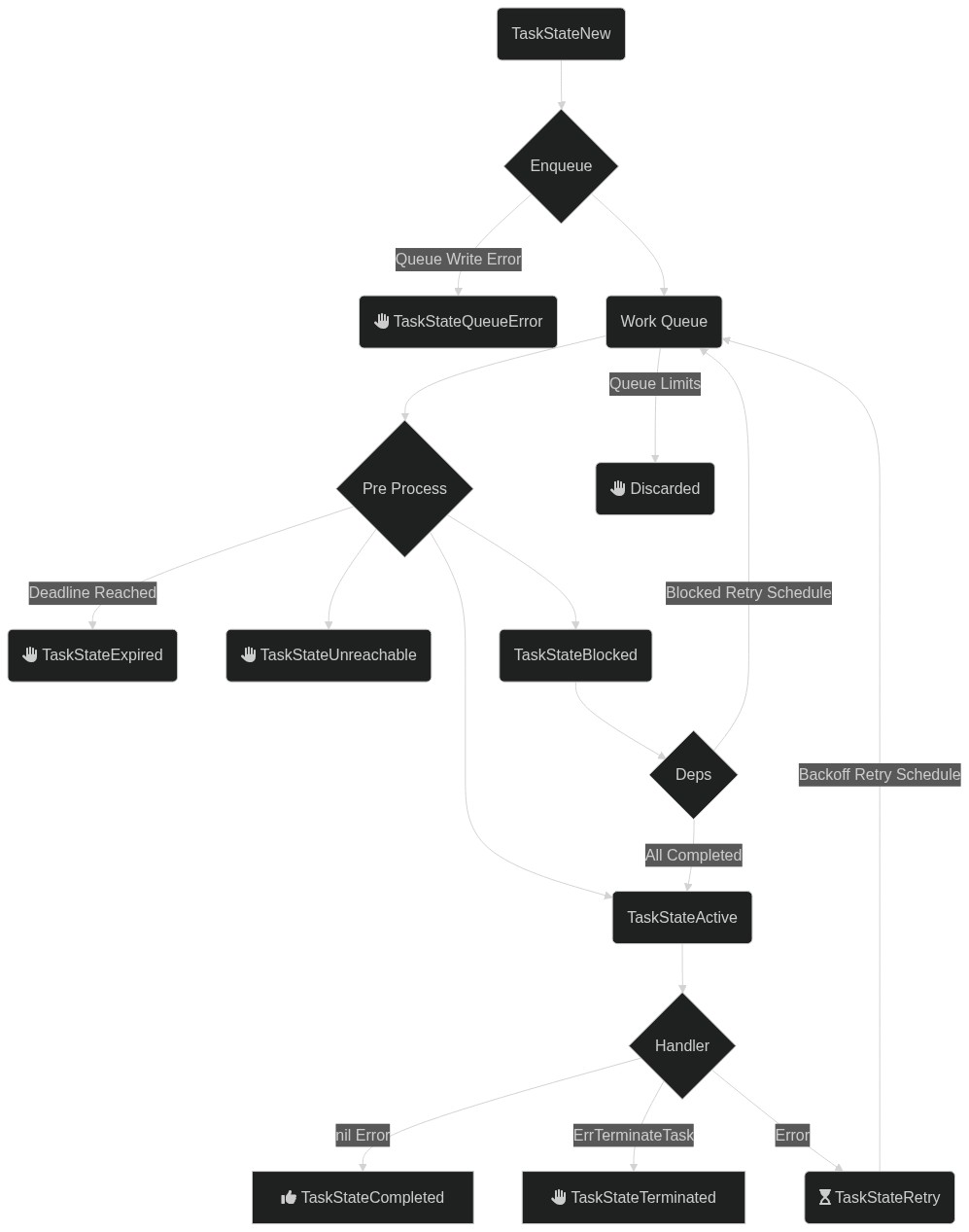
Tasks lifecycle
A task is the basic unit of work, scheduled and processed by a handler.
Task storage
Tasks are stored in NATS JetStream in a stream called CHORIA_AJ_TASKS. Each task lives on a subject keyed by its ID: CHORIA_AJ.T.<TASK ID>. Task IDs must be unique.
Task storage defaults to file-based, non-replicated, with no limits on count or retention. An appropriate retention time is recommended, as shown below.
On a new setup, task storage can be initialized with custom defaults:
In code, the same initialization happens on the first client start:
Once created, the retention period can be adjusted:
Task properties
Tasks have several properties that influence processing:
| Property | Description |
|---|---|
Type | A string like email:new; the router dispatches the task to any handler matching email:new, email, or "" |
Payload | Content of the task that the handler reads to drive its behavior |
Deadline | Checked before calling the handler; tasks past their deadline are not processed |
MaxTries | Tasks that have already had this many tries are terminated; defaults to 10 since 0.0.8 |
Dependencies | Task IDs that must complete successfully before this task runs, since 0.0.8 |
LoadDependencies | For tasks with dependencies, load dependency TaskResults into DependencyResults before the handler, since 0.0.8 |
Setting other properties on new tasks should be avoided.
Task outcomes
During a task lifecycle, several properties are set. State is the main one and may be updated many times as described below. The others include:
| Property | Description |
|---|---|
Queue | Once enqueued, the name of the queue holding the task |
Result | On success, set with the time of completion and the result payload |
State | As described below |
CreatedAt | Timestamp of first enqueue |
LastTriedAt | When not nil, the last timestamp at which a handler was called |
Tries | Count of times the task has been sent to handlers |
LastErr | When not empty, the text of the most recent error from the handler |
Task states
Tasks have many possible states. The processor updates the task as it traverses them.
| State | Description |
|---|---|
TaskStateUnknown | No state is set; uninitialised or corrupt task |
TaskStateNew | A brand new task, either never processed or possibly not enqueued |
TaskStateActive | A task that is being handled by a handler |
TaskStateRetry | A task that had a previous failure and is scheduled for a later retry, or one that was manually retried |
TaskStateExpired | A task that was attempted to be processed past its deadline |
TaskStateTerminated | A handler returned ErrTerminateTask, so no further retries are done |
TaskStateCompleted | Successfully completed task |
TaskStateQueueError | Task was created but the work queue entry could not be made |
TaskStateBlocked | A task is waiting on its dependencies, since 0.0.8 |
TaskStateUnreachable | A task cannot execute because a dependent task failed, since 0.0.8 |
Some termination cases are not reflected in the task state. For example, a task with no processor over the full queue retention window is orphaned without a final state update.
Task dependencies
Since 0.0.8, task dependencies are supported. A task with dependencies starts in TaskStateBlocked. When the processor schedules it, dependencies are checked; if all are complete, the task becomes active.
If a dependent task reaches a final failure state, the task becomes TaskStateUnreachable as a final state.
Retrying a task
A task that still exists in the task store can be retried by ID. Any work queue items for the task are discarded, the state is set to TaskStateRetry, the Result is cleared, and the task is enqueued again for processing.
The CLI can also retry tasks with ajc task retry 24atXzUomFeTt4OK4yNJNafNQR3.
End state discard
Without additional configuration, tasks are retained forever, or for the duration of the task store retention policy.
The client can be configured to discard tasks in specific end states:
The client first saves the state change and then discards the task. Saving first allows lifecycle watchers to observe the terminal state. This behavior will change once #15 is resolved.
Flow diagram
The diagram includes the task relationships introduced in 0.0.8.