Choria Async Jobs is an asynchronous job queue system backed by NATS JetStream. It works with any JetStream-compatible system, including self-hosted JetStream, Choria Streams, and commercial SaaS offerings.
Each task is stored in JetStream under a unique ID, with a work queue item referencing that task. JetStream handles scheduling, retries, and acknowledgements for the work queue item. The stored task is updated throughout its lifecycle.
Multiple processes can process jobs concurrently, giving horizontal and vertical scalability. Job handlers are written in Go, with one process hosting one or many handlers. Other languages can implement handlers through NATS Request-Reply services. Per-process and per-queue concurrency controls are available.
Synopsis
Tasks are published to work queues:
// establish a connection to the EMAIL work queue using a NATS contextclient, _:=asyncjobs.NewClient(asyncjobs.NatsConn(nc), asyncjobs.BindWorkQueue("EMAIL"))
// create a task with the type 'email:new' and body from newEmail()task, _:=asyncjobs.NewTask("email:new", newEmail())
// store it in the Work Queueclient.EnqueueTask(ctx, task)
Tasks are processed by horizontally and vertically scalable workers. A handler typically handles one type of task. Prometheus integration, concurrency limits, and retry backoff are configurable.
// establish a connection to the EMAIL work queue using a // NATS context, with concurrency, prometheus stats and backoffclient, _:=asyncjobs.NewClient(
asyncjobs.NatsContext("EMAIL"),
asyncjobs.BindWorkQueue("EMAIL"),
asyncjobs.ClientConcurrency(10),
asyncjobs.PrometheusListenPort(8080),
asyncjobs.RetryBackoffPolicy(asyncjobs.RetryLinearTenMinutes))
router:=asyncjobs.NewTaskRouter()
router.Handler("email:new", func(ctxcontext.Context, logasyncjobs.Logger, task*asyncjobs.Task) (any, error) {
log.Printf("Processing task %s", task.ID)
// do work here using task.Payloadreturn"sent", nil})
client.Run(ctx, router)
Subsections of Choria Async Jobs
Overviews
Subsections of Overviews
Golang Walkthrough
This walkthrough covers publishing tasks and handling them in Go. A more thorough guide is planned. Complete Go reference documentation is available on pkg.go.dev.
The guide is known to work with Release 0.0.4.
Connecting to JetStream
A connection to a JetStream server is required. Either a prepared NATS connection or the name of a NATS Context can be passed in.
NATS supports many connection methods, security approaches, TLS or non-TLS, and websockets. See the nats.go package for details.
The call attaches to or creates a queue called EMAIL with specific options. If the queue exists, the client attaches without updating the configuration. Setting NoCreate: true prevents on-demand creation. See the Queue reference for details.
Creating and enqueueing tasks
A task can carry any payload that serializes to JSON. Task types such as email:new or email-new drive routing to handlers.
Any number of producers can create tasks from any number of processes.
A helper creates a map describing an email:
funcnewEmail(to, subject, bodystring) any {
returnmap[string]string{"to": to, "subject": subject, "body": body}
}
A new email task can then be created and enqueued:
The task is sent to the store and placed in the EMAIL work queue for processing.
Consuming and processing tasks
Messages are consumed and handled by matching their type on a specific queue. Task processors can run concurrently across processes, and each process can handle multiple tasks concurrently. Per-process and per-queue concurrency limits are configurable.
The following example uses more options than typical:
client, err:=asyncjobs.NewClient(
asyncjobs.NatsContext("EMAIL"),
// 10 Tasks handled by this process concurrentlyasyncjobs.ClientConcurrency(10),
// Prometheus stats on 0.0.0.0:8080/metricsasyncjobs.PrometheusListenPort(8080),
// Logs using an already-prepared loggerasyncjobs.CustomLogger(log),
// Schedules retries on a jittering backoff between 1 and 10 minutesasyncjobs.RetryBackoffPolicy(asyncjobs.RetryLinearTenMinutes),
// Connects to a queue that should already existasyncjobs.BindWorkQueue("EMAIL"))
panicIfErr(err)
router:=asyncjobs.NewTaskRouter()
err = router.Handler("email:new", func(ctxcontext.Context, logasyncjobs.Logger, task*asyncjobs.Task) (any, error) {
log.Printf("Processing task %s", task.ID)
// do work here using task.Payloadreturn"sent", nil})
panicIfErr(err)
err = client.Run(ctx, router)
panicIfErr(err)
The example registers one handler for email:new with a callback that handles up to 10 tasks at a time.
Loading a task
Existing tasks can be loaded, including their status and other details:
This walkthrough covers publishing tasks and handling them with the CLI. It mirrors the Introductory Golang Walkthrough, with shell commands in place of Go code.
The guide is known to work with Release 0.0.4. A video walkthrough covers the same material.
Requirements
The NATS CLI, an optional JetStream server, and the Async Jobs CLI are required.
$ go install github.com/choria-io/asyncjobs/ajc@v0.0.4
JetStream
For an existing JetStream server, add a context to connect to it:
A queue holds messages for processing. Many named queues can coexist. Without an explicit queue, a default called DEFAULT is used.
Different queues support different concurrency limits, maximum attempts, and validity periods.
$ ajc queue add EMAIL --run-time 1h --tries 50
EMAIL Work Queue:

         Entries: 0 @ 0 B
    Memory Based: false
        Replicas: 1
  Archive Period: forever
  Max Task Tries: 50
    Max Run Time: 1h0m0s
  Max Concurrent: 100
     Max Entries: unlimited
The command attaches to or creates a queue called EMAIL with specific options.
Creating and enqueueing tasks
A task can carry any payload that serializes to JSON. Task types such as email:new or email-new drive routing to handlers.
Any number of producers can create tasks from any number of processes.
$ ajc task add --queue EMAIL email:new '{"to":"user@example.net", "subject":"Test Subject", "body":"Test Body"}'
Enqueued task 24YUZF4MzOCLgI7kpwrGtT4lYnS
$ ajc task view 24YUZF4MzOCLgI7kpwrGtT4lYnS
Task 24YUZF4MzOCLgI7kpwrGtT4lYnS created at 02 Feb 22 13:04:26 UTC

              Payload: 85 B
               Status: new
                Queue: EMAIL
                Tries: 0
Consuming and processing tasks
The CLI can process tasks through a shell command. Create a basic command:
$ touch /tmp/send-email.sh
$ vi /tmp/send-email.sh
$ chmod a+x /tmp/send-email.sh
#!/bin/bash

echo '{"status":"success"}'
Run jobs from the EMAIL queue, five concurrently:
$ ajc task process "" EMAIL 5 /tmp/send-email.sh --monitor 8080
WARN[0000] Exposing Prometheus metrics on port 8080
INFO[0000] Running task 24YUZF4MzOCLgI7kpwrGtT4lYnS try 1
INFO[0000] Task 24YUZF4MzOCLgI7kpwrGtT4lYnS completed after 2.425439ms and 1 tries with 18 B payload
The empty task type matches all tasks. Prometheus stats are exposed at http://localhost:8080/metrics.
After processing, the task shows as done:
$ ajc task view 24YUZF4MzOCLgI7kpwrGtT4lYnS
Task 24YUZF4MzOCLgI7kpwrGtT4lYnS created at 02 Feb 22 13:04:26 UTC

              Payload: 85 B
               Status: complete
            Completed: 02 Feb 22 13:07:09 UTC (2m42s)
                Queue: EMAIL
                Tries: 1
$ ajc queue ls
╭─────────────────────────────────────────────────────────────────────────────╮
│                                 Work Queues                                 │
├─────────┬───────┬───────┬──────────┬───────────┬───────────┬────────────────┤
│ Name    │ Items │ Size  │ Replicas │ Max Tries │ Max Items │ Max Concurrent │
├─────────┼───────┼───────┼──────────┼───────────┼───────────┼────────────────┤
│ EMAIL   │ 0     │ 0 B   │ 1        │ 50        │ unlimited │ 100            │
│ DEFAULT │ 3     │ 489 B │ 1        │ 100       │ unlimited │ 100            │
╰─────────┴───────┴───────┴──────────┴───────────┴───────────┴────────────────╯
List tasks and their status:
$ ajc task ls
╭───────────────────────────────────────────────────────────────────────────────────────────────╮
│                                            2 Tasks                                            │
├─────────────────────────────┬───────────┬────────────────────────┬──────────┬─────────┬───────┤
│ ID                          │ Type      │ Created                │ State    │ Queue   │ Tries │
├─────────────────────────────┼───────────┼────────────────────────┼──────────┼─────────┼───────┤
│ 24YUZF4MzOCLgI7kpwrGtT4lYnS │ email:new │ 02 Feb 22 13:04:26 UTC │ complete │ EMAIL   │ 1     │
│ 24YV5AyE6epR8XMpIdIzcppYyBK │ email:new │ 02 Feb 22 13:08:41 UTC │ complete │ EMAIL   │ 1     │
╰─────────────────────────────┴───────────┴────────────────────────┴──────────┴─────────┴───────╯
Show a general overview:
$ ajc info
Tasks Storage:

         Entries: 5 @ 2.2 KiB
    Memory Based: false
        Replicas: 1
  Archive Period: forever
     First Entry: 02 Feb 22 13:01:19 UTC (14m24s)
     Last Update: 02 Feb 22 13:08:41 UTC (7m2s)

DEFAULT Work Queue:

         Entries: 3 @ 489 B
    Memory Based: false
        Replicas: 1
  Archive Period: forever
  Max Task Tries: 100
    Max Run Time: 1m0s
  Max Concurrent: 100
     Max Entries: unlimited
      First Item: 02 Feb 22 13:01:19 UTC (14m24s)
       Last Item: 02 Feb 22 13:02:16 UTC (13m27s)

EMAIL Work Queue:

         Entries: 0 @ 0 B
    Memory Based: false
        Replicas: 1
  Archive Period: forever
  Max Task Tries: 50
    Max Run Time: 1h0m0s
  Max Concurrent: 100
     Max Entries: unlimited
       Last Item: 02 Feb 22 13:08:41 UTC (7m2s)
Scheduled Tasks
The Task Scheduler supports cron-like entries that create tasks on demand.
A separate supervisor process evaluates the configured schedules and creates the tasks. The supervisor is built into the ajc binary and is deployable in any container manager.
The scheduler supports highly-available clusters. Members perform leader election, and one member schedules tasks at a time. Restarts and signals are not required when schedules are added, removed, or updated.
Deploying to Kubernetes is supported through Helm charts. The scheduler can also run anywhere else, as described below.
Schedule overview
A scheduled task combines a cron-like schedule with task properties. The scheduler creates new jobs on demand, using those properties as templates.
// ScheduledTask represents a cron like schedule and task properties that will// result in regular new tasks to be created machine scheduletypeScheduledTaskstruct {
// Name is a unique name for the scheduled taskNamestring`json:"name"`// Schedule is a cron specification for the scheduleSchedulestring`json:"schedule"`// Queue is the name of a queue to enqueue the task intoQueuestring`json:"queue"`// TaskType is the type of task to createTaskTypestring`json:"task_type"`// Payload is the task payload for the enqueued tasksPayload []byte`json:"payload"`// Deadline is the time after scheduling that the deadline would beDeadlinetime.Duration`json:"deadline,omitempty"`// MaxTries is how many times the created task could be triedMaxTriesint`json:"max_tries"`// CreatedAt is when the schedule was createdCreatedAttime.Time`json:"created_at"`}
Valid schedules use the common unix cron format, including syntax like */5. Shortcuts such as @yearly, @monthly, @weekly, @daily, and @hourly are supported, along with @every 10m, where 10m is a Go standard duration.
Go API
Adding and loading scheduled tasks resembles working with a normal task:
client, _:=asyncjobs.NewClient(asyncjobs.NatsContext("AJC"))
// The deadline being an hour from now results in a Scheduled Task with a 1 hour deadline settask, _:=asyncjobs.NewTask("email:monthly", nil, asyncjobs.TaskDeadline(time.Now().Add(time.Hour)))
// Create the scheduleerr:=client.NewScheduledTask("EMAIL_MONTHLY_UPDATE", "@monthly", "EMAIL", task)
// Load itst, _:=client.LoadScheduledTaskByName("EMAIL_MONTHLY_UPDATE")
// Remove iterr = client.RemoveScheduledTask("EMAIL_MONTHLY_UPDATE")
CLI management
The CLI is new, and some aspects may change.
Adding and removing scheduled tasks
$ ajc task cron add EMAIL_MONTHLY_UPDATE "0 0 1 * *" email:monthly --queue EMAIL --deadline 12h
Scheduled Task EMAIL_MONTHLY_UPDATE created at 17 Feb 22 17:40:37 UTC

             Schedule: 0 0 1 * *
                Queue: EMAIL
            Task Type: email:monthly
              Payload: 0 B
  Scheduling Deadline: 12h0m0s
The command adds a scheduled task that runs monthly. The shortcut monthly also works. Each run creates a task of type email:monthly in the EMAIL queue with a 12-hour deadline from creation.
To enter the @yearly schedule, use just yearly. The CLI interprets the @.
Remove a scheduled task by name with ajc task cron delete EMAIL_MONTHLY_UPDATE. The -f flag makes the command non-interactive.
Viewing schedules
List all schedules:
$ ajc task cron list
╭───────────────────────────────────────────────────────────────────────────────────╮
│                                1 Scheduled Task(s)                                │
├──────────────────────┬───────────┬───────┬───────────────┬────────────────────────┤
│ Name                 │ Schedule  │ Queue │ Task Type     │ Created                │
├──────────────────────┼───────────┼───────┼───────────────┼────────────────────────┤
│ EMAIL_MONTHLY_UPDATE │ 0 0 1 * * │ EMAIL │ email:monthly │ 17 Feb 22 17:40:37 UTC │
╰──────────────────────┴───────────┴───────┴───────────────┴────────────────────────╯
$ ajc task cron list --names
EMAIL_MONTHLY_UPDATE
Deploying to Kubernetes is supported through Helm charts. The scheduler can also run elsewhere using the CLI below.
Each scheduler needs a name, ideally unique. The name appears in logs and in leader elections.
$ ajc task cron scheduler $(hostname -f) --monitor 8080 --context AJC
INFO[19:21:29] Starting leader election as dev1.example.net
INFO[19:21:29] Registered a new item EMAIL_MONTHLY_UPDATE on queue EMAIL: 0 0 1 * *
INFO[19:21:29] Loaded 1 scheduled task(s)
INFO[19:21:42] Became leader, tasks will be scheduled
Logs record schedule additions, schedule removals, and task-creation events. Prometheus metrics are served at port 8080 on /metrics.
Any number of schedulers can run. Members perform leader election. All members log schedule updates, but only the leader creates tasks.
Note
During a leadership change, some tasks may not be scheduled. A later release will address this.
The ajc info output includes scheduler state:
$ ajc info
...
Leader Elections:

         Entries: 1 @ 139 B
    Memory Based: false
        Replicas: 1
       Elections:
                  task_scheduler: dev1.example.net
...
The current leader of the task_scheduler election group appears in the output.
Handlers in Docker
Version 0.0.4 introduces a packager that builds handler containers from configuration.
Preparing handlers
Go based
One handler per Go package is recommended. The packager pulls configured handlers into a small microservice.
packagehandlerimport (
aj"github.com/choria-io/asyncjobs")
funcAsyncJobHandler(ctxcontext.Context, logaj.Logger, task*aj.Task) (any, error) {
// process your email}
Place this in any package, for example git.example.com/example/email/new. Multiple handlers are supported as long as each resides in its own package.
Other languages
Other languages are supported through NATS Request-Reply. Implement them against the protocol described in Remote Request-Reply Handlers.
Packaging
In an empty directory, create a file asyncjobs.yaml with the following content:
# The NATS Context to connect with.## Same as NatsContext() client optionnats: AJ_EMAIL# The Work Queue to consume.## Same as BindWorkQueue() client optionqueue: EMAIL# The package name to generatename: git.example.com/example# The version of github.com/choria-io/asyncjobs to use,# something go get would accept. Defaults to the same# as the CLI versionasyncjobs: latest# Use the RetryLinearTenMinutes retry policy,## Equivalent to client RetryBackoffPolicyName() optionretry: 10m# Discard tasks that reach complete state.## Same as DiscardTaskStates() client optiondiscard:
- completed# List of Task handlerstasks:
- type: email:newpackage: git.example.com/example/email/newversion: v0.2.0 - type: audit:logremote: true - type: webhook:callcommand: webhook/call.sh
The webhook:call handler is a shell script that must exist at commands/webhook/call.sh and is copied into the container. Handlers often need dependencies absent from the default container. Use the generated container as a FROM base and add dependencies through the alpine package system.
Generate the package:
$ ajc package docker
╭────────────────────────────────────────────────────────────────╮
│                 Handler Microservice Settings                  │
├────────────────────────────────┬───────────────────────────────┤
│ Package Name                   │ git.example.com/example       │
│ NATS Context Name              │ AJ_EMAIL                      │
│ Work Queue                     │ EMAIL                         │
│ Task Handlers                  │ 2                             │
│ github.com/choria-io/asyncjobs │ latest                        │
╰────────────────────────────────┴───────────────────────────────╯

╭───────────────────────────────────────────────────────────────────────────────────────────────╮
│                              Handler Configuration and Packages                               │
├──────────────┬───────────────────────┬────────────────────────────────────────────────────────┤
│ Task Type    │ Handler Kind          │ Detail                                                 │
├──────────────┼───────────────────────┼────────────────────────────────────────────────────────┤
│ email:new    │ Go Package            │ git.example.com/example/email/new@v0.2.0               │
│ webhook:call │ External Command      │ webhook/call.sh                                        │
│ audit:log    │ Request-Reply Service │ CHORIA_AJ.H.T.audit:log                                │
╰──────────────┴───────────────────────┴────────────────────────────────────────────────────────╯

Build your container using 'docker build'

$ ls -l
total 12
-rw-rw-r-- 1 rip rip  166 Feb  8 17:48 asyncjobs.yaml
-rw-r--r-- 1 rip rip  713 Feb  8 20:01 Dockerfile
-rw-r--r-- 1 rip rip 2540 Feb  8 20:01 main.go
drwxrwxr-x 3 rip rip   19 Feb  8 17:48 commands
A main.go is generated and built into a container:
$ docker run -ti -v "/home/myname/work/email_service/nats:/handler/config/nats" -p 8080:8080 --rm example/email:latest
INFO[19:07:39] Connecting using Context AJ_EMAIL consuming work queue EMAIL with concurrency 4
WARN[19:07:39] Exposing Prometheus metrics on port 8080
The nats configuration directory is mounted to /handler/config/nats, where the container looks for the context. Additional files such as credentials can be placed in the container and referenced at their in-container paths.
Environment configuration
The following environment variables influence the container:
Variable
Description
YAML Item
AJ_WORK_QUEUE
The name of the queue to connect to
queue
AJ_NATS_CONTEXT
The NATS context to use for connectivity
nats
XDG_CONFIG_HOME
The prefix for NATS context configuration, defaults to /handler/config
AJ_CONCURRENCY
The number of workers to run, defaults to runtime.NumCPU()
AJ_DEBUG
Set to 1 to enable debug logging
AJ_RETRY_POLICY
Sets the retry backoff policy, one of 10m, 1h, 1m, default
retry
Handlers in K8s
Helm charts are published to deploy the system to Kubernetes.
Requirements
NATS Server with JetStream
A NATS JetStream server is required. Choria users can enable Choria Streams. The NATS community publishes its own NATS Helm Charts.
Connection context
NATS Contexts configure the connection between asyncjobs and NATS. For an existing context configured through the NATS CLI, run nats context show CONTEXTNAME --json to retrieve the keys and values.
TLS certificates for NATS authentication can be stored in a secret called task-scheduler-tls. NATS credential files and similar data fit the same pattern:
Supports NATS Contexts for connection configuration
Supports custom loggers, defaulting to the Go standard log package
HTTP(s) Server for access to tasks, queues and schedules
Command line
Various info and state requests
Configure aspects of task and queue storage
Watch task processing
Process tasks through shell commands
CRUD on the task store or an individual task
CRUD on scheduled tasks
Planned features
Several features are planned in the near term. See the GitHub Issues.
References
Subsections of References
Tasks lifecycle
A task is the basic unit of work, scheduled and processed by a handler.
Task storage
Tasks are stored in NATS JetStream in a stream called CHORIA_AJ_TASKS. Each task lives on a subject keyed by its ID: CHORIA_AJ.T.<TASK ID>. Task IDs must be unique.
Task storage defaults to file-based, non-replicated, with no limits on count or retention. An appropriate retention time is recommended, as shown below.
On a new setup, task storage can be initialized with custom defaults:
Tasks have several properties that influence processing:
Property
Description
Type
A string like email:new; the router dispatches the task to any handler matching email:new, email, or ""
Payload
Content of the task that the handler reads to drive its behavior
Deadline
Checked before calling the handler; tasks past their deadline are not processed
MaxTries
Tasks that have already had this many tries are terminated; defaults to 10 since 0.0.8
Dependencies
Task IDs that must complete successfully before this task runs, since 0.0.8
LoadDependencies
For tasks with dependencies, load dependency TaskResults into DependencyResults before the handler, since 0.0.8
Setting other properties on new tasks should be avoided.
Task outcomes
During a task lifecycle, several properties are set. State is the main one and may be updated many times as described below. The others include:
Property
Description
Queue
Once enqueued, the name of the queue holding the task
Result
On success, set with the time of completion and the result payload
State
As described below
CreatedAt
Timestamp of first enqueue
LastTriedAt
When not nil, the last timestamp at which a handler was called
Tries
Count of times the task has been sent to handlers
LastErr
When not empty, the text of the most recent error from the handler
Task states
Tasks have many possible states. The processor updates the task as it traverses them.
State
Description
TaskStateUnknown
No state is set; uninitialised or corrupt task
TaskStateNew
A brand new task, either never processed or possibly not enqueued
TaskStateActive
A task that is being handled by a handler
TaskStateRetry
A task that had a previous failure and is scheduled for a later retry, or one that was manually retried
TaskStateExpired
A task that was attempted to be processed past its deadline
TaskStateTerminated
A handler returned ErrTerminateTask, so no further retries are done
TaskStateCompleted
Successfully completed task
TaskStateQueueError
Task was created but the work queue entry could not be made
TaskStateBlocked
A task is waiting on its dependencies, since 0.0.8
TaskStateUnreachable
A task cannot execute because a dependent task failed, since 0.0.8
Some termination cases are not reflected in the task state. For example, a task with no processor over the full queue retention window is orphaned without a final state update.
Task dependencies
Since 0.0.8, task dependencies are supported. A task with dependencies starts in TaskStateBlocked. When the processor schedules it, dependencies are checked; if all are complete, the task becomes active.
If a dependent task reaches a final failure state, the task becomes TaskStateUnreachable as a final state.
Retrying a task
A task that still exists in the task store can be retried by ID. Any work queue items for the task are discarded, the state is set to TaskStateRetry, the Result is cleared, and the task is enqueued again for processing.
The client first saves the state change and then discards the task. Saving first allows lifecycle watchers to observe the terminal state. This behavior will change once #15 is resolved.
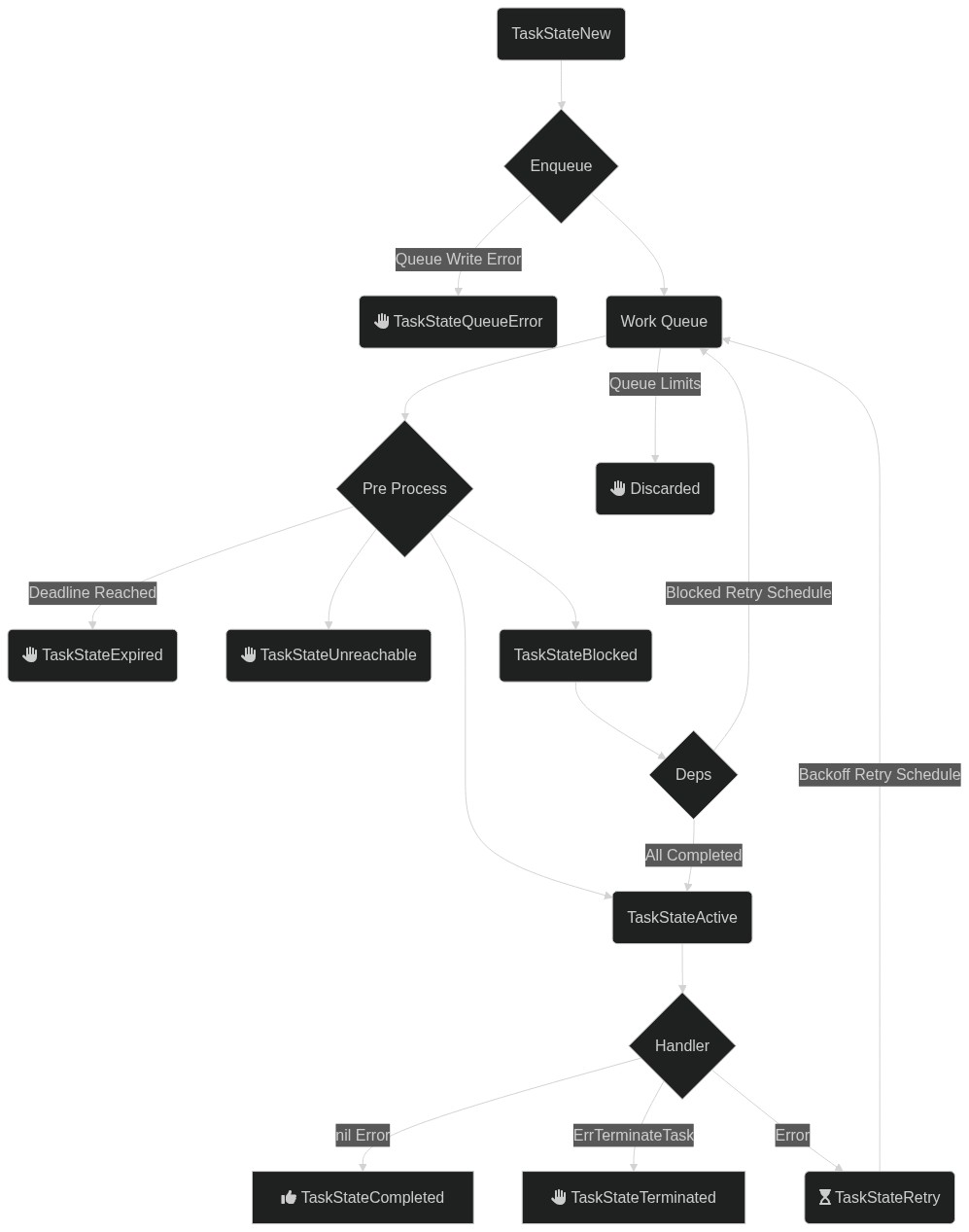
Flow diagram
The diagram includes the task relationships introduced in 0.0.8.
Routing, Concurrency, Retry
Processing tasks is the core of the system. The general case is straightforward, but several nuances are worth knowing.
Handlers execute tasks. Handlers are typically code supplied by the caller, written in Go.
For a non-Go solution, see Remote Request-Reply Handlers. This page still provides useful grounding, since remote handlers map directly onto the same concepts.
Example
The following handler sends an email. The task payload is a serialized object describing the email. Deadlines and timeouts come from the context.
A task handler is a single-purpose piece of code capable of handling one type of task.
funcemailNewHandler(ctxcontext.Context, logasyncjobs.Logger, task*asyncjobs.Task) (any, error) {
// Parse the task payload into an emailemail, err:=parseEmail(task.Payload)
iferr!=nil { returnnil, err }
// extract the deadline from the contextdeadline, ok:=ctx.Deadline()
if !ok { deadline = time.Now().Add(time.Minute) }
// send the email using github.com/xhit/go-simple-mailserver:=mail.NewSMTPClient()
server.Host = "smtp.example.com"server.Port = 587server.ConnectTimeout = 2*time.Secondserver.SendTimeout = time.Until(deadline)
client, err:=server.Connect()
iferr!=nil { returnnil, err }
client.SetFrom(EmailFrom).AddTo(email.To).SetSubject(email.Subject).SetBody(mail.TextHTML, email.Body)
err = email.Send(client)
iferr!=nil { returnnil, err }
log.Infof("Sent an email to %s", email.To)
return"success", nil}
Routing tasks to handlers
Every client that processes messages must be ready to process every message found in the queue. A client connected to an EMAIL queue must handle every task on that queue.
A message with no matching handler fails and enters retries.
The router above dispatches email:new tasks to emailNewHandler and all other tasks to emailPassthroughHandler. A handler registered for email: would process all unmatched email-related tasks.
Middleware
Cross-cutting behavior such as logging, metrics, tracing, authentication, or panic recovery is typically expressed as middleware. A Middleware is a function that wraps a HandlerFunc and returns a new one:
Middleware should normally invoke next(ctx, log, t) and return its result and error unchanged. To short-circuit (for example on an authentication failure) return without calling next. Always use the (ctx, log, t) arguments passed to the returned closure; capturing values from the surrounding scope at construction time will leak them across dispatches.
Global Middleware
Use Mux.Use to register middleware that applies to every handler:
Middleware registered earlier runs outermost, so the example above resolves at dispatch time to Recovery(Logging(emailNewHandler)). Put a recovery middleware first if you want it to catch panics from later middleware as well as the handler.
Use may be called before or after HandleFunc; existing handlers are rewrapped so subsequent dispatches see the new chain. Dispatches already in flight keep the chain they previously resolved.
Per-Route Middleware
HandleFunc accepts optional middleware that applies only to that route, inside any global middleware:
The dispatch chain is Logging(RequireSignedTask(emailNewHandler)) — global middleware always wraps per-route middleware, which always wraps the handler.
Reusable Bundles
asyncjobs.Chain composes several middlewares into one, useful when the same combination is reused across routes:
Order is preserved: Chain(a, b, c) runs a outermost, then b, then c.
Unrouted Tasks
The built-in handler returned for task types with no matching route is intentionally not wrapped by middleware. This keeps unrouted tasks from generating logging or metric noise; if you want to observe them, register a catch-all handler with HandleFunc("", ...) or a prefix that matches them.
Both Use and HandleFunc return ErrInvalidMiddleware if any supplied middleware is nil.
Concurrency
Two kinds of concurrency control are in effect at any time: client and queue.
Client concurrency
Every client can limit how many concurrent tasks it handles. A host with four cores might run only four handlers at a time.
runtime.NumCPU() dynamically allocates maximum concurrency based on available logical CPUs.
Queue concurrency
When many clients are active against a specific queue, each receives jobs up to its own limit. Overall concurrency across a queue can also be capped. With 10 clients, each allowing 10 concurrent tasks, the total would be 100; an infrastructure that only supports 50 at a time can enforce that on the queue.
This creates a new queue on first use and caps it at 50 concurrent handlers, regardless of how many clients start.
Adjust the value after creation with ajc queue configure EMAIL --concurrent 100.
Task runtime and max tries
The queue defines how long a task can be processed. A task still running past that timeout is retried, on the assumption that the handler has crashed. Choose the timeout carefully to avoid duplicate handling.
The queue above allows a task to be handled for up to one hour and retries up to 100 times. Choose these values with care.
The ajc CLI can adjust these values post-creation. Running clients still build context deadlines from the configuration present when they were started.
This returns the parse error from the handler, and the task is retried later. A bad payload will never parse; invalid JSON will always be invalid JSON. In that case, give up on the task immediately:
The returned error wraps asyncjobs.ErrTerminateTask. The task is terminated immediately, no further retries run, and the state is set to TaskStateTerminated.
Retry schedules
When the client determines that a task has failed and must be retried, it consults a RetryPolicy. The default retries at increasing intervals between one and ten minutes, with jitter applied.
To switch to a 50-step policy ranging from 10 minutes to 1 hour:
The predefined policies are RetryLinearTenMinutes, RetryLinearOneHour, and RetryLinearOneMinute.
Custom schedules, such as exponential backoff, can be built by populating asyncjobs.RetryPolicy or by implementing the asyncjobs.RetryPolicyProvider interface.
Request-Reply Handlers
Handlers are typically implemented in Go and compiled into the binary for best performance.
Other programming languages are supported through NATS Request-Reply. A remote service can be written in any language and called out to over NATS.
This registers with the router for tasks of type email:new. Tasks of that type are dispatched via NATS Request-Reply.
When all handlers in a deployment use request-reply, the Docker-based runner achieves the same outcome without any Go code.
Protocol
A lightweight JSON-plus-headers protocol communicates with the remote service. The protocol supports returning errors, including the ErrTerminateTask behavior.
The service must listen on CHORIA_AJ.H.T.email:new, typically in a NATS queue group, replacing email:new with the configured task type. A handler registered with task type "" handles all tasks, and the service listens on CHORIA.AJ.H.T.catchall.
Tasks
A request for a task handler carries these headers:
Header
Value
AJ-Content-Type
application/x-asyncjobs-task+json
AJ-Handler-Deadline
2009-11-10T23:00:00Z
The content type is identical for all tasks. The deadline is a UTC timestamp by which the remote service must complete handling to avoid a timeout.
The body is a JSON-encoded Task.
Responses from the service may set these headers:
Header
Description
AJ-Error
Indicates an error was encountered; the value is set as the task error and the task is retried later
AJ-Terminate
Terminates the task via ErrTerminateTask; the value becomes additional text in the error. No further retries are performed
The body of the response is stored on the task unmodified.
Demonstration
The nats CLI tool shows this in action:
$ nats reply CHORIA_AJ.H.T.email:new 'success' --context AJC
18:33:32 [#1] Received on subject "CHORIA_AJ.H.T.email:new":
18:33:33 AJ-Content-Type: application/x-asyncjobs-task+json
18:33:33 AJ-Handler-Deadline: 2022-02-09T17:34:31Z

{"id":"24smZHaWnjuP371iglxeQWK7nOi","type":"email:new","queue":"DEFAULT","payload":"InsuLi4ufSI=","state":"active","created":"2022-02-09T17:28:41.943198067Z","tried":"2022-02-09T17:33:33.005041134Z","tries":5}
The CLI received the job with the two headers set and the expected payload, responded with success, and the task completed.
Lifecycle events are small JSON messages published to notify observers about stages of task processing and client life.
Only one event type is supported today: a notification about changes to task state. Additional events will follow. A future release will emit Cloud Events standard messages.
Events are informational. Delivery is not guaranteed and events are not persisted. They can loosely couple systems that react to task completion, but they must not be relied on for exactly-once or guaranteed notification.
Event types
Each event carries a type such as io.choria.asyncjobs.v1.task_state, exposed in Go as asyncjobs.TaskStateChangeEventType. The type string aids parsing and routing through other systems.
Parsing an event
A helper parses any supported event for use with the common Go type-switch pattern:
// subscribe to all eventssub, err:=nc.SubscribeSync(asyncjobs.EventsSubjectWildcard)
panicIfErr(err)
for {
msg, _:=sub.NextMsg(time.Minute)
event, kind, _:=asyncjobs.ParseEventJSON(msg.Data)
switche:=event.(type) {
caseasyncjobs.TaskStateChangeEvent:
// handle task state change eventdefault:
// logs the io.choria.asyncjobs.v1.task_state style task typelog.Printf("Unknown event type %s", kind)
}
}
TaskStateChangeEvent
This event is published for any state change of a task. A task can be watched by ID, or all tasks can be watched at once.
These events are published to CHORIA_AJ.E.task_state.*, where the final token is the job ID.
On the wire, the messages look like this. The task_age field is a Go duration.
Handlers sometimes run in untrusted locations and must only execute tasks from trusted creators.
Tasks can be signed with ed25519 private keys. Clients can be configured to accept only tasks created and signed with a specific key. When keys are configured, signatures on all tasks are required by default. Clients can also be configured to accept unsigned tasks, while still verifying signatures when present.
Create keys and save them to a file using hex.Encode():
client, err:=asyncjobs.NewClient(
asyncjobs.NatsContext("AJC"),
// when tasks are created sign using this ed25519.PrivateKey, see also TaskSigningSeedFile()asyncjobs.TaskSigningKey(prik),
// when loading tasks verify using this ed25519.PublicKey, see also TaskVerificationKeyFile()asyncjobs.TaskVerificationKey(pubk),
// support loading unsigned tasks when a verification method is set, disabled by defaultasyncjobs.TaskSignaturesOptional(),
)
panicIfErr(err)
On the command line, ajc tasks supports --sign and --verify flags. Each accepts either a hex-encoded key or a path to a file containing a hex-encoded key.
Docker containers built with ajc package docker can set a key via the AJ_VERIFICATION_KEY environment variable. Optional signatures can be enabled at build time by setting task_signatures_optional: true in asyncjobs.yaml.
A task is a specific kind of work item handled by a handler via the router. Tasks are the primary unit of work. Other kinds of work item are anticipated, such as scheduled items. At present, tasks are the only kind.
Tasks have timestamps, statuses, and more. See Task Lifecycle.
Lifecycle event
A lifecycle event is a small message published to notify listeners about state changes. Only task state changes are reported today. Processor start and stop events and similar signals will follow.
A cron-like schedule that creates tasks on demand. A task scheduler process must be running. See Scheduled Tasks.
HTTP API
The asyncjobs library can be exposed over an HTTP/JSON API so non-Go services and operators can enqueue tasks, manage queues, and inspect schedules without linking the library. The contract is OpenAPI 3.0; the canonical document lives at api/openapi.yaml.
The server is shipped as the httpserver subpackage and a launchable ajc server run subcommand.
Quickstart
Start the server on loopback and call it with curl:
$ ajc queue add EMAIL --run-time 1h
$ ajc server run --queue EMAIL
INFO[0000] asyncjobs HTTP API listening on 127.0.0.1:8080 (none)
Listen address. Non-loopback requires --unsafe-bind or mTLS.
--tls-cert, --tls-key
(none)
Enable TLS. Both must be supplied together.
--tls-client-ca
(none)
CA bundle used to verify client certificates. Enables mTLS.
--queue
(none)
Work queue the API enqueues to. Required unless --allow-create-default.
--allow-create-default
false
Permit auto-creating the implicit DEFAULT queue.
--read-timeout
30s
Per-request read timeout.
--write-timeout
30s
Per-request write timeout.
--max-body
524288
Maximum request body size, in bytes (default 512 KiB).
--unsafe-bind
false
Acknowledge that a non-loopback bind exposes an unauthenticated server.
The server binds to a dedicated http.ServeMux, never the default mux, and applies a MaxBytesReader to every request body. Request bodies and the Authorization header are never logged.
Authentication
The server performs no authentication and no authorization. The default loopback bind is sufficient for same-host integrations; anything else must be fronted by a reverse proxy or secured with mTLS.
A non-loopback --bind is rejected at startup unless one of the following holds:
Reverse proxy (nginx, oauth2-proxy, envoy, caddy, Traefik, Tailscale, …): pass --unsafe-bind to acknowledge that you have fronted the server with a proxy that terminates authentication.
mTLS: pass --tls-cert, --tls-key, and --tls-client-ca. When a client-CA bundle is configured, every TLS client must present a certificate chain that verifies against it. Certificate subjects are not mapped to scopes; successful verification alone grants full access.
/v1/info advertises the mode as auth: "none" or auth: "mtls" so callers and health checks can assert it externally.
Reverse-proxy requirements
Any fronting proxy must:
Terminate authentication (bearer token, OIDC, SSO, mTLS, whatever fits) before reaching the asyncjobs listener.
Preserve or strip request headers per the proxy’s own policy; asyncjobs itself reads none.
Pass through 413 Payload Too Large and 429 Too Many Requests emitted by the backend.
Client requests rejected by the proxy receive the proxy’s error envelope (a 401 or 403), not the asyncjobs envelope — those status codes do not originate from this server.
Rotating mTLS material
There is no hot-reload for TLS or client-CA material; restart the server to pick up new files.
Endpoint catalog
All paths are versioned under /v1.
Meta
Method
Path
Notes
GET
/healthz
Liveness probe. Does not touch storage.
GET
/readyz
Readiness probe. Returns the same body shape on 200/503.
GET
/v1/openapi.json
The full OpenAPI document, generated from the embedded YAML.
GET
/v1/info
Server version, auth mode, queue count, task count.
code is a stable string drawn from a closed enum (invalid_argument, not_found, conflict, duplicate, rate_limited, payload_too_large, unavailable, signature_required, signature_invalid, dependency_failed, internal). Treat code as the machine-readable surface; message is for operators.
details.reason carries a library-specific identifier (e.g. task_not_found, queue_already_exists, payload_both_set) and lets clients branch on a finer-grained signal than code alone provides. details.field is set on validation failures to the offending field name.
Quirks worth remembering
Payload encoding. Create requests accept either payload (any JSON value, server-encoded) or payload_base64 (pre-encoded bytes). Setting both yields HTTP 400 with details.reason: payload_both_set. Task and schedule responses always return payload as a base64 string; this matches the library’s []byte JSON encoding. Decode before use, and use payload_base64 when round-tripping a fetched task.
Duration vs RFC3339 dates. Queue duration fields (max_age, max_runtime) accept Go duration strings (30s, 5m) on requests but echo int64 nanoseconds on responses. Task deadline is an absolute RFC3339 timestamp. Schedule deadline_offset is a Go duration string applied at fire-time. The names differ deliberately so the schemas cannot silently collide.
Rate-limited list.GET /v1/tasks opens a fresh ephemeral JetStream consumer per call and is serialized server-side. Concurrent callers receive HTTP 429 (code: "rate_limited"). stream=ndjson tail mode is capped at roughly 60 seconds by the underlying library; clients should reconnect.
Default-queue guard.POST /v1/queues rejects name: "DEFAULT" unless the server was started with ajc server run --allow-create-default. The library would otherwise auto-create it, masking misconfigured deployments.
Signing is the caller’s responsibility. When the deployment has a TaskVerificationKey configured, the HTTP server does not sign on the caller’s behalf. Callers must supply a pre-computed signature field.
Idempotency.POST /v1/tasks honors the Idempotency-Key header for a 10-minute window: a repeat request with the same key returns the existing task as 200 with the same Location header rather than enqueuing twice.
Generating client SDKs
The OpenAPI document at /v1/openapi.json is OpenAPI 3.0.3 — emitted from the embedded YAML at server boot. Use a generator that supports 3.0:
For the openapi-generator-cli tool, pin the input version with --spec-version 3.0.3 if your generator defaults to 3.1; the asyncjobs spec does not use 3.1-only constructs but generators may emit warnings otherwise.
The repository also exposes the YAML directly at api/openapi.yaml for offline generation.